This guide shows how to detect and fix keyword cannibalization in Google Search Console using real, practical steps.
I caused this problem myself. Everything I am about to explain — the traffic crash, the ranking collapse, the months of near-zero visibility — I built it with my own two hands by making one very specific content strategy mistake. And if I had understood keyword cannibalization in Google Search Console earlier, I could have saved almost 16 months of rebuilding.
This is a practical SEO guide based on real Search Console pattern analysis. This is my actual story from monktech.net, with real GSC numbers, real URLs, and the real sequence of events that started in March 2025 and is still playing out today in July 2026.
By the time you finish reading this, you will know exactly how to detect keyword cannibalization inside Google Search Console, how to choose which page should rank, and how to fix it without nuking your best content.
What You Will Learn in This Guide
- What keyword cannibalization actually is and why it is different from duplicate content.
- The exact publishing mistake I made on monktech.net that triggered the problem.
- How to find cannibalization in GSC using the Query + Pages method.
- How to decide which page should be your primary ranking URL.
- Every fix method I used, including merges, 301 redirects, de-optimization, and internal linking.
- A real keyword-to-URL map from my NYT cluster.
- A prevention system so you never create this problem again.
- A full FAQ with schema-ready answers.
TL;DR
- Find competing pages: Use Google Search Console to see whether multiple URLs are showing for the same query and search intent.
- Pick the main URL: Keep the strongest and most relevant page as the primary one that should rank.
- Redirect outdated pages: If a page is no longer needed, send it to the main page with a 301 redirect.
- Merge overlapping content: If two pages cover the same intent, combine the useful parts into one stronger page.
- Rewrite weak pages: If a page should stay live, change its focus so it does not compete with the main page.
- Clean internal links: Point supporting links to the primary URL so all ranking signals stay together.
- Keep one clear winner: One search intent should lead to one main page for better SEO performance.
1. What Keyword Cannibalization Really Means — And Why Most People Confuse It with Duplicate Content
Let’s first understand what keyword cannibalization is and how it affects a website.
Keyword cannibalization happens when two or more pages on your website compete for the exact same search query and the same user intent — so instead of Google confidently backing one strong page, it splits impressions, clicks, and ranking signals across multiple URLs.
The result is that none of your pages rank as well as they could, and your total traffic suffers even though you technically have more content.
This is not the same as duplicate content. Duplicate content means two pages have nearly identical text. Keyword cannibalization means two pages target the same keyword intent even if the actual words are different. And intent is what matters to Google in 2025 and beyond, not just exact phrase matching.
Here is the simplest way I now explain it to anyone who asks:
If two of your pages could both answer the same search query in the same way, you have a cannibalization problem. Google may not know which page deserves to rank first. So it either rotates them — showing one URL today and another tomorrow for the same query — or it demotes both because neither one has consolidated enough signals to be the clear authority.
When is it NOT a problem?
Not every case of overlapping keywords is harmful. If two pages cover the same broad topic but satisfy clearly different user intents, both can exist without hurting each other.
For example, on monktech.net, I have a page that gives the actual NYT Sudoku answers for today, and I could have a separate page that teaches strategy for solving NYT Sudoku faster.
Both mention “NYT Sudoku” heavily. But one satisfies the “I need the answer right now” intent and the other satisfies the “I want to improve my skills” intent. Google can tell the difference. That is not cannibalization.
Cannibalization only becomes a real, damaging problem when two pages are both trying to be the best answer to the exact same question. And that is precisely what I did on monktech.net — at scale.
2. The Exact Mistake I Made: Date-Wise Daily Publishing for NYT Puzzle Queries
Let me be very specific about what I did, because I think a huge number of content creators are making this same mistake right now without realizing it.
When I started working on monktech.net in March 2025, my strategy was built around NYT puzzle games — Sudoku, Spelling Bee, Connections, Strands, Mini Crossword, Wordle, and Letter Boxed. These are searched millions of times daily. The logic seemed obvious: publish a fresh post every day for each game with the date in the title and URL.
So I was creating posts like:
- “NYT Wordle Answer for 6 April 2025”
- “NYT Wordle Answer for 7 April 2025”
- “NYT Connections Hints for 8 April 2025”
- “NYT Sudoku Answers for 9 April 2025 — Easy, Medium, Hard”
I was pushing out 5 to 7 new posts every single day across multiple puzzle categories.
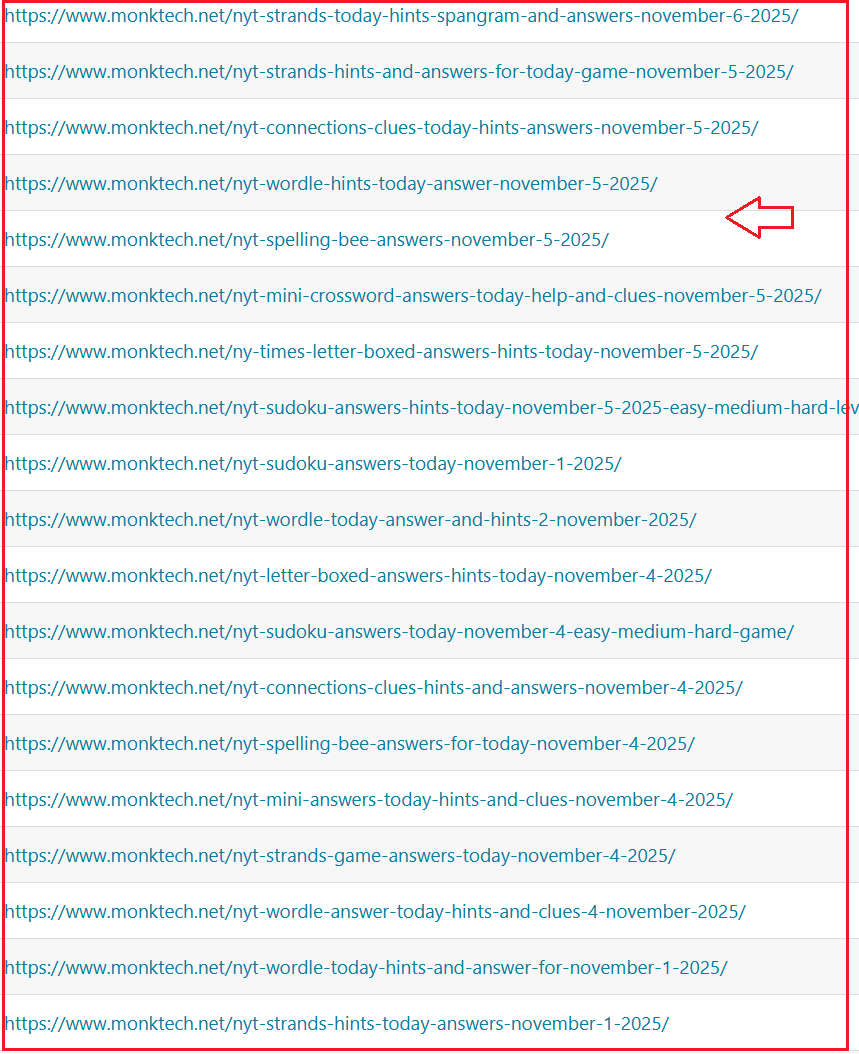
At the time, it genuinely felt like I was doing everything right — fresh content, relevant titles, time-sensitive keywords. But what I was actually doing was creating one of the most aggressive forms of keyword cannibalization possible.
Here is why: when someone searches for “NYT Sudoku answers today,” their intent does not change from one date to the next. They want today’s answer.
That is one intent.
But I had published 120 different pages — one for each day — all fighting to be the answer to that same query. Google saw 120 pages from monktech.net all claiming to be the best answer to the same question. It could not decide which one deserved position 1. So it started rotating them, demoting them, and eventually stopped trusting any of them.
That is when the traffic decline became visible in Search Console.
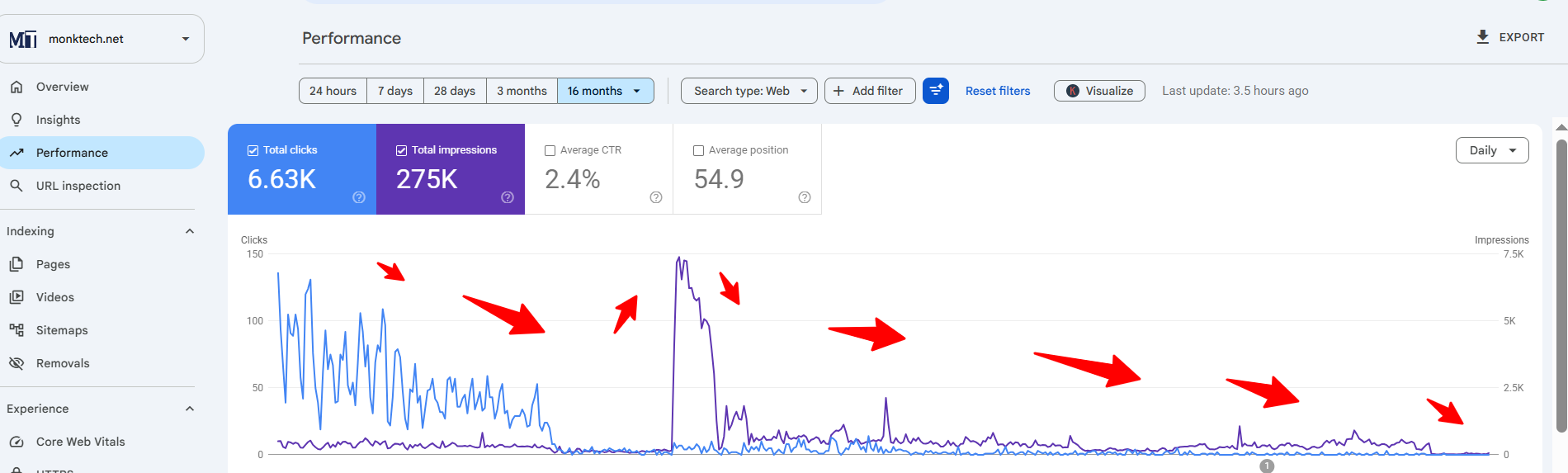
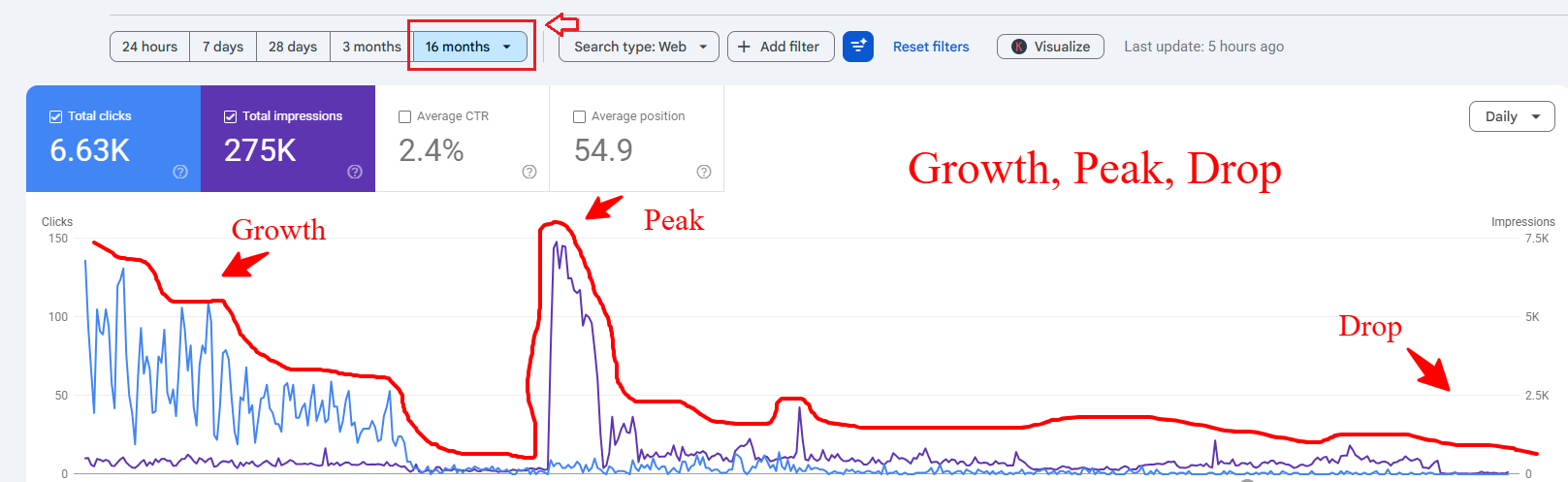
Looking at my GSC Performance graph for the full 16-month range from March 2025 to July 2026, the pattern is unmistakable. You can see the traffic climbing through the early months, hitting a clear peak around August–September 2025, and then dropping sharply and staying low for months after the update. That spike and crash is the visual story of keyword cannibalization at scale. The traffic looked like a mountain — built fast, collapsed fast, and recovering only very slowly.
3. My Real GSC Data
Once I started seriously investigating, I pulled the 16-month Performance report from Google Search Console and the numbers told me everything I needed to know.
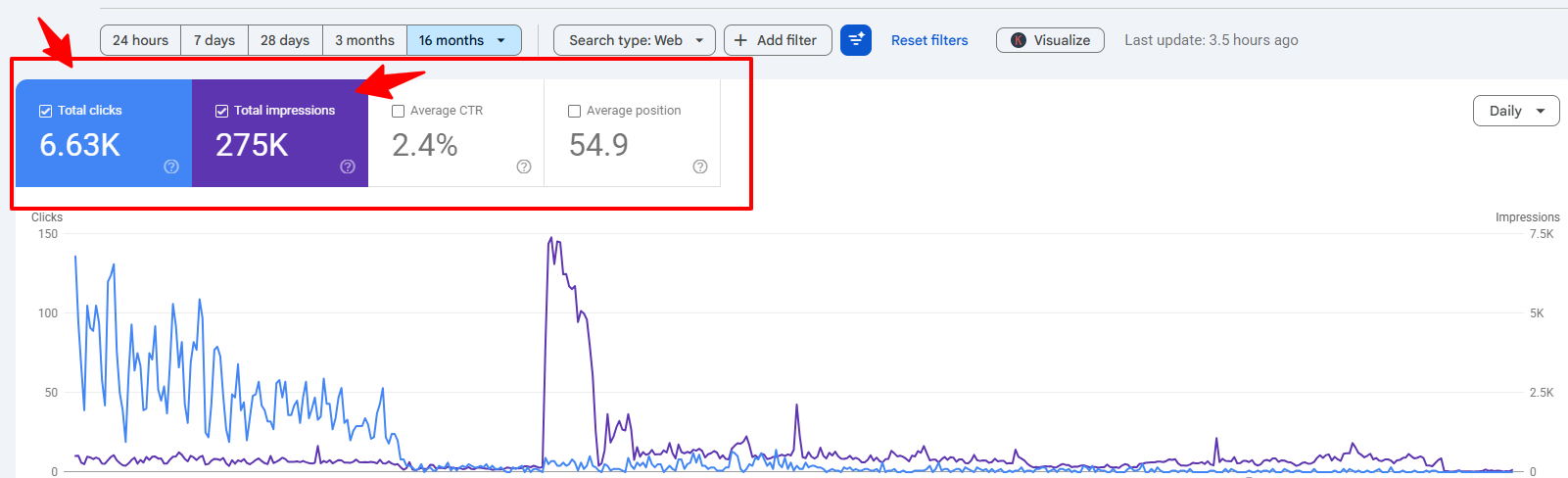
Overall site metrics (16 months, March 2025 – July 2026):
- Total Clicks: 6,630
- Total Impressions: 275,000
- Average CTR: 2.4%
- Average Position: 54.9 (within this 16-month report view)
In this specific report, an average position of 54.9 across 275,000 impressions stands out. It suggests that while these pages were visible, they were frequently surfacing on pages 5 or 6 of the search results where user engagement is typically low. This observation illustrates how cannibalization can inflate impression counts without yielding significant clicks or authority.
Top pages from my GSC Pages tab (16 months):
| Page Path | Clicks | Impressions |
| /nyt-sudoku-answers-and-clues/ | 5,961 | 46,460 |
| /nyt-spelling-bee-answers-today/ | 158 | 12,680 |
| /nyt-connections-today-see-hints-and-answers/ | 73 | 28,191 |
| /nyt-sudoku-answers-and-clues/#NYT_Sudoku_Answer_Today | 46 | 18,972 |
| /wordle-today-hint/ | 39 | 4,666 |
| /nyt-letter-boxed-answer-today/ | 29 | 10,902 |
| www.monktech.net | 22 | 565 |
| /nyt-mini-crossword-answers-today/ | 21 | 33,139 |
| /nyt-strands-today-hints-answers/ | 13 | 16,453 |
| /todays-nyt-sudoku-answers-october-29-easy-medium-hard/ | 13 | 103 |
The data in the fourth row is particularly interesting.
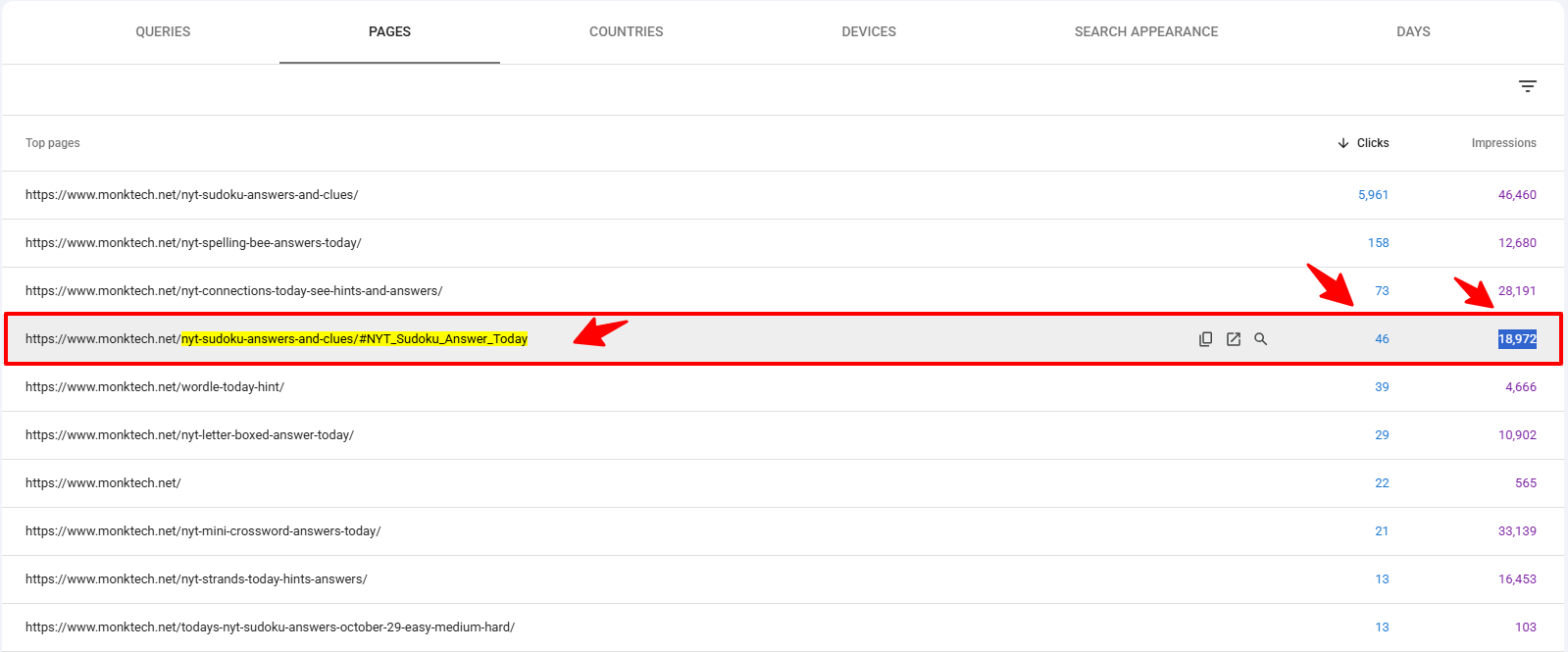
The URL /nyt-sudoku-answers-and-clues/#NYT_Sudoku_Answer_Today appeared as its own separate entity in the reports, capturing 46 clicks and 18,972 impressions independently of the root page. This often happens when fragment identifiers are used in internal links; Google may treat the anchor variant as a competing URL, effectively causing a page to cannibalize itself.
Top queries from my GSC Queries tab (16 months):
| Query | Clicks | Impressions |
| sudoku nyt answers | 431 | 2,081 |
| sudoku answers nyt | 256 | 855 |
| nyt sudoku answers | 244 | 1,500 |
| new york times sudoku answers | 223 | 966 |
| sudoku medium nyt answers | 164 | 434 |
| nyt medium sudoku answers | 159 | 577 |
| nyt hard sudoku answers today | 147 | 623 |
| nyt sudoku medium answers today | 138 | 639 |
| nyt sudoku answer | 129 | 492 |
| nyt sudoku hard answers today | 113 | 492 |
Based on these findings, every top query appears to be a variation of the same core intent: “I want NYT Sudoku answers right now.” Having multiple pages surfacing for this single intent likely fragmented the site’s ranking signals, making it difficult for any single URL to consolidate authority within the search results.
4. How to Detect Keyword Cannibalization in Google Search Console — My Exact Step-by-Step Method
This is the practical part. Here is exactly how I found the cannibalization on monktech.net, using a method you can replicate on any site in under 20 minutes.
Step 1 — Open Performance → Search results and set 16 months
Go to Google Search Console → Performance → Search results. Set your date range to the maximum available — 16 months if possible. A short date range hides the pattern. You need to see the full arc: growth, peak, drop, and current state. That full picture is what tells you whether rankings are genuinely unstable or just seasonal.
Step 2 — Go to the Pages tab first
Before looking at queries, go to the Pages tab and write down your top 15 to 20 URLs by impressions.
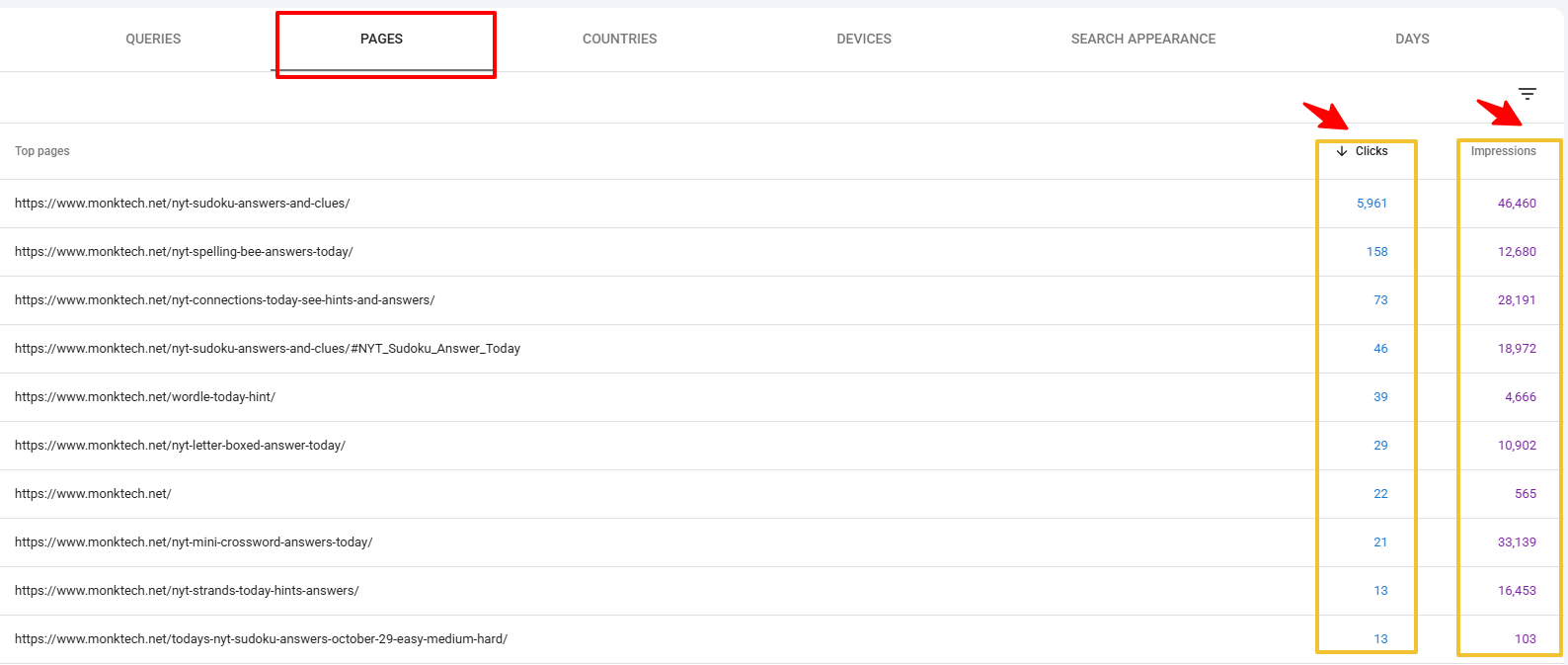
Not just clicks — impressions. A page with 30,000 impressions and only 20 clicks is a massive signal that it is ranking poorly despite being seen. That combination — high impressions, low clicks — usually means it is ranking at position 30 to 60, which is exactly where cannibalization pushes pages.
From my own Pages tab, I immediately flagged:
- Two Sudoku URLs appearing separately: the main hub and the anchor variant
- One dated Sudoku post (/todays-nyt-sudoku-answers-october-29-easy-medium-hard/) still alive in the index
- Mini Crossword with 33,142 impressions but only 21 clicks — average position clearly in double digits despite massive visibility
Step 3 — Switch to Queries, pick your most important “money” queries
Now switch to the Queries tab. Do not look at every query — focus only on the ones that matter commercially or by traffic volume. For me, every “NYT [game] answers today” style query was a money query because those are the intent-driven, high-frequency searches my content was built for.
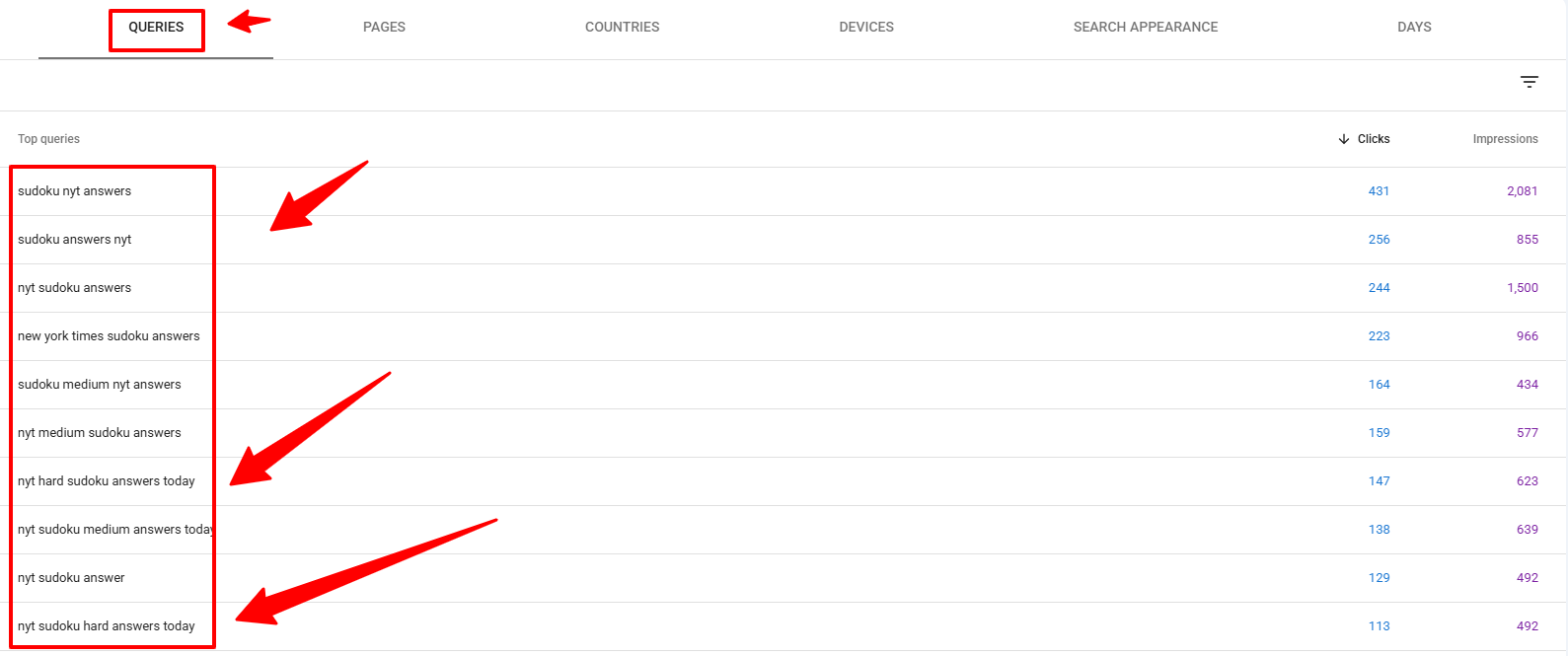
I filtered mentally for:
- “nyt sudoku answers today”
- “nyt spelling bee answers today”
- “nyt connections today hints”
- “nyt mini crossword answers”
- “nyt strands hints today”
- “nyt letter boxed answer today”
Step 4 — Click each query and immediately switch to the Pages tab
This is the most important step in the entire detection process. For each important query, click on it in the Queries list, let GSC apply the query filter, and then switch to the Pages tab. This shows you every URL on your site that received impressions for that specific query over the selected period.
If more than one URL appears for the same query with the same intent, you are probably looking at pages ranking for the same keyword, and that usually points to cannibalization.
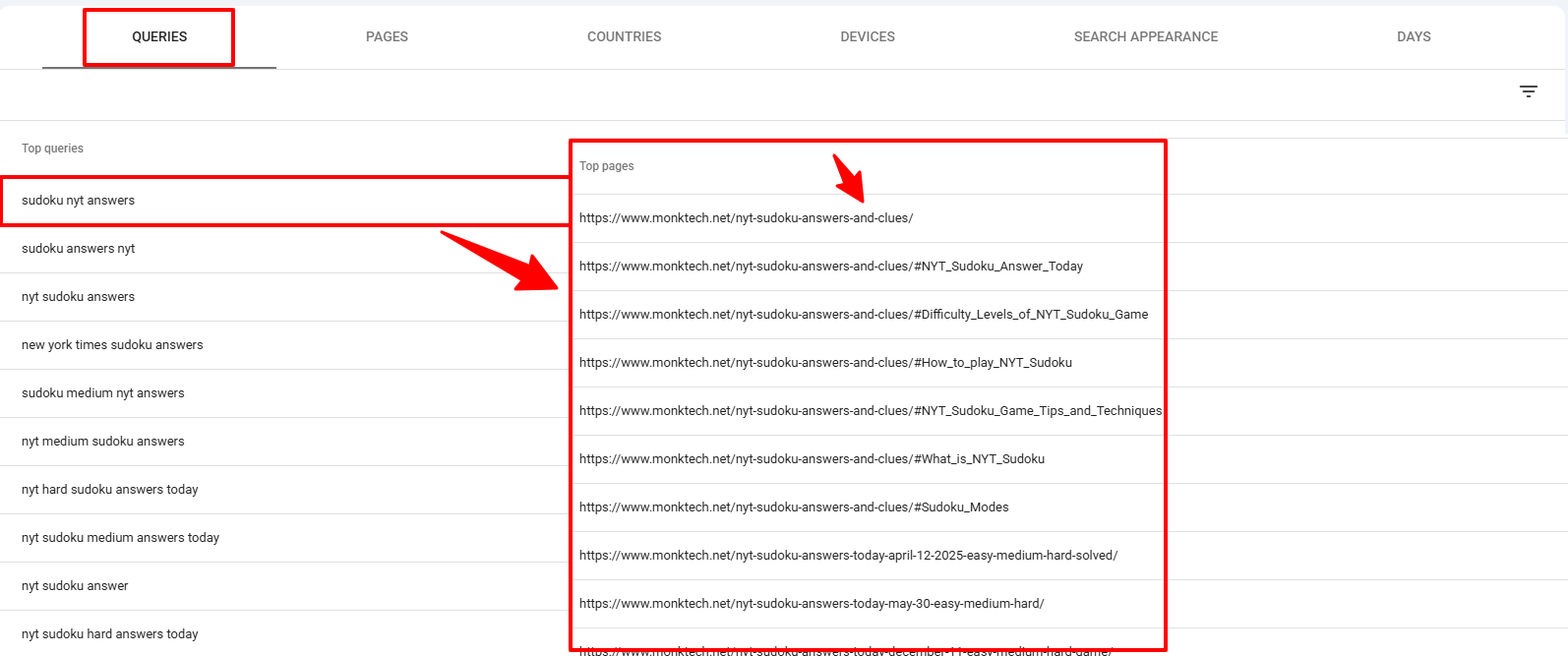
For my NYT Sudoku queries, I saw three separate URLs appearing under the same query filter:
- /nyt-sudoku-answers-and-clues/ — the main evergreen hub
- /nyt-sudoku-answers-and-clues/#NYT_Sudoku_Answer_Today — the anchor variant being tracked separately
- /todays-nyt-sudoku-answers-october-29-easy-medium-hard/ — the old dated post still indexed
Three URLs. One intent. Classic cannibalization.
Step 5 — Check for page-swapping over time
Inside the filtered view for each query, check whether the dominant URL has changed over time. If one month your main hub was ranking and another month a different URL was appearing for the same query — that is Google’s signal that it is confused. That rotation is not Google “testing” your pages. It is Google unable to commit to a winner because you haven’t given it one clear choice.
5. How to Confirm Whether It Is Real Cannibalization or Just Harmless Overlap
Not every case of multiple URLs appearing for a query is a problem worth fixing. Before you start redirecting or merging pages, always confirm that the overlap is actually harming you. Here is the decision framework I use now.
Ask three questions for any cluster of competing URLs:
Question 1: Do these pages satisfy the same user intent?
If a user searching for “NYT Sudoku answers today” would be equally satisfied by both pages — they are cannibalizing. If one page gives answers and another teaches strategy, they are not.
Question 2: Are the titles, H1s, and internal anchors pointing at the same keyword?
If multiple pages have nearly identical titles like “NYT Sudoku Answers Today” and “Today’s NYT Sudoku Answers” — those pages are fighting each other at the metadata level before Google even reads the body content. That is a clear signal to act.
Question 3: Is one URL consistently stronger than the others in clicks, impressions, and position?
If yes, that is your winner. The other URLs are weakening it, not supporting it.
My decision rule, simplified:
If two pages can satisfy the same query in the same way — they should not both be optimized for it. Pick one, strengthen it, and reassign or remove the other.
6. How to Choose Which Page Should Be Your Primary Ranking URL
Once you have confirmed real cannibalization, you need to pick one winner for each intent cluster. This is where most people make a second mistake: they keep the wrong page.
The right page to keep is not always the one with the most clicks. It is the page that deserves primary URL selection because it best matches the user intent and can be maintained long-term.
Here is the exact criteria I used for every NYT cluster on monktech.net:
Relevance and intent match — Which URL is actually structured as a hub for that puzzle’s “today answers” intent? Evergreen slugs like /nyt-sudoku-answers-and-clues/ always beat dated slugs like /todays-nyt-sudoku-answers-october-29/ because the dated URL becomes irrelevant the next day.
Content depth — Which page has the fuller, more useful content? The page that genuinely helps users the most deserves to be the primary URL.
Internal links pointing to it — Which URL already receives the most internal links from other pages? That page already has an authority advantage and consolidating around it is faster than rebuilding from scratch.
Maintainability — Which page can I realistically keep updated every day without creating new URLs? A dated post like /todays-nyt-sudoku-answers-october-29-easy-medium-hard/ is dead the moment October 29 passes. I cannot maintain 365 separate posts for one puzzle. But I can maintain one evergreen hub page that I update daily with fresh answers. That evergreen page is always the right choice for a “today” intent query.
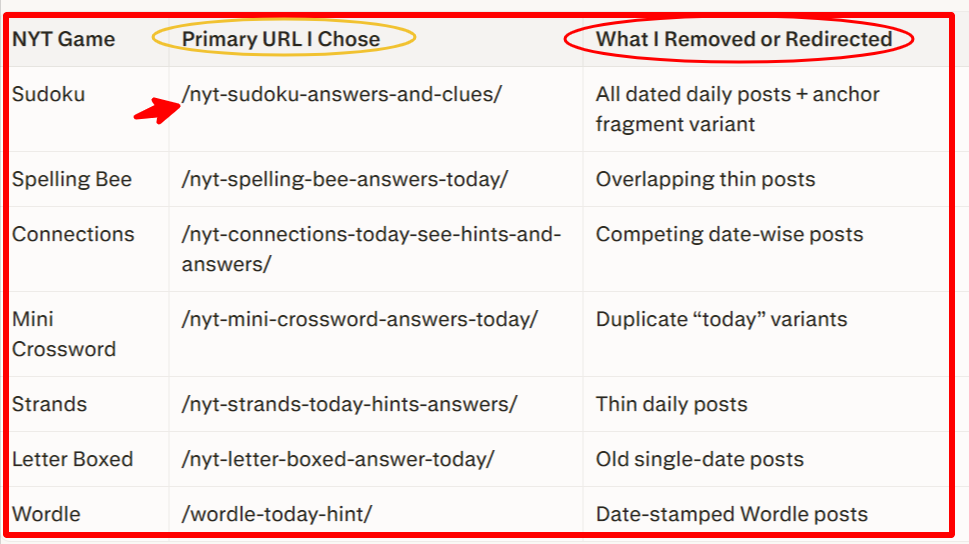
My primary URL decisions for every NYT cluster on monktech.net:
| NYT Game | Primary URL I Chose | What I Removed or Redirected |
| Sudoku | /nyt-sudoku-answers-and-clues/ | All dated daily posts + anchor fragment variant |
| Spelling Bee | /nyt-spelling-bee-answers-today/ | Overlapping thin posts |
| Connections | /nyt-connections-today-see-hints-and-answers/ | Competing date-wise posts |
| Mini Crossword | /nyt-mini-crossword-answers-today/ | Duplicate “today” variants |
| Strands | /nyt-strands-today-hints-answers/ | Thin daily posts |
| Letter Boxed | /nyt-letter-boxed-answer-today/ | Old single-date posts |
| Wordle | /wordle-today-hint/ | Date-stamped Wordle posts |
Every single primary URL I chose is an evergreen hub. None of them have a date in the slug. None of them expire. All of them can be updated daily with fresh content without creating a new URL. That was the most important structural decision I made during this entire fix.
7. The Exact Fix Methods I Used — Ranked by Situation
Once I had my primary URLs locked in, I used a combination of four fix methods depending on how severe the overlap was. There is no single fix that works for every case. Here is how I matched the right fix to each situation.
Fix Method 1: Consolidate and 301 Redirect Dated Posts
This was my most-used fix and the most impactful one. Every dated NYT puzzle post I had published — from April 6 to October 29 and beyond — got a 301 redirect pointing to the corresponding evergreen hub.
For example:
- /todays-nyt-sudoku-answers-october-29-easy-medium-hard/ → 301 redirect → /nyt-sudoku-answers-and-clues/
- /nyt-wordle-answer-6-april-2025/ → 301 redirect → /wordle-today-hint/
- Every other dated Connections, Spelling Bee, Strands post → 301 redirect → the respective evergreen hub
Before redirecting each post, I checked whether it had any unique content worth keeping. If a dated post had a particularly good explanation or an example I had written well, I copied that section into the evergreen hub first, then redirected. That way I did not lose good content — I consolidated it into one place where it could actually help rankings.
A 301 redirect tells Google two things very clearly: this page no longer exists independently, and all the authority it had should transfer to the destination URL — which is why 301 redirect cannibalization cleanup is usually stronger than canonicals. Over time, that consolidation strengthens the evergreen hub instead of diluting signals across hundreds of thin dated posts.
Fix Method 2: Remove the Fragment Anchor Variant from the Index
The /nyt-sudoku-answers-and-clues/#NYT_Sudoku_Answer_Today URL appearing separately in my GSC with 46 clicks and 19,244 impressions was a self-cannibalization problem I had not even noticed until I dug into the Pages tab carefully.
A fragment identifier like #NYT_Sudoku_Answer_Today should never be a separate indexed URL. It is just an anchor on the same page that jumps the user to a specific section. But because I had used that anchor link extensively in my internal linking — pointing other pages directly to the fragment rather than the root URL — Google started treating the fragment as a separate page and splitting impressions between it and the main URL.
The fix was simple but important:
- I updated every internal link pointing to /nyt-sudoku-answers-and-clues/#NYT_Sudoku_Answer_Today and changed them to point to /nyt-sudoku-answers-and-clues/ instead.
- I requested removal of the fragment URL from Google’s index using the URL Inspection tool in GSC to force a fresh crawl of the main URL.
- Over time, as the fragment stopped receiving internal link signals, Google stopped treating it as a separate entity and merged all impressions back to the root page.
This single fix alone recovered 19,244 impressions worth of signal that was being split away from my best-performing page.
Fix Method 3: Rewrite and Differentiate — For Pages That Needed to Stay
Not everything could be redirected. Some pages were ranking for slightly different queries and had their own value. For these, the fix was to deliberately change the angle, heading structure, and keyword focus so they clearly served a different intent— in other words, rewrite or redirect competing pages based on which version has the stronger long-term value.
For example, I had a page that was supposed to be a general “how to play NYT puzzle games” introduction but had accidentally been optimized with “answers today” phrasing throughout the title, H1, and body. It was competing with my actual answer hubs without providing the “answer today” value users were expecting.
I fixed it by:
- Rewriting the title to focus on “how to play” and “beginner guide” language instead of “answers today”
- Changing the H1 and all subheadings to match a strategy and tips intent
- Removing every instance of “answers today” from the body copy and replacing it with contextual language like “improve your daily puzzle performance”
- Adding a natural internal link from that page to the Sudoku hub using anchor text like “check today’s NYT Sudoku answers and clues”
After this rewrite, Google stopped seeing that page as a competitor to my answer hubs and started indexing it for the correct beginner-guide queries it was actually suited for.
Fix Method 4: De-optimize Supporting Pages
Several pages on monktech.net were supporting content — they were not supposed to rank for the main “NYT answers today” queries, but they had picked up the keyword accidentally because I had used the same phrasing in their titles, meta descriptions, and internal anchor text.
De-optimization means deliberately removing the main keyword from pages that should not be optimized for it. This is the opposite of standard SEO advice — most guides tell you to add keywords everywhere. But when you are fixing cannibalization, sometimes you need to remove keywords from the wrong pages so the right page can dominate.
Specifically, I did this on:
- Pages that mentioned multiple NYT games in the title (for example, “NYT Puzzle Answers Today — Sudoku, Spelling Bee, Connections”) — I removed the word “Sudoku” from those titles and replaced it with more general language
- Navigation menus that used exact anchor text like “NYT Sudoku Answers Today” pointing to non-hub pages — I changed those anchors to generic labels like “Puzzle Games” or “NYT Games”
- Image alt text across the site that used the main keyword on images that appeared on non-hub pages
Fix Method 5: Strengthen Internal Linking to Every Primary Hub
After cleaning up all the competing URLs, I rebuilt the internal linking structure of the entire site around the chosen primary hubs. Internal links are how you tell Google, in the clearest possible way, which page is the most important one for a specific topic, and that is a big part of internal linking for cannibalization cleanup.
My internal linking rules after the fix:
- Every NYT-related page on the site must link to the appropriate primary hub using descriptive, intent-aligned anchor text
- Anchor text must be natural but keyword-rich — for example, “see today’s NYT Sudoku answers and clues” or “get today’s NYT Connections hints and answers”
- No internal link anywhere on the site should use the main keyword phrase and point to a non-hub page — that was a rule I had been violating constantly before the fix
- The homepage links to each primary NYT hub in the navigation and in the body content, reinforcing their importance to Googlebot on every crawl
If you want to understand why internal linking matters so much for ranking consolidation, this guide on how to do keyword research for SEO explains how keyword signals flow through a site’s link structure — the same principle applies in reverse when you are consolidating cannibalized pages.
8. My Complete GSC Workflow — Copy This for Your Own Site
Here is the exact workflow I now follow inside Google Search Console every time I publish new content or run a monthly audit. Use this as your repeatable process.
Step 1 — Set the date range to 16 months and open the Pages tab
Write down every URL with high impressions but a CTR below 3%. These are your problem candidates. High impressions and low CTR almost always mean poor average position, which is often caused by cannibalization splitting authority.
Step 2 — Group all your URLs by topic cluster
For me, the clusters are: Sudoku, Spelling Bee, Connections, Strands, Mini Crossword, Letter Boxed, Wordle. For your site, group by your main keyword themes. Write this down in a simple spreadsheet — URL in column A, topic cluster in column B, clicks in column C, impressions in column D.
Step 3 — For each cluster, click the top query and check the Pages tab
Use the Query filter method I described in Section 4. For each main query in your cluster, see how many URLs appear. More than one URL for the same intent = confirmed cannibalization.
Step 4 — Classify each cluster as one of three types
- MERGE — Two or more pages serve the same intent. Pick the strongest, 301 redirect the others, consolidate content.
- DIFFERENTIATE — Pages are close but can be saved with a rewrite to serve clearly different intents.
- LEAVE ALONE — Pages cover similar topics but serve genuinely different intents. Monitor but do not touch.
Step 5 — Execute fixes in order of traffic value
Always fix your highest-traffic, highest-impression clusters first. Do not waste time fixing thin pages with 50 impressions when your Sudoku cluster with 46,742 impressions is still cannibalizing itself.
Step 6 — Monitor GSC weekly for 8 weeks after each fix
After implementing 301 redirects and de-optimization, check GSC weekly to see whether impressions for the primary URL are increasing and whether the old competing URLs are disappearing from the Pages tab. Expect 4 to 8 weeks before the data clearly reflects your changes.
9. Real Examples from My NYT Cluster — Before and After
Example 1: The NYT Sudoku Cannibalization Cluster
Before the fix: Three separate URLs appearing in GSC for “NYT Sudoku answers today” queries — the main hub, the anchor fragment variant, and an old dated October 29 post. Total impressions split across all three: approximately 66,000. My main hub, which deserved all of those impressions, was only claiming 46,742 of them.
What I did: 301 redirected the dated post to the hub. Updated all internal links pointing to the fragment anchor. Requested re-crawl of the main hub through URL Inspection.
After the fix: Impressions began consolidating on /nyt-sudoku-answers-and-clues/. The fragment URL stopped appearing in the Pages tab within about 6 weeks. The dated post was completely deindexed within 8 weeks after the redirect.
Example 2: The NYT Mini Crossword — High Impressions, Almost Zero Clicks
Before the fix: /nyt-mini-crossword-answers-today/ had 33,142 impressions but only 21 clicks — a CTR of just 0.06%. That is not a content problem. That is a position problem caused by competing URLs splitting authority. The page was ranking somewhere around position 40 to 60 for most queries despite massive visibility.
What I did: Identified 3 other Mini Crossword posts that were accidentally using “NYT Mini Crossword answers today” in their titles and H1s. De-optimized all three by rewriting their titles and removing the keyword from headings. Redirected one that had no unique content. Added 6 new internal links to the main hub from related pages using strong anchor text.
After the fix: The page’s average position for Mini Crossword queries began improving as the competing signal from the other posts was removed. Clicks do not jump overnight, but the position improvement creates the conditions for CTR to recover over time.
Example 3: Date-Wise Wordle Posts — The Clearest Cannibalization Case
Before the fix: I had published a separate Wordle answer post for every single day from March to September 2025. That was approximately 180 individual Wordle posts — all targeting the same core intent of “Wordle answer today.” Google’s response was to rank none of them well. My main Wordle hub /wordle-today-hint/ had only 39 clicks despite being the strongest page I had on that topic.
What I did: 301 redirected all 180 dated Wordle posts to /wordle-today-hint/. Updated the main hub with the best explanations I had written across those old posts. Strengthened the hub’s title, H1, and opening paragraph to clearly signal the “today’s Wordle answer” intent. Built 10 new internal links to it from related pages.
After the fix: The dated posts disappeared from GSC within 10 weeks. The hub URL started appearing more consistently for Wordle queries instead of the old rotating pattern of different dated URLs showing up each day.
Understanding how backlinks work alongside this internal consolidation also helps — when your primary hub accumulates both internal link signals and any external backlinks your dated posts had collected, the authority compounds. You can read more about what backlinks are and how they affect rankings to understand why consolidating those signals onto one URL matters so much.
10. Common Mistakes to Avoid When Fixing Keyword Cannibalization
I made most of these mistakes myself before I understood what I was dealing with. Learn from my 16-month lesson.
Mistake 1: Creating new content before fixing the old overlapping pages
This is the most common mistake, and I made it repeatedly in the early months. Every new NYT puzzle post I published without fixing the existing overlap made the cannibalization worse. I was adding fuel to a fire I had not yet put out. Before you publish any new content on a topic where you already have pages, check whether those pages are already cannibalizing each other.
Mistake 2: Relying on canonical tags when a real redirect is needed
Canonical tags are useful for near-duplicate technical variants. They are not a replacement for a 301 redirect when you have two clearly separate pages competing for the same intent. I wasted almost two months trying to solve my dated-post problem with canonicals before realizing that Google was simply ignoring the hints because the pages were different enough to both seem independently valuable. If a page should not exist as a standalone ranking URL, redirect it — do not canonical it.
Mistake 3: Using the same keyword in titles and H1s across too many pages
Every dated post I published had a title that included “NYT Sudoku answers” or “NYT Connections hints.” I was essentially telling Google, through every title tag across 200 posts, that all of those pages wanted to rank for the same queries. Title tags are one of Google’s strongest signals for understanding what a page is about. If you repeat the same keyword in the title across many pages, you are manually creating the conditions for cannibalization.
Mistake 4: Ignoring search intent and treating every keyword match as a ranking candidate
Not every page that mentions your keyword should rank for it. Some pages exist to support the primary hub, not to compete with it. When I had a general “NYT puzzle games” intro page that included “Sudoku answers today” in the body, I treated it as a second ranking candidate for that query. I should have treated it as a supporting page that links to the hub. The moment you start optimizing multiple pages for the same intent, you are choosing cannibalization over consolidation.
Mistake 5: Fixing low-value pages first instead of your highest-traffic clusters
When I started cleaning up, I made the mistake of going through my posts in reverse chronological order — fixing the newest ones first, which were also the thinnest and least impactful. I spent weeks cleaning up pages with 50 impressions and 0 clicks while my Sudoku cluster, which had 46,742 impressions and was actively cannibalizing itself, went untouched. That was the wrong priority order.
Always fix by traffic value, not by publish date. Sort your GSC Pages tab by impressions descending and start at the top. The pages with the most impressions are usually where cannibalization is costing you the most real traffic.
11. Prevention System — How I Stopped Creating This Problem Again
Fixing keyword cannibalization is only half the battle. The other half is building a publishing system that prevents you from accidentally recreating it every time you hit publish. Here is the exact prevention framework I put in place after cleaning up monktech.net.
Prevention Rule 1: Build and maintain a keyword-to-URL map
This is the single most important prevention tool I now use. A keyword-to-URL map is just a simple spreadsheet where each important intent has one primary URL, and that makes content consolidation much easier.
Before publishing any new content, I check this map first. If the intent is already owned by an existing page, I do not create a new page. I either update the existing one or create a clearly differentiated piece that targets a different angle.
My keyword-to-URL map for the NYT cluster on monktech.net looks like this:
| Primary Intent | Primary URL | Supporting Pages Allowed |
| NYT Sudoku answers today | /nyt-sudoku-answers-and-clues/ | Strategy guide, difficulty breakdown guide |
| NYT Spelling Bee answers today | /nyt-spelling-bee-answers-today/ | Word lists guide, how to improve score |
| NYT Connections hints today | /nyt-connections-today-see-hints-and-answers/ | Category strategy guide |
| NYT Mini Crossword answers | /nyt-mini-crossword-answers-today/ | Crossword tips for beginners |
| NYT Strands hints today | /nyt-strands-today-hints-answers/ | How to find theme words guide |
| NYT Letter Boxed answer | /nyt-letter-boxed-answer-today/ | Strategy and word length guide |
| Wordle answer today | /wordle-today-hint/ | Wordle starting word guide |
Every new piece of content I create for monktech.net must fit somewhere in this map — either as a primary URL that owns a unique intent, or as a supporting page that links to the primary without targeting the same keyword in its title or H1. If I cannot place it cleanly in this map, I do not publish it until I can.
Prevention Rule 2: Use topical clusters, not competing hubs
After the fix, I completely changed how I think about content structure. Instead of creating multiple similar pages hoping one will rank, I now design every new piece of content as either a hub or a spoke.
- Hub = the primary URL for a specific intent. Gets all the main keyword targeting. Updated regularly. Receives all internal links from related pages.
- Spoke = a supporting piece that covers a related but distinct sub-intent. Links back to the hub. Never optimized for the hub’s main keyword in its title or H1.
For example, a page about “how to solve NYT Sudoku medium difficulty faster” is a spoke. It covers a sub-intent — solving strategy — that is clearly different from “give me today’s NYT Sudoku answers.” It supports the hub by linking to it, but it does not compete with it because its title, H1, and body are all oriented around strategy, not today’s specific answers.
Prevention Rule 3: Run a cannibalization check before publishing every new post
Before I publish anything new on monktech.net, I do a 60-second check:
- Go to GSC → Performance → Search results → Queries
- Search for the primary keyword I plan to target in the new post
- Click it and switch to the Pages tab
- If any existing URL already appears for that query with meaningful impressions — stop. Do not publish a competing page. Update the existing one instead.
This takes less than a minute and has already saved me from creating new cannibalization problems three times in the months since I rebuilt the site structure.
Prevention Rule 4: Set editorial rules and stick to them
I now have three non-negotiable editorial rules for monktech.net:
- One primary URL per intent — no exceptions. If a new post targets the same intent as an existing page, one of them gets redirected or rewritten before the new one goes live.
- No date in the slug for recurring content — I will never again publish /nyt-wordle-answer-6-april-2025/ or any variant of it. Evergreen slugs only for recurring daily-answer content.
- Every new post must link to its parent hub — whatever cluster a new piece belongs to, it must include at least one internal link to the primary hub using descriptive anchor text that includes the hub’s main keyword phrase.
These three rules alone would have prevented the entire 16-month traffic crisis I went through on monktech.net if I had followed them from the start in March 2025.
12. Should You Fix It? The Decision Tree
Not every cannibalization situation requires the same response. Use this decision tree to quickly decide what action to take for any cluster of competinga URLs on your site.
Start here: Do two or more URLs on your site appear in GSC for the same query?
→ NO — No cannibalization detected. Continue monitoring monthly.
→ YES — Continue to next question.
Do those pages satisfy the same user intent?
→ NO — The overlap is harmless. Leave both pages alone. Monitor but do not merge. Different intents can coexist.
→ YES — Continue to next question.
Does one page clearly outperform the other in clicks, impressions, and internal links?
→ YES — The stronger page is your winner. Apply Fix Method 1: redirect the weaker page to the stronger one after merging any unique content.
→ NO — Both pages are weak because they are splitting signals. Continue to next question.
Can the weaker page be rewritten to serve a clearly different intent?
→ YES — Apply Fix Method 3: rewrite and differentiate. Change the title, H1, body focus, and internal anchor text so the two pages no longer compete.
→ NO — Both pages are too similar to differentiate meaningfully. Apply Fix Method 1: merge and 301 redirect. Pick the better URL structure as the destination.
Special case: Are the pages technically the same URL but with different parameters or fragment identifiers?
→ YES — Apply Fix Method 2: clean up the fragment or parameter variants. Update internal links and request re-crawl through URL Inspection in GSC.
13. Content Consolidation Playbook — When to Merge, Redirect, Canonicalize, or Rewrite
This is the at-a-glance reference I wish I had when I first started cleaning up monktech.net. Match your situation to the right fix method without second-guessing yourself.
| Situation | Right Fix | Why |
| Two pages, same intent, one clearly stronger | 301 redirect weaker → stronger | Consolidates all ranking signals onto one URL permanently |
| Two pages, same intent, both weak | Merge content into one new or existing page, then 301 redirect both old URLs | Neither page deserves to survive independently |
| Two pages, similar topic, different intent | Rewrite and differentiate the weaker one | Both pages have standalone value if they serve different user needs |
| One page accidentally picking up your hub’s keyword | De-optimize the secondary page | Remove the keyword from title, H1, and body of the page that should not rank for it |
| Fragment anchor appearing as a separate URL | Update internal links to point to root URL, request re-crawl | Fragments should never be treated as separate ranking pages |
| Near-duplicate pages that must technically exist | Canonical tag on the weaker version pointing to the preferred URL | Use only when redirect is technically impossible |
| Dated posts competing with evergreen hub | 301 redirect all dated posts → evergreen hub | Dated posts have zero long-term ranking value for recurring intents |
The most important column in that table is the last one — the “Why.” Every fix method has a specific logic behind it. Do not use canonical tags when you should use a redirect. Do not use a redirect when differentiation is the right answer. Matching the fix to the situation is what separates a recovery from a deeper ranking problem.
14. Post-Fix Monitoring Checklist — What to Watch in GSC After Changes Go Live
After you implement any cannibalization fix, do not just walk away and hope for the best. Here is the exact monitoring routine I follow in GSC after every fix batch.
Week 1–2 after fix:
- Go to GSC → URL Inspection → paste each redirected URL → confirm it shows “URL is not on Google” or “Redirect detected” status
- Check that the primary hub URL is still indexed and has no manual actions or coverage errors
- Confirm internal links have been updated by doing a quick site crawl or checking the Links report in GSC
Week 3–4 after fix:
- Open Performance → Pages tab → filter by the primary hub URL → check whether its impressions are trending upward
- Check the competing URLs in the Pages tab — they should be showing declining or zero impressions as Google processes the redirects
- If the old URL still appears with strong impressions after 4 weeks, check whether the 301 redirect is actually live using a redirect checker tool
Week 5–8 after fix:
- Run the full Query → Pages detection method again for your top 10 queries
- Confirm that each query now shows only one primary URL in the Pages tab
- Check average position for the primary hub URL — it should be improving as ranking signals consolidate
- Monitor CTR alongside position — as position improves from 40–50 range toward page 1, CTR should start recovering meaningfully
Month 3 and beyond:
- Run a full cannibalization audit across all your top 20 queries once per month
- Before publishing any new content, run the 60-second GSC check described in Prevention Rule 3
- Update your keyword-to-URL map every time you publish something new — this map only works if it stays current
15. The Full Recovery Picture — What My GSC Looks Like After Almost 16 Months
I want to end this with complete honesty about where monktech.net stands right now, because I think false positivity is one of the most harmful things in SEO writing.
The numbers from my current GSC — 16 months, March 2025 to July 2026:
- Total clicks: 6,740
- Total impressions: 276,000
- Average CTR: 2.4%
- Average position: 54.9
Those are not triumphant recovery numbers. An average position of 54.9 means most of my pages are still ranking on page 5 or 6. But what the graph tells me — and this is the important part — is that impressions are no longer crashing. They are slowly, quietly, consistently recovering. After the dramatic drop that followed the Google update in late 2025, the impressions line has been gradually climbing back. Not explosively. But steadily.
The Sudoku hub alone — /nyt-sudoku-answers-and-clues/ — accounts for 6,069 of my 6,740 total clicks. That is what happens when you consolidate properly. One well-maintained, clearly-targeted evergreen page starts to accumulate signals instead of bleeding them across 120 competing dated posts. That page is now doing the work that 120 thin pages were failing to do collectively.
The recovery is slow. It always is after a cannibalization cleanup — especially one this extensive. But the direction is right. The impressions are coming back. The page-swapping has stopped. And for the first time since late 2025, I am no longer watching Google rotate between different URLs for the same query every time I check GSC.
That stability — that quiet consistency — is what fixing keyword cannibalization actually feels like in practice. It is not a dramatic overnight ranking jump. It is Google finally trusting one URL per intent and starting to build authority on it instead of splitting confusion across many.
FAQ — Everything Else You Need to Know About Keyword Cannibalization
Q1: Is keyword cannibalization always bad?
No — and this is genuinely important to understand. Keyword cannibalization is only harmful when two pages compete for the exact same user intent. If your pages cover the same broad topic but serve clearly different purposes — for example, one gives today’s NYT Sudoku answers and another teaches Sudoku strategy — they are not cannibalizing each other even though both mention “NYT Sudoku” throughout. Google is sophisticated enough to distinguish intent. The problem only becomes real when both pages are essentially trying to be the same answer to the same question. If you are unsure, use the Query → Pages method in GSC to check whether both URLs are actually receiving impressions for the same query at the same time.
Q2: How many URLs for one keyword is too many?
For any single user intent, one primary URL is the right number. The moment you have two URLs both heavily optimized for the same keyword phrase and the same intent — that is already one too many. Supporting pages that cover related sub-intents are fine, but they must not use the same keyword in their title, H1, or primary anchor text. On monktech.net, I learned this the hardest possible way: I had up to 180 pages targeting the same “NYT Wordle answer today” intent, and all 180 performed worse collectively than one well-maintained hub would have performed on its own.
Q3: Should I use a canonical tag or a 301 redirect to fix keyword cannibalization?
Use a 301 redirect when one page should clearly replace another and the weaker page has no standalone reason to exist as a separate URL. A redirect permanently consolidates ranking signals and is the stronger signal to Google. Use a canonical tag only when pages must technically exist as separate URLs — for example, paginated versions, filtered product listing pages, or tracking parameter variants — and you want to signal preference without removing the page entirely. Do not use canonical tags as a lazy shortcut when a redirect is the correct solution. Google often ignores canonical hints when it believes the pages are sufficiently different, which means your cannibalization problem will simply continue unresolved.
Q4: How long does it take to see improvement in GSC after fixing keyword cannibalization?
Realistically, expect 4 to 8 weeks before GSC data starts reflecting your changes clearly, and 3 to 6 months before you see full stabilization of rankings and impressions. The timeline depends on how frequently Googlebot crawls your site, how many pages you redirected, and how deep the cannibalization was before you fixed it. On monktech.net, I started seeing the fragment URL disappear from the Pages tab within 6 weeks of fixing the internal links. The dated posts were deindexed within 8 to 10 weeks of the redirects going live. But the average position improvement for the primary hubs has been gradual — measured in months, not days. Do not panic if nothing seems to change in the first two weeks. Keep monitoring weekly and give the process time to work.
Q5: Can two pages target the same topic if the user intent is different?
Yes — and sometimes having two pages on the same topic is exactly the right strategy, as long as each page is designed to satisfy a clearly distinct user need. For monktech.net, a page that gives today’s NYT Connections answers and a page that explains the strategy behind NYT Connections categories can both exist. One satisfies “I am stuck and need the answer now.” The other satisfies “I want to get better at this game.” The test is simple: could a user searching for the first query be satisfied by the second page? If no, they are different intents and both pages can coexist. If yes, one of them is in the wrong place.
Final Thought — The One Thing I Would Tell Myself Back in March 2025
If I could go back to the very beginning — to the day I published my first date-wise NYT puzzle post on monktech.