Driving organic traffic, improving search visibility, increasing rankings, and building topical authority without actively building backlinks is possible. If you use the right strategy, it can bring long-term growth.
On-page SEO and technical SEO help a website rank without backlinks.
In this blog, I’ll share 10 essential points to help you increase organic traffic without depending on backlinks.
What Is Organic Traffic?
Organic traffic means visitors who come to your website from search engines like Google through unpaid search results, improved search visibility, relevant content, and strong user intent matching. It happens when users search for a query, see your page in the results, and click your URL to get the information they need.
You do not have to pay for this traffic like paid ads, and it can bring long-term results when your content stays relevant and useful.
Now a question arises: how much traffic can I get?
Well, it can’t be predicted with exact numbers if you are getting it in real time. However, there are many tools that give certain numbers as per your query (Keyword), which is called search volume in technical language.
Can You Grow Traffic Without Backlinks?
Yes, you can! Good and authoritative backlinks can help a site rank, improve search performance, support organic growth, and strengthen authority, but they are not the only ranking factor in 2026.
Even I grew my technical site, which targets the USA audience.
Before I start, I will show you what my initial traffic was when I did not apply link-building strategies.
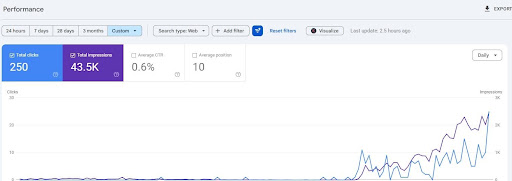
As you can see, the initial graph of my site was almost zero clicks and zero impressions.
Instead of focusing on off-page SEO like backlinks, guest posting, Digital PR, social media, and influencer marketing, I only focused on the right keyword strategy, search intent, content relevance, topical authority, and people-first content.
Then the results started to show clearly.
Later you’ll see how I grew my website’s organic traffic without building backlinks and ads from zero ranking.
10 Proven Ways to Increase Organic Traffic Without Backlinks
These 10 methods show how you can grow organic traffic without depending on active backlink building. If you follow the right keyword strategy, search intent, content depth, structure, E-E-A-T, and user experience, you can still build strong rankings and bring consistent traffic to your site.
Much of the older content on this site followed outdated SEO practices from 2017 to 2021. The keywords were stuffed, the content was generic, and E-E-A-T was missing, which is one of the reasons traffic dropped after Google’s updates.
Now I’ll show you the strategies I used to bring the site back and grow traffic without building any new backlinks.
1. Start With the Right Keyword
Choosing the right keyword is one of the most important steps for improving search visibility, ranking signals, long-tail query coverage, and organic growth, yet many people still ignore it
Most SEO professionals and content marketers think they can easily find good keywords, or simply ask AI like ChatGPT. But is that the right strategy? Of course not.
Initially, by working on a lot of successful projects, I figured out how important keyword selection is for ranking. Following this, I implemented it for this project.
I chose low-competition keywords instead of hard keywords at the beginning. These are long search phrases that are easier to rank for.
To find such keywords, I use tools like Semrush and Ahrefs to identify search volume, keyword variations, long-tail queries, and related search terms.
From the start, I had a clear plan in my mind for this project: I will work on it solely without taking help from off-page factors like backlinks.
If you do not have an authoritative site and it has had little or no traffic for almost 3 to 4 years, it is very hard to rank for competitive keywords.
Keeping this in mind, instead of targeting “Why YouTube Buffering So Much,” I chose a micro and specific keyword: “Why 8K YouTube Buffers on 1Gbps Fibre Networks.”
Choosing these keywords gives your content a specific search intent and makes it easier to rank with less competition.
Now, how did I do this keyword research process? I have created a separate guide on How to Do Keyword Research for SEO: Basic Guide To Get Started. You can read this guide and get to know it in detail.
2. Understand Search Intent
The concept of Understanding Search Intent Before Choosing Keywords With Examples was already mentioned, but as per the above example, I will break it down in a simpler way.
First, what is search intent?
Search intent is the primary goal — or the “why” — behind a user’s search query.
In SEO, optimising for search intent means making sure your content format, topic, content relevance, and user experience match what the searcher wants to accomplish.
In simple words, if I want to write about YouTube buffering, then I should stay on that topic and write complete info about it. If, while writing about YouTube buffering, I divert to Netflix or Amazon Prime Video buffering, then that is an intent mismatch — and your article will struggle to rank.
When an article does not match search intent, search engines are less likely to rank it well.
Now, back to my selected keyword. I chose “Why 8K YouTube Buffers on 1Gbps Fibre Networks” instead of “Why YouTube Buffering So Much.” Both keyword search intents are completely different. Let’s understand what these keywords are saying:
Keyword 1 (I Chose): Why 8K YouTube Buffers on 1Gbps Fibre Networks
If someone searches this keyword, it means they have a 1 Gbps high-speed internet connection, and they want to stream 8K high-quality video on it — but it is buffering.
Why might they search this?
- Their internet provider guaranteed smooth 8K streaming, but it isn’t working.
- They’re wondering if their device is compatible with 8K streaming.
- They’re questioning whether 1 Gbps is actually enough for 8K content.
This is a very specific pain point, and the content should address it directly.
This is a very specific pain point, so the content should address it directly.
Keyword 2: Why YouTube Buffering So Much
This keyword is vague. It doesn’t define the user’s internet speed or their streaming preferences. The person simply wants to know why YouTube is buffering and how to fix it.
For this keyword, content must offer diverse solutions — not just one fix — so readers can try each option one by one.
Overall Conclusion
In the first keyword, it is a very specific issue — so when writing the article, you only target that exact pain point: the 8K YouTube buffering issue on a 1 Gbps Fibre Network. The content should provide a solution for that specific scenario.
In the second keyword, the intent is completely different. The user is not aware of why they are getting buffering issues and hasn’t explained their internet speed or streaming preferences. For this, content should not be limited to one solution — it should contain diverse solutions so the user can try each one.
This is what search intent means: understanding exactly what users are searching for with a given keyword, and then providing the right solution in your article to get more organic traffic on your site.
3. Write Deep and Useful Content
To grow organic traffic without backlinks, writing deep, useful, semantically rich content with strong information gain and topic completeness is essential.
In my writing, I always use comprehensive research, an actionable structure, clear formatting, and strong topic coverage to engage my audience.
While focusing on the target audience and addressing the core intent behind their searches, I plan my content structure. First, it is necessary to determine exactly what your audience needs by looking at top-ranking articles for your keyword on platforms like Google Search.
When I start writing, I back up my claims with several sources like:
- Statistics
- Quotes
- Case studies from authoritative sources
This gives the content more value, authority, and topical relevance while helping build reader trust.
Covering all the aspects that competitors might lack is what helped me get more organic traffic on my website.
In short, I follow the AIDA framework — Attention, Interest, Desire, and Action — to guide my reader.
4. Use Simple Language
Back in 2018, I was writing blogs based on word count. If I had more words than competitors, then my blog was good, and its ranking chances also increased.
Does that help in modern 2026 content writing? Definitely not!
If the focus is organic traffic without link building, writing style matters a lot
Let me reveal my strategy for how I write blogs to engage my audience and grow organic traffic effortlessly. I will divide it into 4 sections:
1. Structure for Easy Scanning Content
I keep my blog writing clear, conversational, jargon-free, and easy to scan, so readers of any level can understand the message and stay engaged. I structure content for modern readers who skim rather than read every word. Here’s my writing strategy:
- Short paragraphs: I keep them to 2–4 sentences maximum to create white space on the page. It helps readers scan information clearly.
- Use headings: I always break my content using clear H2 and H3 tags. It avoids making it bulky and helps readers understand without wasting much time.
- Bullet points: I summarise blogs with proper lists to present complex ideas or steps cleanly, so users can read every point clearly.
2. Choose the Right Words
The right vocabulary for the right keyword is more important than anything while writing a blog — even more than off-page SEO.
- Active voice: I always prefer active voice, which makes content clearer, more concise, and easier to skim.
- Active voice: “The dog chased the cat.”
- Passive voice: “The cat was chased by the dog.”
- Everyday language: I always prefer to write using everyday conversational language. It It helps even a middle-schooler easily understand the meaning, context, and main takeaway.
- Remove the fluff: During proofreading, I cut any sentence that doesn’t add value or answer a reader’s question. This makes the blog more concise and readable without unwanted fluff.
3. Let Your Personality Shine
Think of it this way: if your content speaks, readers stay. If you’ve read this blog this far, that means you are engaged — and that is real engagement-based writing. Here’s what I follow:
- Write like you’re talking to a friend: If your search query is explained in simple, conversational language, then it will be more readable than anything. This is what you should do while writing your blog.
- Use contractions: Most of my sentences include words like can’t, it’s, and you’re. These words make my tone much warmer and more engaging — like talking with a friend.
- Voice-to-text: Initially, when I was a beginner and struggled to write simple sentences, I used tools like Google Docs Voice Typing to speak my content first, then edited and proofread it to fix minor issues.
4. Edit With Tools
If you want to rank without backlinks and grow organic traffic, editing is essential.
My 5-Step Editing Routine:
- Step 1 — Run AI analysis: I use Perplexity first to clean up big logical errors and major mistakes right away.
- Step 2 — Check readability: I paste my text into Hemingway to fix passive voice and shorten heavy sentences.
- Step 3 — Add keywords: I inject my main semantic keywords into the clean, simple sentences.
- Step 4 — Read out loud: I read my text aloud to make sure it sounds natural and friendly.
- Step 5 — Final manual polish: I do one last quick scan to fix tiny typos before I hit publish.
5. Structure Your Content Well
If your scenario is no backlinks but you want traffic, then content optimisation and structuring it well is an essential part to follow carefully.
Here’s how I do it in my own unique way:
After editing, I structure the content. I always start with a captivating headline and hook my readers in the introduction. I break my text into digestible sections using H2 and H3 headings. I always integrate bullet points, short paragraphs, and relevant multimedia to make my posts highly readable.
A well-organised blog improves readability, user satisfaction, and on-page engagement while keeping readers on the page longer. It also helps search engines crawl and understand the content more easily.
Here is the simple blueprint I follow:
- Headline (H1): A catchy, concise title that always includes my main keyword.
- Introduction: I hook my readers immediately by stating their problem, promising a clear solution, and telling them why they should stick around.
- Body: This is the meat of my post, where I use descriptive headings in a clear order — H2 for main points and H3 for sub-points — to break up the text.
- Conclusion & CTA: I briefly summarise my main takeaways and always end with a clear Call to Action (CTA) like asking readers to leave a comment or subscribe.
My Best Practices for Formatting
I use smart formatting to make sure my readers do not get tired and leave my site:
- Keep paragraphs short: I always aim for 2–3 sentences per paragraph so I don’t create huge, scary walls of text.
- Use bold text: I bold important phrases to help skimmers grab my core message instantly without reading every single word.
- Add visuals: I break up long text blocks with relevant images, infographics, or videos, and I add alt-text to help my SEO.
- Include links: I add helpful internal links to my other blogs and external links to authoritative outside sites to bring more value.
How I Tailor the Layout to My Content Type
Depending on the type of article I am writing, I slightly adjust my layout to fit exactly what my readers expect to see:
- For my list posts: I provide an introduction outlining the list, use consistent subheadings or numbers for each item, and wrap it up with a quick summary.
- For my how-to guides: I use a clear step-by-step format, list all the necessary requirements up front, and include a brief troubleshooting or tips section at the end.
Note: In practice, it can take a bit more time to edit a large blog. I usually take help from multiple AI tools, including ChatGPT and Claude, which are best for content management.
6. Build Topic Clusters
This is a much more important aspect when you want to build topical authority, search visibility, contextual relevance, and organic traffic without backlinks.
I’ll make it simple for you to follow:
Going back to my example — “Why 8K YouTube Buffers on 1Gbps Fibre Networks” — I made sure that related blogs were also published on my site. This improves SEO by organising my content around a central “pillar” page connected to specific “cluster” pages through strategic internal linking.
I identified my core topic and conducted keyword research around it. As per my current topic, I created a pillar page like “YouTube TV Not Loading or Buffering? Fixes for 2026.”
I also found a cluster keyword — “why is my internet buffering on high speed” — and wrote an approximately 2,500-word blog on it. Then I linked both page URLs to each other in a natural way.
The first keyword was very specific; the second was broader. Together, they created a strong topical cluster that increased organic traffic without any backlinks.
If you have a strong topical cluster, the right keywords, and a solid content strategy, you can rank without relying heavily on off-page SEO.
Use Smart Internal Linking
When I build topic clusters, I do not just link pages randomly. I make sure every new article gets 3 to 5 contextual internal links from related pages so Google can understand the connection between them.
I always use descriptive anchor text instead of generic words like “click here” or “read more.” For example, if I am linking to a page about keyword research, I will use a phrase like “keyword research for SEO” so the link itself gives a clear topic signal.
I also make sure my pillar page links to every important cluster page, and each cluster page links back to the pillar page. This creates a strong two-way structure that helps search engines understand which page is the main guide and which pages support it.
If I already have a page with more visibility or stronger authority, I use it to push link value to newer pages. That way, my new content gets discovered faster and starts building topical strength sooner.
7. Strengthen E-E-A-T and Experience
Before 2021, it was generally easier to rank with lighter content and weaker quality signals than it is today. Those days are gone now.
Honestly, I was doing the same back then — running multiple websites, and every site was ranking well and getting a good amount of traffic.
Even in my GSC stats from a 16-month period, I got approximately 7.28K clicks and 278K total impressions — which was very good.
The interesting fact is: during the publishing of that content, I wasn’t doing any off-page SEO or link building on the site at all.
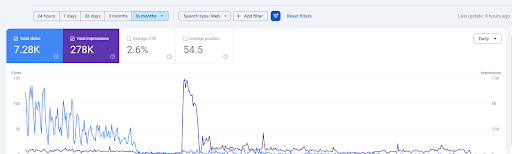
Later, as you can see in the screenshot above, the traffic dropped drastically to almost zero
This likely happened because the content no longer matched Google’s evolving quality expectations, including E-E-A-T signals
Google added the extra ‘E’ for Experience to the E-A-T framework in the Search Quality Rater Guidelines in December 2022
I didn’t work on this site from 2018 to 2024. When I restarted, Google’s bots crawled my articles and ranked them on the first page, and I was getting good traffic at that time. But I couldn’t keep up with Google’s evolving algorithm factors.
Then came the June 2025 Core Update, which rolled out from June 30 to July 17, 2025, followed by the August 2025 Spam Update, which ran from August 26 to September 22, 2025. These updates directly affected my site and brought down my traffic significantly — as you can see in the chart above.
What’s the current situation after applying EEAT?
As you can see in this screenshot below, the site is still in the early recovery stage. In the last 3 months, it received 36 clicks and 29.5K impressions, and although the CTR is still low at 0.1%, the impressions show that the content is starting to get visibility again.
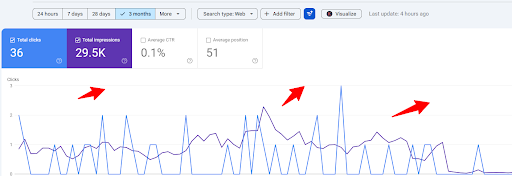
This shows why E-E-A-T, trust signals, author signals, brand signals, and content quality matter so much when you want to grow organic traffic without actively building backlinks.”
What Is E-E-A-T in Content and How to Implement It
E-E-A-T stands for four pillars:
- Experience
- Expertise
- Authoritativeness
- Trustworthiness
These pillars form a quality evaluation framework Google uses to determine how reliable, helpful, credible, and authoritative a webpage is. Trust is the most important element, and the other three characteristics support it.
As per Google’s people-first content guidelines, the core focus is on creating helpful, reliable content that:
- Prioritises user value over manipulating search rankings
- Transparently communicates the “Who, How, and Why” behind the content
- Ensures clear authorship and disclosure of AI-assisted generation
- Demonstrates genuine intent to assist the audience
Now let’s look at exactly how I implement these factors in my blogs to rank without backlinks.
Add Author Experience
On my website, I provide correct and authentic information about who is writing the blog. This is displayed at the top of each article along with the published date and last updated date.
If someone clicks on the author name, they will find all the information related to the author, like:
- Qualifications
- Work experience
- Role and specialised area
- Content approach
- LinkedIn account for trust verification
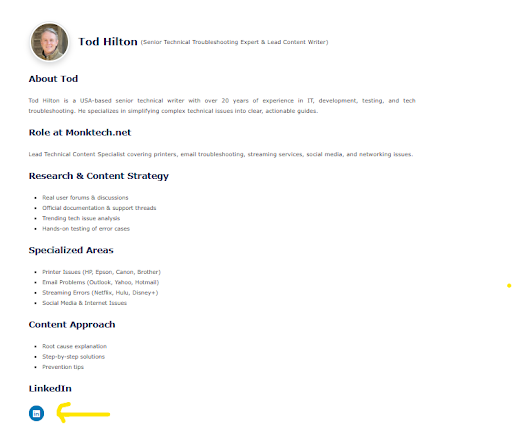
A complete and trusted author bio like this highlights the Expertise and Experience signals for your blog.
Show Screenshots or Proof
While writing a blog, I always prefer to provide screenshots and real proof — just as I’ve done throughout this blog. As per the need of my writing, I always prefer to provide proof, which not only helps search engines but also enhances user experience (UX) with the article.
Add Trust Signals
Trust is a critical part of E-E-A-T because even strong expertise will not help if visitors do not trust your site, brand, or content quality.
To implement this without needing a single backlink, focus on clear on-page cues that prove your site is a safe and honest place.
I always make sure my site is technically secure with HTTPS encryption — it’s a non-negotiable trust signal today. I do this for all my sites.
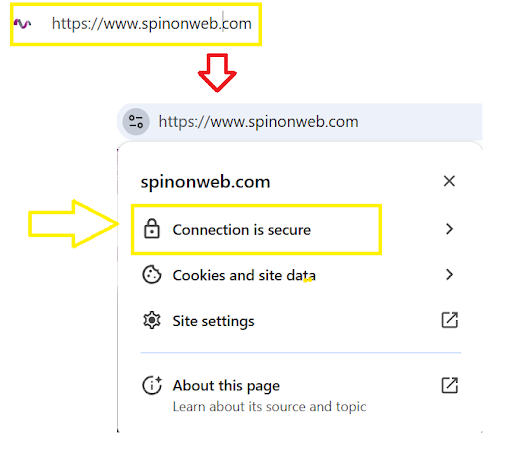
Beyond that, I use transparency as a tool: displaying visible contact information and clear privacy policies ensures readers know how to reach a real person.

In my useful links section, I provide all page links including About Us, Privacy Policy, Terms & Conditions, Refund Policy, and Contact Us. This builds trust and strengthens my E-E-A-T signals.

Social media pages are among the most important aspects to enhance trust parameters.
Build Entity SEO and Add Schema
Along with author bio, About Us, Privacy Policy, Contact Us, and social pages, I also focus on Entity SEO. This helps search engines connect my brand, authors, categories, and services in a clear way.
I make sure my website has consistent brand signals across all pages. That means the same name, same niche, same author identity, and the same business details wherever they appear.
I also use schema markup like Organization, Article, FAQ, and Review where needed. This helps search engines understand my content better and can support E-E-A-T and AI visibility.
If Google can clearly understand who I am, what I write about, and what my site represents, then it becomes easier to trust my content and rank it better.
Show Social Proof
Another simple but powerful move is showing social proof — like positive user reviews or industry awards — which quietly confirms that your content is reliable.
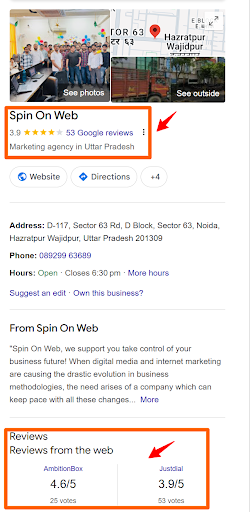
If you have this level of trust factor, then it is absolutely possible to get traffic without even creating backlinks.
Add Real Examples
Providing real examples in your blog is a must. It not only fulfils the E-E-A-T criteria but also enhances user experience gradually.
Whether I’m providing case study information, showcasing real results, or writing any article, I always:
- Share exact metrics
- Reveal the dashboard screenshots
- Document the failures as well as successes
- Embed original media
- Use “Good vs. Bad” comparisons to to illustrate points
For instance, if I’m explaining a complex technical topic, I’ll share a personal story of how I tested it — or include a screenshot of my own results to back up my claims. Using specific, original examples proves you’ve actually “done the thing” you’re writing about, which instantly satisfies the “Experience” part of E-E-A-T.
This is where my blog separates from AI-generated fluff — by adding your own personal first-hand testing results that Google rewards.
Add User Voices From Forums
Along with my own GSC data, I also like to check what other founders, SEOs, and website owners are saying on platforms like Reddit and Quora. This helps me understand what real people are experiencing, what is working for them, and what mistakes they are making.
When I use these discussions, I do not copy opinions blindly. I pick the useful points only, like what type of content got traffic, what kind of SEO changes worked, and what problems people kept repeating.
This also helps me find real user language, which I can use in my blog to make the content more natural and more helpful. If many people are asking the same thing in the same way, then that is a strong sign that I should answer it in my content too.
8. Improve User Experience
In modern AI SEO, user experience, page experience, crawlability, and content usability are some of the most important factors for growing traffic and improving Google rankings without active backlink building.
Although it is called technical SEO, you never need to be a technical expert to implement these factors. I have divided this user experience guide into important headings that I follow for my own website to grow organic traffic.
Improve Page Speed
Page speed refers to how quickly your blog loads after a user clicks your URL from the search engine results page (SERP), which affects user satisfaction and engagement. If it feels slow to users, you should improve it
I am a WordPress content publisher. There are multiple ways I improve my website’s speed for both web and mobile users:
- I shrink my images: I change the size of my images (including screenshots and feature images) and use new formats like WebP. This makes the files smaller but keeps them looking clean and sharp.
- I clean up my code: I remove extra spaces and characters from my site’s HTML, CSS, and JavaScript. This makes the files light and easy for browsers to read.
- I turn on browser caching: I set up my site to save files directly on my visitor’s device. This way, they don’t have to reload everything when they visit again.
- I use a CDN: I share my website files across a global network of servers. This lets my users download data from the server closest to them.
- I invest in good hosting: I don’t use cheap, crowded shared hosting plans. Instead, I use a fast, high-quality managed server to keep my sites running smoothly.
- I manage my plugins: I go into my WordPress backend and delete any old or slow plugins I don’t need anymore.
- I cut down on redirects: I avoid sending users from one link to another unnecessarily. Fewer redirect hops means pages load a lot faster.
Now, let me show you the page performance of one of my blogs that includes multiple images, including a feature image and screenshots.
My Desktop Performance
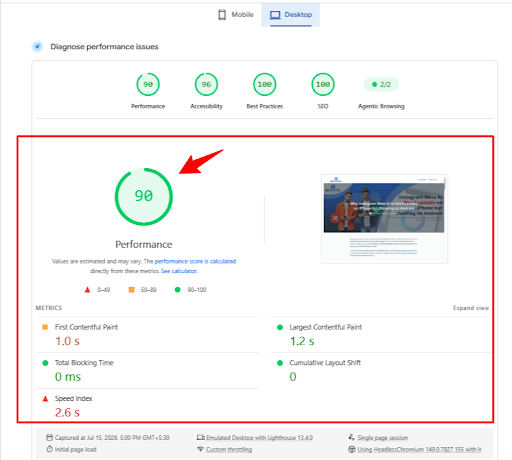
As you can see, I hit a solid 90 in Performance and a perfect 100 in both SEO and Best Practices! Even with all the screenshots I added, the main content fully loads in just 1.2 seconds. The page is fast, and the layout stays perfectly still with zero shifts while readers are scrolling.
My Mobile Performance
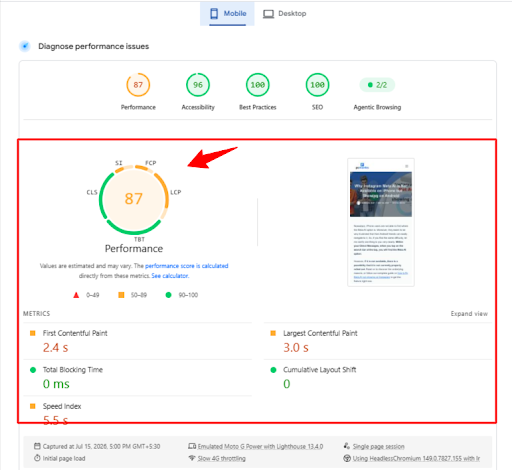
Since most people browse on their phones, mobile speed is just as important.
- Overall Score: 87 on Mobile
- Perfect 100 in SEO and Best Practices
- The page takes about 3 seconds to load the largest top image
Here, my page scored 87 on mobile. But because I regularly monitor my site, I already know the easy fix: I just need to stop lazy-loading my main feature image and clear out a tiny bit of leftover CSS code.
Once I do those two quick tweaks, my mobile score will easily hit the 90s!
At the end of the day, a fast website keeps your readers happy and helps you rank better on Google. If you need to grow organic traffic without off-page SEO, start by applying just one or two of these steps to your own WordPress site today. Test your speed, make those small tweaks, and watch your scores climb into the green!
Make Your Site Mobile-Friendly
Since most of my readers browse on their phones, mobile-friendliness is an absolute must. If my blog looks broken on a small screen, people will leave immediately.
- Responsive themes: I only use WordPress themes that automatically shrink and adjust to any screen size.
- Tap-friendly buttons: I make sure my menus, links, and buttons are large enough to easily tap with a thumb.
- Visual check before publishing: Before I hit publish, I always check the mobile preview.
How to check without your phone:
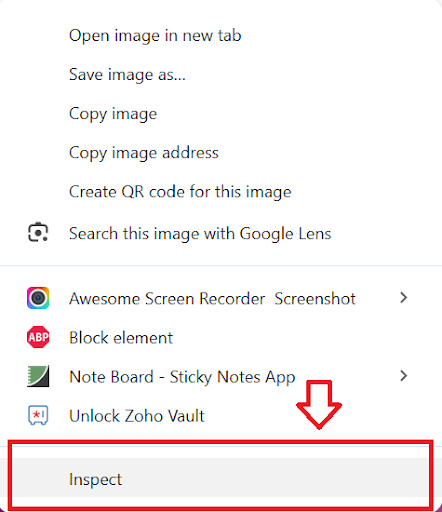
Go to the page you want to check, right-click, and click the Inspect button.
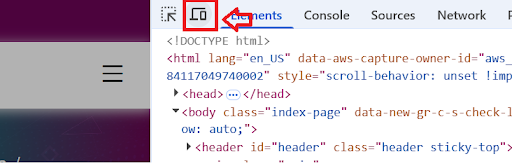
Click on the computer/mobile icon as shown in the screenshot.
After you click it, your blog will automatically convert to a mobile view. You can scroll the page and see whether your content is aligned for mobile. If not, fix it.
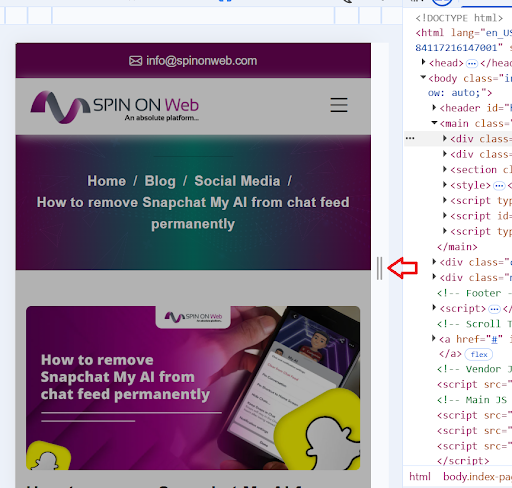
As you can see in the screenshot, my blog is completely aligned with mobile devices, even the feature image.
Use Better Formatting
In the short-content era, nobody likes reading a giant wall of text. It hurts the eyes and makes readers bounce fast.
- Short paragraphs: I try to keep my paragraphs as short as possible — usually just 2–3 sentences.
- Clear headings: I use plenty of H2 and H3 tags to break my posts into clean, easy sections.
- Bullet points: Whenever I list items (just like I’m doing right now!), I use bullet points so readers can scan the page quickly.
Improve Readability and Navigation
If my readers cannot find what they are looking for, they will just go to another website. I make sure my site is easy to explore:
- Clean fonts: I use simple, dark text on a light background. Good contrast makes reading much easier on the eyes.
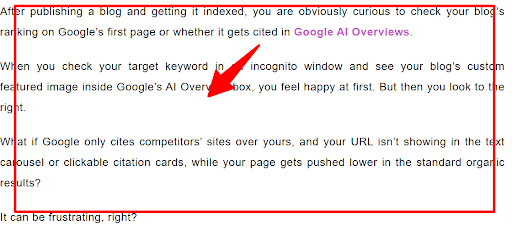
- Simple menus: I keep my top navigation bar clean. I only link to my most important categories so users don’t get overwhelmed.

- Helpful internal links: I always add links to my other related articles so readers can keep exploring my site without getting lost.
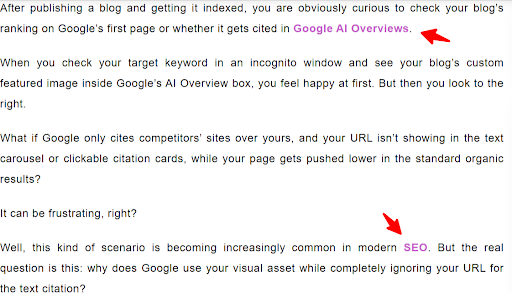
If you design a seamless and engaging experience for your visitors, you keep readers hooked longer and signal massive value to search engines. Ultimately, a user-friendly site proves exactly how it’s possible to get traffic without backlinks!
Improve On-Page and Technical SEO
If you want to grow organic traffic without backlinks, on-page SEO and technical SEO must be in place. These are the basic things that help search engines understand your content, crawl your pages, and show your site properly in search results.
First, I always make sure the title tag is clear, short, and includes the main keyword. The title is one of the first things Google and users see, so it should tell them exactly what the page is about.
Next, I write a proper meta description that explains the value of the page in a simple way. It does not directly rank the page, but it helps increase clicks when people see your result in Google.
I also check indexation so only the right pages get crawled and shown in search. If a page should not appear in Google, I use the right robots tag or settings to control it properly.
For technical SEO, I keep my robots.txt file and sitemap.xml updated. Robots.txt helps guide crawlers, while the sitemap helps search engines discover important pages on the site faster.
I also use schema markup or structured data to help search engines understand my content better. This can make my blog more eligible for rich results, and it adds another trust signal to support E-E-A-T.
9. Update Old Content
If you want to grow organic traffic without backlinks, then along with publishing new content regularly on your site, you must also focus on updating your previously published content to keep it up to date.
My Blog Updating Routine
I regularly monitor my previously published content and make changes in the following ways:
- Replacing outdated statistics: I replace old statistics with new ones to stay accurate for the current year.
- Add new internal links: I add links to my newer articles so readers can easily find more of my work.
- Fix the meta descriptions: I rewrite these to be clear and catchy so more people click on them in Google.
- Delete what’s not needed: I remove old info, dead tool links, or anything that is no longer accurate.
- Update the date: I update the “Last Updated” date on blogs to signal that the information is fresh.
My Service Page Updates
For my service pages, I make sure everything is still right so customers can trust what they see:
- Check the pricing: I make sure my current pricing is listed clearly so there is no confusion.
- Update the team: I refresh bios and headshots so everyone knows who they are working with.
- Add new wins: I put in my most recent case studies and results to show I’m still getting things done.
Updating your old content is like giving your website a second life through content freshness, relevance, updated information, and stronger search performance. It helps articles rank better because search engines love content that is helpful, simple, and updated with the latest facts.
Plus, it’s much easier than creating backlinks to force a blog to rank.
10. Publish Consistently
When I decided I would rank my blogs without creating backlinks, I also made up my mind about what consistency I would follow to publish blogs on my site.
In an era of huge competition where millions of blogs are published a day, if I don’t maintain consistency while publishing regularly, it will definitely hurt my website’s ranking.
Here’s the logic behind it: Google’s crawling bots visit your site based on your publishing consistency.
For example, if I publish a blog every 3 days, Google may start revisiting the site more often. But if I publish with a gap of 1 or 2 weeks and then do the same again, the crawler gets confused and crawl frequency drops.
Hence, it is very important to publish articles consistently — as I do.
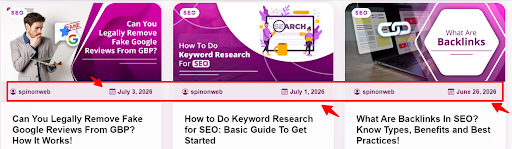
This is one of the reasons my site instantly started growing organic traffic without backlinks and ads.
Frequently Asked Questions
Can you grow traffic without backlinks?
Yes, you can. If your keyword strategy, search intent, content quality, internal linking, and E-E-A-T are strong, a site can grow organic traffic without depending on backlinks.
Are backlinks still important in 2026?
Yes, backlinks can still help with authority and discovery. But they are not the only ranking factor, and they work best when your on-page SEO and content quality are already strong.
How long does it take to grow organic traffic without backlinks?
It depends on your niche, competition, and publishing consistency. In many cases, you need a few months of steady improvement before you see meaningful movement.
What helps most besides backlinks?
The biggest factors are the right keywords, clear search intent, useful content, internal links, technical SEO, mobile usability, and trust signals like author details and updated content.
Can a new website rank without backlinks?
Yes, but it is easier when you start with low-competition keywords and build topical authority first. A new site usually needs strong content structure and consistency to compete.
Should I focus on content or backlinks first?
For a new or weak site, content and technical SEO should come first. Once the page is useful and well structured, backlinks can help later, but they should not be the only plan
Simple Action Plan
If your plan is to get organic traffic without backlinks — or you don’t have link-building resources right now — here’s the simple action plan to follow:
- Start with the right, low-competition keyword — specific and long-tail, targeting a clear pain point.
- Understand and match search intent — make sure your content format and topic exactly match what the user wants.
- Write deep, useful content — backed by real stats, quotes, and case studies. Cover what competitors miss.
- Use simple language — conversational tone, active voice, cut the fluff, and edit with tools.
- Structure your content well — strong H1 headline, engaging introduction, organised body with H2/H3 headings, clear CTA at the end.
- Build topic clusters — create pillar pages and cluster blogs, then link them to each other naturally.
- Strengthen E-E-A-T — add author bios, real screenshots, trust signals, and genuine first-hand examples.
- Improve user experience — optimise page speed, make the site mobile-friendly, use clean formatting and easy navigation.
- Update old content regularly — refresh stats, add new internal links, fix meta descriptions, and remove outdated information.
- Publish consistently — set a realistic schedule and stick to it so Google crawls your site regularly.
What Other SEOs Say About Ranking Without Backlinks
If you want to make your blog stronger and more trustworthy, then adding real user voices is a smart move. It shows that other SEOs also believe you can grow organic traffic through content quality, internal linking, and technical optimization even without building new backlinks.
- One Reddit case study shows that when content was restructured around search intent and internal links were cleaned up, the site got a strong traffic boost without any new backlink campaign. You can check that real discussion here: Reddit case study on increasing organic traffic without backlinks.
- Another Reddit discussion includes multiple SEOs confirming that they grew traffic mainly through on-page SEO, technical fixes, and content depth, while link building stayed secondary. You can read that thread here: Reddit discussion on organic traffic without link building.
Further reading:
- Reddit: case study on increasing organic traffic without building backlinks
- Reddit: how many people confirm getting organic traffic without link building
So, if you are writing about how to grow organic traffic without backlinks, this section works like a trust signal. It supports your own experience and also shows readers that this strategy is being discussed and used in the real SEO world.
Final Thoughts
Growing organic traffic without backlinks is absolutely possible in 2026 — but it requires a smart, consistent, and people-first approach.
The strategies I’ve shared in this blog are not theories. They are the exact methods I applied to my own site — a site that was essentially dead for nearly three years — to bring it back to life and grow it organically.
Backlinks can help, but they are not the only path. If you choose the right keywords, understand search intent, write deep and useful content, build topical authority, strengthen your E-E-A-T signals, and deliver a great user experience — the organic traffic will follow.
Start with one strategy, execute it well, and then build from there.