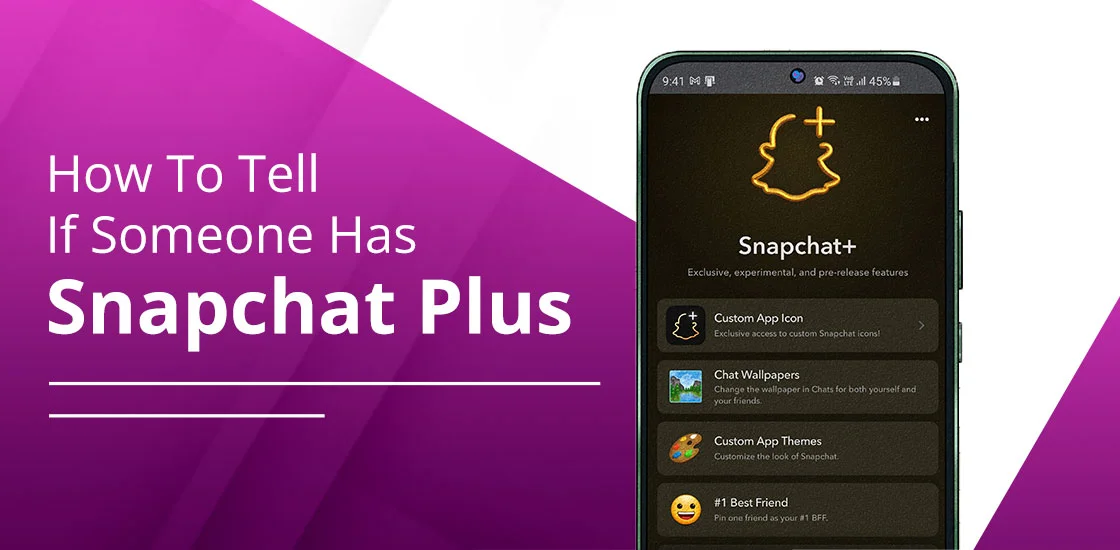
We have seen various forums and threads where users are asking, “How to tell if someone has Snapchat Plus.” There is no official or guaranteed method to know whether the particular user has a Snapchat subscription. However, here are some indicators that your friend is using Snapchat+. Common signals are as follows:
- Unique App Icons
- Story Rewatch
- Customized Bitmoji Backgrounds and other important indicators are there.
By understanding these subtle clues, you can easily determine that the user has Snapchat+. Read on to understand all indicators in detail.
TL;DR
- Understand the following hints to know that someone is using Snapchat Plus.
- Star icon badge, which is optional to show to others.
- Customized profile design, which will be different from the free Snapchat account.
- Extended story time up to seven days.
- While having a conversation with your friend, you can see that premium chat wallpapers are applied.
- Post View Emojis will also appear after a Premium user has viewed your snap.
- Personalize various elements on Snap Map, such as vehicles, 3D houses, etc.
- Premium avatars will also be accessible to Plus subscribers.
- Closest friends will appear in a solar system-style visualization.
- There are various premium features, such as AI wallpapers that are not visible to others.
- It is a premium model that costs $3.99 per month but varies by region and chosen plan.
What Is Snapchat Plus?
Snapchat Plus is a paid plan that was released on June 29, 2022, by Snap Inc., by Evan Spiegel and Bobby Murphy. It comes with advanced, exclusive, and experimental pre-release functionalities. In addition, it is designed for those users who actually want deep customization and control settings as per their demand.
Since Snapchat has a free version, Plus enhances the user experience. On a standard plan, users can simply chat or share their stories with their friends. But with the Plus membership, you can easily:
- Personalize your background images
- Chat wallpapers
- Bitmoji avatars, and much more.
In fact, you can post your story for a longer duration, not just for 24 hours.
What Features Are Exclusive to Snapchat Plus?
Here, you will get to know about the additional perks that paid subscribers are getting.
1. Snapchat Plus Badge (⭐)
It is a small black star that appears next to the display name of the user’s profile. It clearly indicates that the other person has subscribed to the Plus plan. Most importantly, if you want to show it to others, toggle it on, as it is disabled by default.
If you want to enable the premium badge, follow these steps:
- Open Snapchat.
- Move towards your Profile.
- Look for the Snapchat+ membership card.
- Tap on it.
- Enable the Snapchat+ Badge.
Note: You can disable it at any time.
2. Custom App Icons
By having the custom app icons, users who have Snapchat Plus can effortlessly change the Snapchat app icon to various designs, such as nighttime beach, tie-dye, or pixelated. Besides this, both Android and iOS users can easily access this premium feature.
If you are wondering how you can do so, these guidelines will help you out.
- Launch Snapchat.
- Navigate to your Profile.
- Tap on the Snapchat+ membership card, which is located at the top.
- Choose Custom App Themes.
- Preview the themes that suit you best.
- Select Apply Theme.
- It will change your app themes according to your needs.
⚠️ Pro-Tip: This indicator is only visible to the subscribed user, not their friends. In addition, nobody will be able to know that you are a Plus member.
3. Story Rewatch Indicator
Premium users have a Story Rewatch Indicator. By having this feature, subscribers can easily check the total number of their friends who have watched their Private Story, My Story, or Shared Story again. It is indicated with an eye emoji (👀). Bear in mind, it doesn’t show the exact number of times your content has been played again. Moreover, it doesn’t show which of your particular friends has rewatched your story.
What you need to do is open your posted story. After that, swipe up. You will see an eye emoji under your stories.
Pro Tip! As per my experience, this Story Rewatch indicator doesn’t refresh in real time. Often, there is a gap of 30-60 minutes while caching. So, you can’t assume that no one has rewatched your story.
4. Best Friends Forever (BFF Pin)
Subscribers can easily use the BFF pin as one of the best premium indicators. It lets users pin their friend to the top of their chat as their #1 Best Friend at a time. Moreover, you can check who has also pinned you. However, there is a limit; you can pin only one person at a time.
In addition, the pinned Snapchatters will not get a notification that you have picked them as your #1 Best Friend. If your friend also pins you back, you will get a special heart emoji next to their name.
These are the instructions that will help you to pin them as your number one BFF.
- Open the Snapchat chat section.
- Hold down the specific friend’s name for a while.
- Choose Pin as your #1 Best Friend.
How Does This Feature Work Differently From Normal Best Friends?
Here, you will see the difference between the BFF Pin on Snapchat+ and normal best friends on the standard version.
| Basis | BFF Pin | Normal Best Friends (Yellow Heart) |
| Fixed Position | Snapchatters will stay at the top of the list on a permanent basis. | There are fluctuations. However, it totally depends on whether you are sending snaps frequently or giving updates on a daily basis. |
| Manual Selection | You can choose who you want to pin to the top of the list. | Snapchat’s algorithm automatically determines who will be your normal best friends. |
| Exclusivity | Only one person can be pinned at a single time. | Various Snapchatters can be your best friends, but it totally depends on the frequency of chat. |
| Privacy | Only the user can see who has pinned their friend. | Both Snapchatters can see best friend emojis, such as a yellow or red heart. |
| Persistence | Your friend will be pinned even if you stop sending snaps frequently. | Positions will change when the frequency of sending snaps decreases or when there is less communication with them. |
How to Tell If Someone Has Snapchat Plus – 7 Ways
Now, it’s time to understand several indicators that will let you know that your friend is using Snapchat Plus.
#1. Extended Stories From One Hour To 1 Week
On a standard Snapchat version, stories are uploaded for up to 24 hours. But if a specific Snapchatter posted a story that stays for more than that maximum of 7 days, you can say that they have taken the subscription.
Note: Sometimes, users can reupload the story. So, you need to be very attentive to whether they have posted the same content or a different one.
You can also spot it by following these guidelines:
- Go to the Stories section after opening your Snapchat app.
- Deeply analyze whether your friend’s uploaded story is still available after a full day.
Expert Tip! Don’t confuse with Spotlight posts, as they stay for an indefinite period of time. However, this clue is only applicable to the Stories section.
#2. The Badge is Available Next to the Username
This is one of the primary indicators that you must look for. As discussed above, the Snapchat Plus Badge looks like a white star in a black circle, which is displayed beside the Snapchatter’s display name. You can easily spot it. What you need to do is the following:
- Open Snapchat.
- Navigate to the Friends tab.
- Go to their friend’s profile or just tap on their Bitmoji avatar.
- Here, you will find the star icon.
When this indicator is visible on their display name, it simply tells that the Snapchatter is a premium user.
Note: Subscribers can easily manage their visibility, hiding or displaying it to others.
#3. Looking for Post View Emojis
Post View Emojis are another clue that tells you your friend is a premium member. By enabling this advanced functionality, you can see an emoji of their choice after they have opened your Snap.
For example, you share a snap of something else. They have viewed it. The emoji will appear in the chat tab beside their name. There are high chances that they are a Snapchat Plus user.
#4. Check for the Replayed Snaps
Snapchat Plus subscribers can easily replay the snap twice instantly after opening the snap. While having a conversation with your friend on Snapchat, if they have replayed your snap two times back-to-back, it clearly indicates that your friend has purchased the premium plan of Snapchat.
#5. Using a Customized Bitmoji Background
Plus users have access to personalize their Bitmoji background with premium scenes, such as sunsets, neon cityscapes, or galaxies. If you find that the other user has a customized Bitmoji background, they’re exclusively a Snapchat Plus user. To spot them more easily, follow these tips and tricks:
- Their background is highly artistic or in 3D and looks like it was AI-generated.
- There might be some animation.
Make sure you are connected with the user, and the above feature is accessible in a one-to-one conversation only by tapping on their profile.
#6. Having a Premium Chat Wallpaper
Unlike other social media platforms, Snapchat Plus also allows its users to add a customized and premium chat wallpaper while chatting with their friends. But it can only be possible if the user has a Snapchat Plus membership. You can easily spot who is currently using Snapchat+ by this:
- You can see the premium chat wallpaper that the other Premium user has added. Plus, it is also accessible for individual chats only.
If you find this, you can clearly understand that your friend is currently using the Snapchat Plus subscription plan.
#7. Snap Map Flex
While exploring your Snap Map, you can see that someone is using their appearance as a pet or a car. However, it can only be accessed when one has chosen the specific appearance, and it will only last for 4 hours, as stated by Snapchat. If you find it, you can consider that the other user has purchased a Premium subscription.
Basic Overview!
Check out the following table to know all the indicators in seconds.
| Detection Method | Probability of Plus | Can it be hidden? |
| Story Active >24h Star Badge (⭐) | High | No |
| Star Badge (⭐) | High | Yes (Toggle) |
| Post-View Emoji | High | Yes |
| Double Snap Replay | Moderate | No |
| Premium Bitmoji Background | Moderate | No |
| Custom Chat Wallpaper | High | No |
| Snap Map Flex | High | No |
How to Know If Someone Has Snapchat Plus When You Are Also a Subscriber?
These are the key indicators that help you to identify that the other person is also using Snapchat Plus, just like you.
A. Spotting Snapchat Plus Through a Friend’s Solar System
This is significantly available to the premium users so that they can effortlessly rank their best and top close friends. You can spot the Snapchatters who are using Snapchat+. Just look at your friend’s profile, as it may show up as “Best Friend” with a gold ring, or there may be a friend’s badge. In other words, you will find the planet symbol beside your name. If you spot that, it means your friend is using Snapchat Plus. Make sure you are also a premium member to know this.
Expert Tip! “Best Friends” indicates that you are in the top 8 of the solar system. On the other hand, Friends shows that you are on 8 planets, but they are not yours. Either way, there is a golden ring that tells you the other person has purchased Snapchat+.
B. Having Access to Experimental Features Access
Usually, Snapchat+ users get access to all those experimental features that are not fully globally rolled out yet. If you find that you do not have a particular feature as compared to the other individual, it clearly indicates that they have purchased the subscription tier of Snapchat, just like you.
For example, your friend has access to AI-driven caption suggestions or advanced AR lenses.
C. Peek-a-Peek (Half-Swipe) Indicator
When someone tries to see the chat by doing a half-swipe, and you are on the chat at the same time, you will get a notification regarding it because you have taken a subscription. This can only be accessed by Plus users. Moreover, they will get an eyes emoji (👀) next to the chat if you are peeking at a conversation.
How to Hide Your Snapchat+ Status?
There are various methods to know that another user has taken a premium subscription of Snapchat. However, hiding the star badge is one of the best and most accurate approaches to do so. Follow the instructions below.
- Open Snapchat.
- Go to your profile and tap on Snapchat Plus.
- Here, you will see various options.
- Tap on the Snapchat+ Badge.
- Toggle it off.
That’s it! You have hidden your Snapchat+ status.
Note: You can also hide premium features, such as customized backgrounds, wallpapers, and other visible features.
Snapchat Plus VS Snapchat
Here is the tabular differentiation between Snapchat Plus and its free version.
| Feature/Aspect | Snapchat (Free) | Snapchat Plus (Paid, $3.99 per month and $29.99 to $39.99 per year) |
| Core Functions | Send snaps, chats, stories, lenses, and filters | The same core functions are included. |
| Customization | Limited (default app icon and standard Bitmoji) | Custom app icons, Bitmoji, themes, and backgrounds for profile personalization. |
| Social Features | Best Friends list by default | You can pin a “Best Friend Forever,” Friend Solar System ( It shows closeness ranking) as well as a Snapchat+ badge. |
| Early Access | No early access | First access to experimental features before public release. |
| Performance Issues | Occasional bugs, battery drains out (especially for Android users). | Paid users will also face the same issue, but they get faster fixes and updates. |
| Engagement Tools | Standard story replies | Priority on story replies, as there are indicators to rewatch snaps. |
| Popularity | Over 932 million monthly active users. | As of late 2025, there are more than 16 million subscribers. |
| Cost | Free | Paid subscription on a monthly or yearly basis. |
| Target Audience | Common users who just want to have basic chats and stories. | Influencers and loyal fans who want exclusivity and advanced features. |
Key Insights!
- Snapchat Plus is different from a free Snapchat account. In a premium version, users will get advanced features and a streamlined user experience.
- Paid users can easily customize the background profile the way they want.
- Both Android and iPhone users face the same performance issues.
- Snapchat Plus is the best for heavy users and creators.
Is There an Official Way to Check If Someone Has Snapchat Plus?
NO! Snapchat doesn’t offer you any official search tool or give you any notifications that the other user has a Snapchat subscription. In fact, it doesn’t allow you to check who has a different tier of Snapchat Plus. Rather, it gives access to its users to what they want to show to others and offers subtle behavioral clues.
Snapchat’s Privacy Stance
It’s mainly focused on ephemeral by default. In short, Snapchat has a policy that when the other user has seen messages or snaps, they will automatically be deleted. If the user saved the chat, it will not go away.
Key Notes!
- Snapchat doesn’t monitor or read the private messages between you and your friend.
- Snapchat only opens your chats when the system flags that you are breaking the Community Guidelines. Or, you are asking them to help you, like taking out transcripts from the voice chat.
- While sending any time or date in a chat, Snapchat opens the conversation. It saves this type of data so that it can enhance the user experience.
- If you have provided your phone number, name, date of birth, and email address, Snapchat will keep the data.
- According to the Common Sense Privacy Program, your personal information will not be sold to third parties. However, Snapchat passes your data to them so that you can see the ads that are totally relevant to you.
- In case police or any law enforcement agency asks Snapchat to provide the particular user data by following the proper legal process, Snapchat will.
Why Snapchat Doesn’t Notify Users?
Snapchat Plus is all about having advanced features, such as custom chat themes or chat wallpapers, not showing off their status to become more important. It doesn’t notify others that their friends are opting for the premium subscription because it protects users’ privacy. In addition, Snapchat doesn’t want to create social pressure on users who are using the free version.
Expert Tip! Users can easily enable or disable the premium badge to show others.
What Does Snapchat Allow and Block?
Snapchat has a strict policy on what users will share with non-subscriber friends.
What is Allowed:
- The Snapchat Plus badge can be visible if the user has enabled it to show beside their display name on the profile screen.
- Post View Emojis will appear beside their name when the recipient views your snap.
- Stories will stay longer instead of 24 hours.
What is Blocked:
- You will not be able to get the subscriber’s list, as there is no official tool.
- Friend Solar Systems, or Pinned Best Friends, are fully private. It means that no one can see it except the user.
- Third parties will not be able to access subscription data, as Snapchat has blocked them. If they are still doing it, they are trying to phish or scam.
Should You Subscribe to Snapchat Plus?
First of all, it totally depends on whether you want to use the app normally or value customization over the key functionality.
From my point of view, you should subscribe to Snapchat Plus. Because if you are a creator or an influencer, here’s what you will get:
- You can easily restore one Snap streak per month. It is beneficial for you because you can maintain the streaks without losing progress.
- Users can also see who has viewed their stories again.
- You will get early access to GenAI-powered lenses, Extended snaps, and AI-generated captions.
Note: If you are in a dilemma about whether you should take the subscription or not, just take a 7-day free trial.
Frequently Asked Questions (FAQ)
These are some of the additional questions and answers about knowing whether someone is a Snapchat Plus subscriber.
Q1. Can someone know if I check their Snapchat Plus status?
Ans. NO! Other users will not be able to know whether you have checked their Snapchat+ as Snapchat doesn’t give any alert regarding it.
Q2. Can You See If Someone Has Snapchat Plus Without Being Friends?
Ans. YES! You can often see someone’s profile to know they are using Snapchat Plus. However, the method is not guaranteed because sometimes, users hide their premium badge.
Q3. Can Snapchat Plus Be Hidden?
Ans. YES! Snapchat+ can be hidden by opening Settings to toggle off the subscription badge. Although other secondary features might be visible to others, the main indicator will be disabled.
Q4. Does Snapchat Plus show up in chats?
Ans. YES! Custom Chat Colors and unique wallpapers are some of the advanced features of Snapchat Plus that show up in chats.
Q5. Is Snapchat Plus visible on Android and iPhone?
Ans. YES! All Snapchat Plus indicators are fully accessible and visible on both Android and iPhone devices.
Q6. Can Snapchat Plus be shared with friends?
Ans. YES! You can easily share Snapchat Plus with your friends by using Buddy Pass, which offers them a 7-day free trial. Otherwise, you can also gift a premium subscription to Snapchat to your friends.
Final Verdict
If you are still wondering how you can check that someone is using Snapchat+, just see that the person has a star badge beside their username. After that, if you are chatting with the individual, you can check whether they have an AI-generated background. Then, if your friend has a customized chat theme, it simply says that Snapchatter is one of the Plus subscribers. So, without wasting a minute, you can start using Snapchat Plus if you want to take advantage of the premium features.