The quickest way to tell if someone has Snapchat Plus is to open their profile and look for the Snapchat+ badge, a white star inside a black circle, next to their display name. The badge is off by default, so if you don’t see it, you need to look for other clues. These include Stories that stay up longer than 24 hours, a custom Post View Emoji after they open your Snap, or a second replay notification on the same Snap.
There is no official or guaranteed method to check whether a particular user has a Snapchat subscription. Below, you’ll learn every reliable sign, which “signs” are actually myths, and what a Snapchat+ user can see about you.
TL;DR
- These are the signs that someone is using Snapchat Plus, from most to least reliable:
- A black-and-white star badge next to their display name. This is the only official sign, but it is off by default.
- A Story that stays up longer than 24 hours. Subscribers can set Stories to last anywhere from 1 hour to 1 week.
- A custom Post View Emoji appears next to their name after they view your Snap.
- You get two replay notifications for the same Snap, one right after the other.
- An exclusive or AI-generated Bitmoji background on their profile.
- An AI-generated chat wallpaper in your one-on-one chat.
- A special Best Friend emoji when you both have Snapchat+ and have pinned each other as #1 BFF.
- Many Plus features, such as custom app icons, Story Rewatch counts, Friend Solar System, and Peek a Peek, are visible only to the subscriber, so they don’t help you spot one.
- In the U.S., Snapchat+ starts at 3.99permonth.HighertierslikeLens+(8.99) and Platinum ($15.99) include the same Plus features, so they leave the same clues.
Quick Overview: Every Snapchat+ Sign at a Glance
Use this table to quickly check which clues you can actually see and how much each one tells you.
| Sign | Where to Look | How Reliable? | Can They Hide It? |
| Snapchat+ star badge | Their profile, next to the display name | Confirmed (if you see it) | Yes, it is off by default |
| Story active longer than 24 hours | Stories tab | High | Yes, by keeping the default 24-hour timer |
| Custom Post View Emoji | Your Chat feed, after they open your Snap | High | Yes, by turning the feature off |
| Two replays of one Snap | Your chat with them (replay notifications) | High | Yes, by not using Replay Again |
| Mutual #1 BFF emoji | Chat feed and Friendship Profile (only if you also have Plus) | Confirmed | Yes, by unpinning you |
| AI-generated or exclusive Bitmoji background | Their profile | Moderate | Yes, by switching backgrounds |
| AI-generated chat wallpaper | Your one-on-one chat | Moderate | Yes, by removing it |
What Is Snapchat Plus?
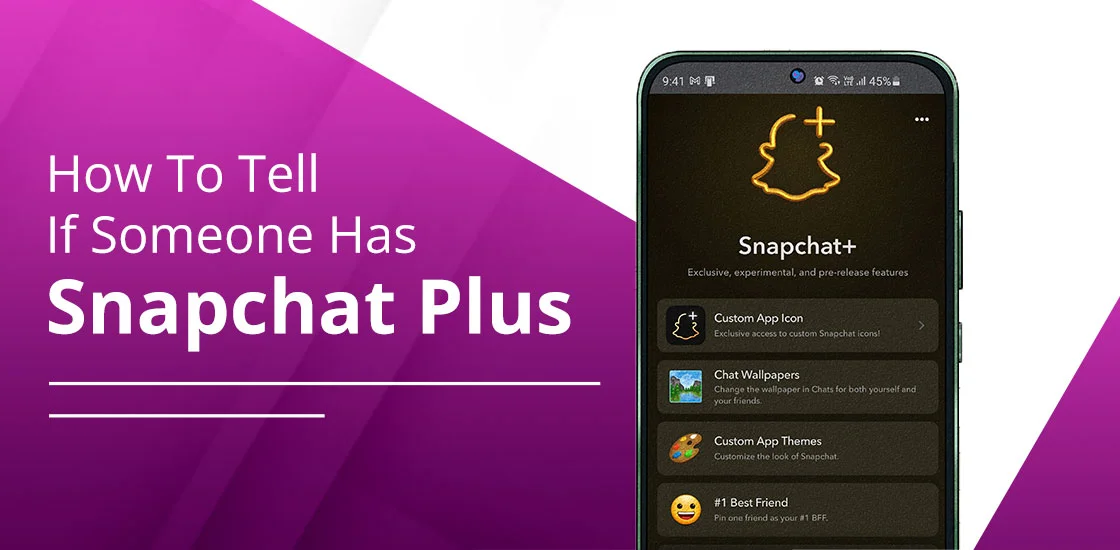
Snapchat Plus (Snapchat+) is Snapchat’s paid subscription that gives users exclusive, experimental, and pre-release features. Snap Inc., the company founded by Evan Spiegel and Bobby Murphy, launched it on June 29, 2022. It’s built for users who want deeper customization and more control over how they use the app.
The free version of Snapchat already lets you chat, send Snaps, and share Stories with friends. Snapchat+ adds extras on top, such as:
- Custom Bitmoji backgrounds and app icons
- AI-generated chat wallpapers and custom chat colors
- Pinning one friend as your #1 Best Friend
- Custom Story timers, so a Story can stay up from 1 hour to 1 week instead of only 24 hours
- Story rewatch counts, Peek a Peek, and early access to new features
Snapchat+ is popular. In 2026, Snap announced that its subscription offerings passed 30 million subscribers across Snapchat+, Lens+, Platinum, and Memories Storage Plans. So there’s a real chance that some of your friends are paying for it.
Snapchat+, Lens+, and Platinum: Do They Look Different?
No. Lens+ and Platinum both include the standard Snapchat+ features, so a Lens+ or Platinum subscriber leaves the same clues as a regular Plus user. Here is how the U.S. tiers compare:
| Plan | U.S. Starting Price | What It Adds |
| Snapchat+ | $3.99/month (6-month and yearly plans also available) | Exclusive and early-access features, Snapchat+ badge, 250GB of Memories storage |
| Lens+ | $8.99/month | All Snapchat+ features plus exclusive Lenses and AI tools |
| Platinum | $15.99/month | All Snapchat+ features, an ad-free experience, and up to 5TB of Memories storage |
Note: Prices vary by region, device, and whether you subscribe through the App Store or Google Play. Always check the price shown inside your app before you subscribe.
What Features Are Exclusive to Snapchat Plus?
Here, you’ll find the main premium perks and, more importantly, whether other people can see them. That second part is what tells you if a feature helps you spot a subscriber.
1. Snapchat Plus Badge (⭐)
The Snapchat+ badge is a white star inside a black circle that appears next to the subscriber’s display name on their profile. It is the only official sign that someone has Snapchat Plus. However, it is disabled by default, so the subscriber has to turn it on before anyone else can see it.
If you want to enable the premium badge on your own account, follow these steps:
- Open Snapchat.
- Tap your Bitmoji to open your Profile.
- Look for the Snapchat+ membership card at the top.
- Tap on it.
- Toggle on Snapchat+ Badge.
Note: You can disable it at any time. Also, your friends need an updated version of Snapchat to see the badge.
⚠️ Pro Tip! Don’t confuse the Snapchat+ badge with the Snap Star badge. Snap Stars are verified creators and public figures, and their star badge marks verification, not a subscription. If you see a star on a celebrity’s or creator’s Public Profile, check the label under their name before assuming it’s Snapchat+.
2. Custom App Icons
Snapchat Plus users can change the Snapchat app icon on their home screen to different designs, and this works on both Android and iPhone.
If you are wondering how to do it, these steps will help you out:
- Launch Snapchat.
- Navigate to your Profile.
- Tap the Snapchat+ membership card at the top.
- Choose App Icon or Custom App Themes.
- Preview the designs and pick the one that suits you best.
- Select Apply.
⚠️ Pro Tip! The custom app icon only shows on the subscriber’s own phone, so their friends can’t see it. You’d only spot it if they show you their phone or post a screenshot of their home screen.
3. Story Rewatch Indicator
The Story Rewatch Indicator lets subscribers see how many friends have watched their Story again. It’s shown with an eyes emoji (👀) and a count under the Story. It doesn’t show the exact number of times your content was replayed. It also doesn’t show which friend rewatched your Story.
To check it, open your posted Story and swipe up. You’ll see the eye emoji with a count under your Story.
Pro Tip! This count doesn’t always refresh in real time, so give it some time before you assume nobody has rewatched your Story. Also, this is a private feature. Only the Story owner sees it, so you can’t use it to tell if someone else has Snapchat+.
4. Best Friends Forever (BFF Pin)
The BFF Pin lets subscribers pin one friend to the top of their Chat feed as their #1 Best Friend. Only one person can be pinned at a time, and the pinned friend does not get a notification.
You can’t see who someone else has pinned. There is one exception: if you both have Snapchat+ and pin each other as #1 Best Friend, you both get a special Best Friend emoji next to each other’s names in the Chat feed and on your Friendship Profiles.
These are the instructions to pin someone as your #1 BFF:
- Open the Snapchat Chat screen.
- Press and hold the friend’s name.
- Choose Pin as your #1 Best Friend.
How Does This Feature Work Differently From Normal Best Friends?
Here you’ll see the difference between the BFF Pin on Snapchat+ and normal Best Friends on the free version.
| Basis | BFF Pin | Normal Best Friends |
| Fixed Position | The pinned friend stays at the top of your Chat feed. | The list changes based on how often you Snap and chat with people. |
| Manual Selection | You choose who to pin. | Snapchat’s algorithm decides who your Best Friends are. |
| Exclusivity | Only one person can be pinned at a time. | Several Snapchatters can be your Best Friends at once. |
| Privacy | Only you can see who you pinned, unless you both pin each other and both have Plus. | Friend emojis like the yellow heart or red heart show up in your Chat feed. |
| Persistence | Your friend stays pinned even if you stop Snapping them. | Positions shift when you talk less. |
How to Tell If Someone Has Snapchat Plus: 7 Ways
Now it’s time to look at the clues that let you know your friend is using Snapchat Plus. Start with the badge, then check the others if you don’t see one.
#1. The Badge Is Next to Their Display Name
The Snapchat+ badge is the clearest and only official sign. It looks like a white star inside a black circle and appears next to the person’s display name. Here’s how to check:
- Open Snapchat.
- Go to the Chat screen or search for your friend.
- Tap their name or Bitmoji to open their Friendship Profile.
- Look right next to their display name for the star icon.
If the badge is there, the Snapchatter is a premium user.
Note: Because the badge is off by default, plenty of subscribers never show it. No badge does not mean no subscription.
#2. Their Story Lasts Longer Than 24 Hours
On a standard Snapchat account, Stories disappear after 24 hours. Snapchat+ subscribers can set a custom Story timer of 1 hour, 6 hours, 12 hours, 24 hours, 2 days, 3 days, or 1 week. So if your friend’s Story is still up after more than a full day, they very likely have the subscription.
You can spot it this way:
- Open the Stories section of your Snapchat app.
- Note when your friend posted a Story (Snapchat shows how long ago it was posted).
- Check back the next day and see whether the same Story is still available.
Note: Some users repost the same content. Make sure it’s the original Story and not a new upload of the same clip.
Expert Tip! Don’t confuse Stories with Spotlight posts or saved Stories on a Public Profile, as those can stay up indefinitely for any user. This clue only applies to regular Stories.
#3. A Custom Post View Emoji Appears
Post View Emoji is a Snapchat+ feature that lets subscribers pick an emoji their friends see after they view a Snap. So if you send someone a Snap and a custom emoji appears next to their name in your Chat feed once they open it, they are very likely a Snapchat Plus user.
For example, you send a Snap of your lunch. They open it. Instead of the usual “Opened” status, you see an emoji such as ✌️ or 👻 next to their name. That’s their Post View Emoji at work.
#4. They Replay Your Snap Twice
Free Snapchat users can replay a Snap only once. Snapchat+ subscribers get Replay Again, which gives them one extra replay. Snapchat notifies you each time someone replays your Snap. So if you see two replay notifications for the same Snap, back-to-back, your friend has the premium plan.
Note: You’ll only notice this clue if you are the one sending the Snap.
#5. They Use a Premium Bitmoji Background
Plus users can choose exclusive Bitmoji backgrounds for their profile, and they can also create AI-generated profile backgrounds. To spot them more easily, look for these signs:
- The background looks highly artistic or 3D, as if it was AI-generated.
- It’s a scene you can’t find in your own free background options.
- It may also use a photo from their camera roll.
Open their profile by tapping their name in a one-on-one chat to check. Compare it with the backgrounds available on your own account. If theirs isn’t in your list, that’s a strong hint.
#6. Your Chat Has an AI-Generated Wallpaper
Any Snapchat user can now set a basic chat wallpaper, so a plain wallpaper on its own isn’t proof of anything. However, only Snapchat+ subscribers can generate a wallpaper from an AI prompt. When a wallpaper is set in a one-on-one chat, both people can see it.
If your chat suddenly has a highly detailed, AI-style wallpaper and you didn’t set it, your friend most likely has Snapchat+.
#7. They Use Premium Bitmoji Extras or Early-Access Features
Snapchat+ subscribers get early access to features before they roll out to everyone, plus extras such as Bitmoji Pets. If your friend is using a feature you can’t find in your own app, Plus is one possible reason.
For example, your friend might have access to AI-generated captions or a new Lens that you don’t see yet.
Note: Treat this as a weak clue. Snapchat also tests features with random free users and rolls them out in stages by region, so a missing feature can simply mean your app hasn’t received the update yet.
Basic Overview!
Check out this table to compare all the indicators in seconds.
| Detection Method | Probability of Plus | Can They Avoid Showing It? |
| Star Badge (⭐) | Confirmed | Yes (off by default) |
| Story Active for More Than 24h | High | Yes |
| Post View Emoji | High | Yes |
| Double Snap Replay | High | Yes |
| Premium Bitmoji Background | Moderate | Yes |
| AI-Generated Chat Wallpaper | Moderate | Yes |
| Early-Access Features | Low | Yes |
How to Tell If Someone Has Snapchat Plus Without the Badge
If the badge is hidden, you can’t confirm a subscription with 100% certainty, but you can look for a combination of clues. Here’s a simple order to follow:
- Check their Story timer. A Story still live after more than 24 hours is the strongest clue after the badge.
- Send them a Snap. Watch for a custom Post View Emoji once they open it, or two replay notifications.
- Look at their profile background. Compare it with the backgrounds available to you.
- Check your chat wallpaper. An AI-generated wallpaper in your chat points to Plus.
One clue alone can be misleading. Two or more clues together give you a much more confident answer. And if you really need to know, asking them is still the most reliable and respectful option.
Signs That Don’t Prove Someone Has Snapchat Plus
Many guides list “signs” that you can’t actually see, or that apply to free users too. Skip these so you don’t jump to the wrong conclusion:
- Their Snap Score: A high or fast-rising Snap Score just means they’re active. It says nothing about a subscription.
- A plain chat wallpaper: Free users can set basic wallpapers, so only AI-generated ones point to Plus.
- A gold star on a creator’s profile: That’s usually a Snap Star badge, not Snapchat+.
- Their custom app icon: It only shows on their phone, not yours.
- Story rewatch counts: Only the Story owner sees these.
- A Friend Solar System planet: When you have Plus, you can see your planet in a friend’s Solar System even if that friend doesn’t subscribe. It shows your rank, not their subscription.
- Normal friend emojis: Hearts, 😊, 🔥, and other friend emojis work the same for everyone.
How to Know If Someone Has Snapchat Plus When You Are Also a Subscriber
Being a subscriber yourself gives you one extra confirmed clue and a few features that tell you more about your friendships. Here’s what actually works.
A. The Mutual #1 BFF Emoji
This is the clearest clue for subscribers. Pin your friend as your #1 Best Friend. If they also have Snapchat+ and have pinned you back, you’ll both see a special Best Friend emoji in the Chat feed and on your Friendship Profiles. Since only subscribers can pin a #1 BFF, this emoji confirms they have Plus.
B. Friend Solar System (What It Does and Doesn’t Show)
The Friend Solar System shows Snapchat+ subscribers where they rank among a friend’s eight closest friends. When you open a friend’s Friendship Profile, you may see a “Best Friends” badge (you’re in each other’s top eight) or a “Friends” badge (you’re in their top eight, but they aren’t in yours). Tap it to see your planet, from Mercury (#1) to Neptune (#8).
Expert Tip! This badge tells you about your position in their Solar System. It does not mean your friend has Snapchat+. You see it because you subscribe. According to Snap, the Solar System is private and nobody else can see it.
C. Peek a Peek (Half-Swipe) Indicator
Peek a Peek lets a Snapchat+ subscriber see when a friend half-swipes into a shared one-on-one or group chat to preview messages without opening them. If you’re on the Chat feed, you’ll see an eyes emoji (👀) next to the chat. If you’re inside the chat at the same time, their Bitmoji appears at the side of the screen.
Note: The person peeking doesn’t need Snapchat+. So this feature tells you when someone peeks at your chat. It doesn’t tell you whether they have a subscription.
What Can Someone With Snapchat Plus See About You?
A Snapchat+ user can see a few extra details about how you interact with them, but they can’t see your profile views, your exact rewatch count, or who you’ve pinned. Here’s what changes when a friend has Plus:
| Your Action | Can a Snapchat+ Friend See It? |
| Half-swiping (peeking) into their chat | Yes, if Peek a Peek is turned on |
| Sitting in their chat without typing | Yes, with Friends in Chat on, your Bitmoji appears holding a phone |
| Rewatching their Story | Only as part of a total rewatch count, not your name |
| Replaying their Snap | Yes, but this works the same for free users too |
| Viewing their profile | No, Snapchat doesn’t show profile visitors |
| Your place in their Best Friends list | They can see their own Solar System, which includes you if you’re in their top eight |
If you’re also curious about what the little dot next to a friend’s Bitmoji means when they’re online, read our guide on what the green dot means on Snapchat.
How to Hide Your Snapchat+ Status
To hide your Snapchat+ status, turn off the Snapchat+ badge from your membership settings. It’s the only feature that openly labels you as a subscriber. Follow these steps:
- Open Snapchat.
- Go to your Profile and tap the Snapchat+ membership card.
- You will see a list of your Plus features.
- Tap Snapchat+ Badge.
- Toggle it off.
That’s it! The badge is now hidden from your friends.
Note: To stay fully low-key, also turn off Post View Emoji, skip Replay Again, keep your Stories on the default 24-hour timer, and use a free Bitmoji background. Those are the features friends can notice.
Snapchat Plus vs. Snapchat
Here’s how Snapchat Plus compares with the free version.
| Feature/Aspect | Snapchat (Free) | Snapchat Plus (Paid, from $3.99 per month in the U.S.) |
| Core Functions | Send Snaps, chats, Stories, Lenses, and filters | The same core functions are included. |
| Customization | Default app icon, standard Bitmoji backgrounds, basic chat wallpapers | Custom app icons, exclusive and AI-generated backgrounds, AI chat wallpapers, custom chat colors |
| Stories | Stories expire after 24 hours | Custom Story timer from 1 hour to 1 week, plus rewatch counts |
| Social Features | Best Friends list by default | #1 BFF pin, Friend Solar System, Peek a Peek, and a Snapchat+ badge |
| Snaps | One replay per Snap | Replay Again (one extra replay) and custom Post View Emoji |
| Early Access | Features arrive with the general rollout | First access to experimental and pre-release features |
| Memories Storage | Limited free storage | Up to 250GB of Memories storage |
| My AI | My AI stays in your Chat feed | Subscribers get more control over the My AI chat |
| Cost | Free | Monthly, 6-month, or yearly plans. Prices vary by region and app store. |
Key Insights!
- Snapchat Plus keeps everything from the free app and adds customization, Story controls, and early access.
- Most visible Plus clues come from features that change what you see, such as Stories, Snaps, and backgrounds.
- Lens+ and Platinum subscribers show the same clues because they include Snapchat+ features.
- Snapchat Plus suits heavy users and creators who post a lot of Stories.
Is There an Official Way to Check If Someone Has Snapchat Plus?
No! Snapchat doesn’t offer a search tool, a subscriber list, or notifications that reveal whether someone has a subscription. The Snapchat+ badge is the only official indicator, and it’s up to each subscriber whether to show it. Everything else is a clue based on how they use the app.
Snapchat’s Privacy Stance
Snapchat is built around privacy and messages that delete by default. A few points help explain why subscription status stays private:
- Snapchat doesn’t have public friend lists or public likes, so the app doesn’t feel like a popularity contest.
- Snap says it doesn’t know what you’re chatting or Snapping except in limited safety-related cases, such as content reported for breaking the Community Guidelines, or when you ask it to, like with Voice Chat Transcription.
- Snapchat only shares user data with law enforcement through a proper legal process, as explained in its privacy FAQs.
Why Doesn’t Snapchat Notify Users?
Snapchat Plus is about personal features, not showing off your status. Snapchat doesn’t announce who subscribes because it protects user privacy and avoids creating social pressure on people using the free version. That’s also why the badge starts switched off.
What Does Snapchat Allow and Block?
Here’s what a non-subscriber can and can’t learn about a Plus user.
What Is Allowed:
- The Snapchat+ badge is visible if the subscriber has turned it on.
- Post View Emojis appear next to their name when they view your Snap.
- Stories can stay up longer than 24 hours.
- Extra replays of your Snap show up as replay notifications.
What Is Blocked:
- You can’t get a list of subscribers, as there is no official tool.
- Friend Solar Systems and #1 BFF pins are private. Nobody else can see them, apart from the mutual BFF emoji between two subscribers.
- Third-party apps and websites can’t access subscription data. Any site that claims to “check” someone’s Snapchat+ status, or asks for your login, is likely a phishing attempt or scam.
Should You Subscribe to Snapchat Plus?
It depends on how you use the app. If you mainly chat and watch Stories, the free version is enough. If you post Stories often, care about customization, or want new features first, Snapchat Plus is worth trying.
Here’s what you get, especially if you’re a creator or heavy user:
- Built-in Snapstreak restores, so a missed day doesn’t wipe out your progress. The number of free restores can change, so check your membership card.
- A count of how many friends rewatched your Stories, which helps you see what content people like.
- Custom Story timers to keep important Stories up for up to a week.
- Early access to GenAI-powered Lenses, AI captions, and other new tools.
- More control over the My AI chat. If it keeps cluttering your inbox, our guide on how to remove Snapchat My AI from your chat feed walks you through it.
Note: If you’re unsure, start with a free trial if one is offered to you, or ask a subscriber friend for a Buddy Pass, which gives you a 7-day trial.
Frequently Asked Questions (FAQ)
These are extra questions people often ask about spotting a Snapchat Plus subscriber.
Q1. Can you get Snapchat Plus without people knowing?
Ans. Yes! The Snapchat+ badge is off by default, so your friends won’t see it unless you turn it on. Just keep in mind that features like Post View Emoji, extra replays, and long Story timers can still give you away.
Q2. Can others see that I have Snapchat Plus?
Ans. Only if you show it. Friends can see your badge if it’s enabled, and they may notice features you use around them, such as an AI chat wallpaper or a Story that lasts several days. Your app icon, rewatch counts, pins, and Solar System stay private.
Q3. If someone has Snapchat Plus, can they see when I view their profile?
Ans. No! Snapchat doesn’t notify anyone when you open their profile, and Snapchat+ doesn’t add a profile visitor list. A Plus user can only see actions like peeking into their chat or rewatching their Story, as covered above.
Q4. If someone has Snapchat Plus, can they see if you half-swipe?
Ans. Yes, if they’ve turned on Peek a Peek. They’ll see an eyes emoji next to the chat in their Chat feed, or your Bitmoji in the chat if they have it open at the same moment. If they don’t subscribe, a half-swipe still stays private.
Q5. Can you tell if someone has Snapchat Plus by their Snap Score?
Ans. No. Snap Score reflects how active someone is, not whether they pay. Subscribers can see how a friend’s score has changed, but the score itself looks the same for everyone.
Q6. Can you see if someone has Snapchat Plus without being friends?
Ans. Sometimes. If they have a Public Profile with the badge turned on, you may see the star next to their name. Most other clues, like Post View Emoji and replays, only work between friends who Snap each other.
Q7. Is 😊 mutual on Snapchat?
Ans. Not necessarily. The smiling face emoji means that person is one of your Best Friends because you Snap them a lot. They may not have you as one of theirs. It has nothing to do with Snapchat Plus.
Q8. Can Snapchat Plus be shared with friends?
Ans. Yes! Subscribers can send a Buddy Pass, which gives a friend a 7-day free trial. You can also gift a Snapchat+ subscription to a friend. There’s also a family plan, so you can share one subscription with several people.
Final Verdict
To check if someone has Snapchat Plus, start with their profile and look for the black-and-white star badge next to their name. If it isn’t there, check whether their Stories last longer than 24 hours, watch for a custom Post View Emoji or a second replay after you send a Snap, and compare their Bitmoji background with your own. Two or more of these clues together are a strong sign. If you want the features for yourself, try a Buddy Pass or a free trial first and see which perks you actually use.