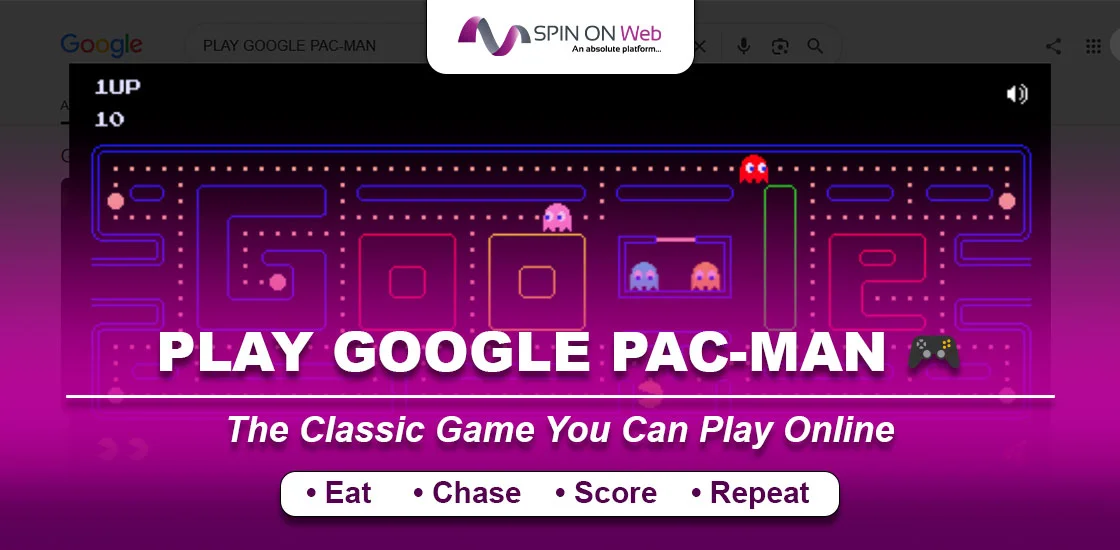
When you search for the Google Pac-Man game, you notice a yellow dot munching through a maze chased by four ghosts. This is the first appearance of the game.
It’s one of the most beloved browser games ever created, which first started as a birthday tribute and later became popular among people.
Whether you’re here for nostalgia, looking to improve your high score, or simply curious about the history behind this iconic Doodle, you’re in the right place. This guide covers everything: where the game came from, how to play it, hidden Easter eggs most players never find, and pro tips that will genuinely help you last longer in the maze.
What Is the Google Pac-Man Game?
The Google Pac-Man game is a fully playable, browser-based version of the classic 1980 arcade game, embedded directly into Google Search. To access the game, simply search for “Pac-Man” on Google, and the game appears right above your search results. You don’t need to install anything or create an account to play the game.
Game Objective
The goal is straightforward, but mastering it takes practice:
- Eat all the small dots (pellets) in the maze to complete the level.
- Avoid the four ghosts at all costs — touching one ends your life.
- Eat a Power Pellet (the large flashing dots in the corners) to temporarily turn the ghosts blue. In this state, you can eat them for bonus points.
- Collect bonus fruit that appears in the center of the maze for extra points.
- Complete as many levels as possible and aim for the highest score.
Origin of Google’s Pac-Man Doodle
On May 21, 2010, Google replaced its homepage logo with something nobody had ever seen from a search engine before. It was a fully playable video game. The occasion was the 30th anniversary of Pac-Man, which was originally released in Japan by Namco in May 1980 (where it was initially called “Puck-Man”).
Google planned to run the Doodle for just 48 hours. User response was so overwhelming that Google made it permanent, and you can still play it today.
Popularity of the game
In the first 48 hours alone, the game was played for an estimated 4.82 million hours worldwide, according to data published by time-tracking software company RescueTime.
Guinness World Records also noted that cumulative play time reached around 500 million hours.
Why did it catch on so fast? A few reasons:
- Browser accessibility: No downloads, no plugins, no accounts. It just worked.
- Instant nostalgia: For millions of Americans who grew up in the 1980s and 90s, Pac-Man is woven into childhood memories. Seeing it on Google’s homepage felt like running into an old friend.
- Universal controls: Arrow keys on desktop. Swipe gestures on mobile. Anyone could pick it up in seconds.
- Completely free: No coins required (ironically, unlike the original arcade cabinet).
- Desktop and mobile compatible: Works on virtually any modern device.
How to Play Google Pac-Man Game
Getting started takes about ten seconds. Here’s everything you need to know.
Step 1: Open Google:
Go to google.com in any modern browser, or open the Google app on your phone.
Step 2: Search the game:
Type “Pac-Man” or “Google Pac-Man” in the search bar and press Enter.
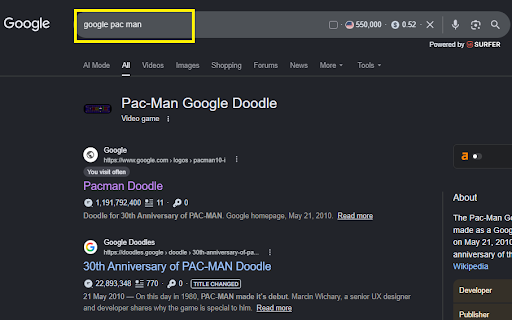
Step 3: Launch the game:
The game appears at the top of the search results page. Click or tap the “Play” button (or the maze itself) to begin.
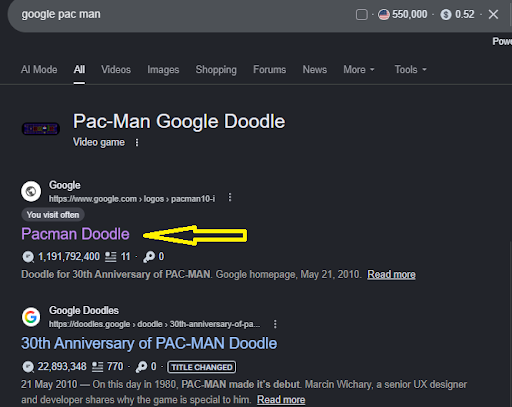
Step 4: Start playing:
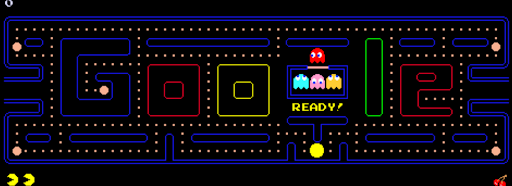
Use the controls below to navigate Pac-Man through the maze. The game starts automatically once you make your first move.
Controls
If you are playing Google Pac-Man on different devices, the method and controlling changes per device. Check how the game operates on different devices.
| Device | Controls |
| Keyboard (Desktop) | Arrow keys (↑ ↓ ← →) to navigate in all four directions |
| Mouse (Desktop) | Click the direction you want Pac-Man to move |
| Touchscreen (Mobile) | Swipe up, down, left, or right on the maze |
| Tablet | Tap the direction on screen or use swipe gestures |
Pro tip: On desktop, arrow keys offer the most precise control. On mobile, swipe gestures feel natural once you’re a few levels in.
Features of the Google Pac-Man Game
This isn’t a watered-down imitation. Google’s team built something surprisingly complete.
1. Original Arcade Gameplay
The Google Doodle faithfully replicates all 256 levels of the original 1980 Pac-Man release. Ghost speed, pellet counts, movement logic — it’s all there. If you were good at the original arcade version, that knowledge transfers directly.
2. Authentic Maze Design
Instead of the standard rectangular maze, the Google version uses a maze designed in the shape of the word “Google.” It’s a clever design — the maze winding through the letters still functions exactly like the original arcade maze, just with a unique visual layout.
3. Ghost AI Movement
Each ghost has its own distinct artificial intelligence pattern, just like the original game:
- Blinky (red): Generally targets Pac-Man’s current position during chase mode. His movement and speed can become more threatening as the levels progress
- Pinky (pink): Tries to move ahead of Pac-Man, setting up ambushes.
- Inky (blue): Uses a complex combo of Blinky’s position and Pac-Man’s position to determine movement. Unpredictable.
- Clyde (orange): Alternates between chasing and wandering to his corner. Seems chaotic but follows a pattern.
The ghosts also switch between chase, scatter, and frightened states. A Power Pellet changes them to their frightened state temporarily, allowing Pac-Man to eat them for increasing bonus points. Their different movement patterns are why simply moving in a straight line rarely works for long.
4. Sound Effects
The original arcade sound effects are included — the waka-waka of eating pellets, the siren that speeds up as you clear a level, the jingle when you eat a ghost. These audio cues aren’t just nostalgic. Experienced players actually use them as gameplay signals: a change in the siren pitch means ghosts are speeding up.
5. Browser-Based Gameplay
The game was one of the earliest notable examples of HTML5 game development at scale. At the time of its 2010 launch, most browser games relied on Adobe Flash. Google’s Pac-Man Doodle helped demonstrate that HTML5 could deliver real gaming experiences natively in the browser — a milestone in web development history.
Hidden Easter Eggs and Fun Facts of Google Pac-Man Game
Here’s where things get interesting. Most players who try Google Pac-Man never discover these details.
1. Two-Player Mode (Most Players Never Find This)
On the original Google homepage launch, there was a button that said “Insert Coin” — just like a real arcade machine. If you clicked it a second time, Ms. Pac-Man joined the game. Pac-Man is controlled with the arrow keys; Ms. Pac-Man uses the WASD keys. The two-player feature is associated with the archived Google Pac-Man Doodle, although its availability may vary depending on the page, browser, and device.
Note: As of 2026, the original Google Pac-Man Doodle’s two-player mode is not consistently available in the version displayed in Google Search. If your desktop game does not show an “Insert Coin” button, you cannot activate Ms. Pac-Man through that current interface.
The two-player feature belongs to the original 2010 Doodle. In that version, clicking “Insert Coin” a second time added Ms. Pac-Man to the maze; Player 1 used the arrow keys and Player 2 used W, A, S, and D.
2. The Level 256 Glitch — Preserved on Purpose
In the original 1980 arcade release, level 256 was notorious: a hardware memory overflow caused the right half of the screen to become a garbled mess of random symbols, making the level unbeatable. It’s one of gaming’s most famous bugs. Google’s team deliberately included this glitch in their Doodle version so players could experience a piece of arcade history. If you make it to level 256 — you’ll see it for yourself.
How to beat Google Pac-Man level 256
You cannot beat Google Pac-Man Level 256 through a normal gameplay strategy. To reach Level 256, you must first survive and complete the 255 playable levels. Your goal should therefore be to preserve lives and avoid unnecessary risks during the earlier stages.
- Learn the maze layout and plan an escape route before entering a corridor.
- Save Power Pellets for moments when several ghosts are nearby.
- Use the side tunnels to create distance from pursuing ghosts.
- Avoid dead ends when a ghost is approaching.
- Prioritize clearing the maze over taking risky ghost bonuses.
- Treat reaching Level 256 as the practical achievement rather than expecting to advance to Level 257.
3. The Ms. Pac-Man Surprise
Beyond two-player mode, Ms. Pac-Man appeared in a separate Google Maps Easter egg in 2017, when Google temporarily turned the road network of any city into a Ms. Pac-Man maze for April Fools’ Day. Players could actually navigate streets they recognized while dodging ghosts. It was brief, bizarre, and brilliant.
4. The 30th Anniversary Celebration
When the Doodle launched on May 21, 2010, it caused what some called a productivity crisis. RescueTime’s study of ~11,000 users found that the average Google visitor spent 36 extra seconds on the site that day — which, multiplied across hundreds of millions of daily Google users, translated to an estimated 4.82 million hours and $120 million in lost productivity. The number went viral. Google VP Marissa Mayer later remarked that they were “overwhelmed, but not surprised” by the reception.
5. Why Google Never Removed It
Most Google Doodles disappear after their event ends. Pac-Man was originally slated to go offline after 48 hours. But the response was so overwhelmingly positive — including direct user outcry — that Google made it a permanent fixture, accessible forever through Google Search. It was the first Google Doodle to receive that treatment.
Tips and Tricks to Improve Your Score
1. Learn Ghost Movement
Study each ghost’s individual behavior (described above). Once you understand that Blinky directly chases you and Pinky targets four tiles ahead of you, you stop making random moves and start planning routes.
2. Save Power Pellets Strategically
Don’t eat a Power Pellet the moment you’re near one. Save it for when multiple ghosts are converging on you. Eating all four ghosts during a single Power Pellet gives you 200, 400, 800, and 1,600 points, respectively — that combo adds up faster than eating hundreds of regular pellets.
3. Use the Tunnel Shortcuts
The left and right tunnels in the maze wrap around to the other side. Crucially, ghosts slow down significantly when passing through these tunnels. You don’t. Use the tunnel to build distance when being chased — especially by Blinky in later levels when he’s at top speed.
4. Clear One Section at a Time
Chasing pellets randomly across the entire maze leads to poor routing and dead ends. Instead, clear one area at a time in a systematic loop. This keeps your movement predictable for you (though not for the ghosts) and reduces the chance of running into a blocked section with no escape.
5. Avoid Corner Traps
Corners and dead-end corridors are where most lives are lost. If you navigate into a corner and a ghost is following you, you have no way out. Always maintain at least one exit from wherever you are, and never enter a corridor until you’ve checked that it’s not blocked on the other end.
Google Pac-Man vs. Original Arcade Pac-Man
How does the Google version stack up against the original arcade release?
| Feature | Google Pac-Man | Original Arcade Pac-Man |
| Platform | Browser (any device) | Arcade Cabinet |
| Installation | None required | Not applicable (built-in) |
| Cost | Free | Paid per play (historically $0.25) |
| Controls | Keyboard / Touchscreen | Physical joystick |
| Availability | Always online via Google Search | Arcade / Console / ROM |
| Maze Design | Google-logo shaped | Classic rectangular |
| Ghost AI | Faithful replica | Original code |
| Level 256 Glitch | Preserved intentionally | Original hardware bug |
| Two-Player | Yes (Ms. Pac-Man via Easter egg) | No (single player only) |
Common Problems and Solutions
Problem 1: Game Not Loading
If the game doesn’t appear in your search results, try these steps:
Solution:
- Refresh the page.
- Clear your browser cache (Settings → Clear Browsing Data).
- Try a different browser (Chrome, Edge, Firefox, Safari all support the game).
- Disable any ad-blocking extensions temporarily — they sometimes interfere with Google’s embedded content.
Problem 2: Controls Not Working
Solution: Arrow keys not responding? Click once directly on the game area to give it focus. Browsers require the game element to be “active” before it accepts keyboard input. On mobile, if swipes aren’t registering, try scrolling to center the game on your screen first.
Problem 3: Slow Performance
Solution: The game is lightweight but can lag on older devices. To improve performance: close unnecessary browser tabs, disable hardware-heavy browser extensions, and try using Google Chrome, which tends to render Google’s own games most efficiently.
Problem 4: Browser Compatibility Issues
Solution: Google Pac-Man works on all major modern browsers. If you’re on a very old browser version, update it. The game requires HTML5 canvas support, which any browser released after 2013 should have.
Why Google Pac-Man Remains Popular in 2026
It’s been more than 15 years since the Doodle launched, and people still search for it every day. Why?
- Nostalgia with zero friction: For Gen X and older Millennials, Pac-Man isn’t just a game — it’s a cultural touchstone. Google made it playable without any barrier.
- A perfect 2-minute break: In an era of mobile gaming and infinite entertainment options, there’s still something satisfying about a focused, short burst of arcade gameplay with a clear objective.
- Genuinely iconic game design: Pac-Man was designed to appeal to everyone — the art, the characters, the simple objective. Toru Iwatani designed it in 1980 partly to attract non-gamers, especially women, into arcades. That universal design still works.
- Introduction for new generations: Every year, kids discover Pac-Man for the first time through a Google search. The Doodle functions as a living museum exhibit.
- No download, ever: In a world full of apps competing for phone storage, the browser game that just works will always have an audience.
Frequently Asked Questions (FAQ)
Q 1: Is Google Pac-Man free to play?
A: Yes, completely free. There are no in-app purchases, no subscription tiers, and no ads interrupting gameplay. Just open Google, search “Pac-Man,” and play.
Q 2: How do I play Google Pac-Man?
A: Search “Pac-Man” on Google, click Play when the game appears in your results, and use arrow keys (desktop) or swipe gestures (mobile) to navigate the maze, eat pellets, and avoid ghosts.
Q 3: Can I play Google Pac-Man on my phone?
A: Yes. The game works on both Android and iPhone in the Google app and in mobile browsers. Touch controls are built in — just swipe in the direction you want to move.
Q 4: Is Google Pac-Man the original game?
A: No. The 2010 Google Pac-Man Doodle was a browser-based recreation built from scratch, not the original Namco arcade game or its code. Google worked with Namco Bandai to reproduce the classic game’s gameplay, ghost behavior, sounds, graphics, and level progression with remarkable accuracy.
Q 5: Does Google Pac-Man have multiplayer?
A: Yes — but it’s hidden. Click “Insert Coin” (or “Play”) twice to add Ms. Pac-Man as a second player. Player 1 uses arrow keys; Player 2 uses WASD keys.
Q 6: Can I save my score?
A: No. Google Pac-Man doesn’t save high scores between sessions. Each game session starts fresh. Some third-party Pac-Man sites offer score tracking if that’s important to you.
Q 7: Does Google Pac-Man still work in 2026?
A: Yes. It’s permanently available via Google Search. Just search “Pac-Man” or visit Google’s Doodle archive directly. It runs on all modern browsers and devices without any changes needed.
Q 8: What are the ghost names in Google Pac-Man?
A: Blinky (red), Pinky (pink), Inky (blue/cyan), and Clyde (orange). Each has a unique AI behavior pattern.
Q 9: Is there a way to cheat at Google Pac-Man?
A: There are no built-in cheat codes. However, understanding ghost behavior patterns (see the Scatter Cycle section above) gives you a genuine strategic edge that feels much better than cheating.
Q 10: Can You Play Offline?
A: The Google Search version requires an internet connection. However, Google’s official Doodle page (doodles.google.com) allows you to play the archived version, and some browsers cache the game. You can also find the game at https://www.google.com/logos/2010/pacman10-i.html as a direct link. For true offline play, you’d need a locally saved version.
Conclusion
The Google Pac-Man game is more than a fun diversion. It’s the first Google Doodle to become permanently accessible, one of the earliest showcases of HTML5 gaming, and a game that turned a 30th birthday tribute into a moment that consumed nearly 5 million hours of the world’s collective attention in a single day.
It works on virtually every device. You just need to visit google search engine, enter ‘Google Pac-Man,’ and the game appears in front of you. It’s like other built-in Google games like Google coin flip, Google Tic Tac Go, and more. Enjoy the game with a learning companion through this guide.