I’ve found Google Search Console to be one of the most underrated keyword research tools in my stack.
I’m not talking about generic dashboards; I’m talking about the raw Google Search Console queries for my various sites.
In this post, I use monktech.net to show how I find low-competition keywords to optimise my articles and also write new articles based on real GSC data.
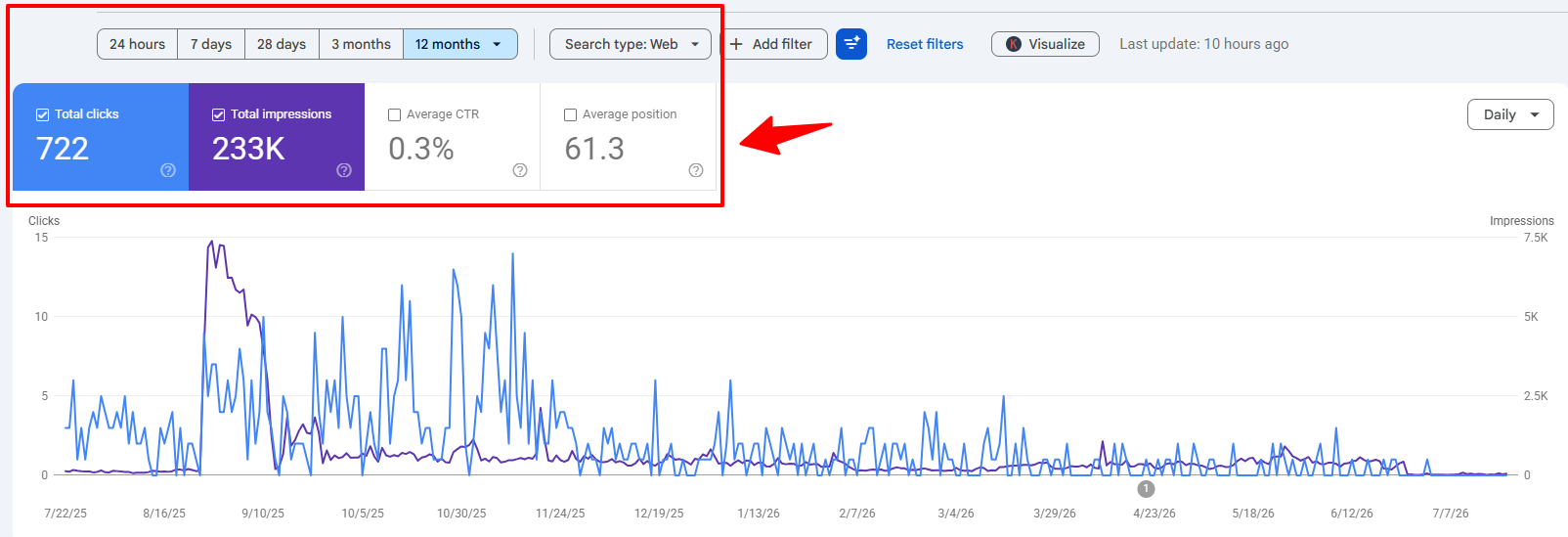
Over the last 12 months, this site recorded 233K impressions, 722 clicks, 0.3% CTR, and an average position of 61.3.
TL;DR: How I Find Low‑Competition Keywords in GSC
- Pull a 12‑month GSC Performance report and focus on clicks, impressions, CTR, and positions.
- Filter out branded terms and keep problem‑centric queries (as I found NYT puzzles, streaming, social, printers, Outlook, Cash App).
- Pick low‑competition queries with 200–5,000+ impressions, low CTR (<1%), and mid‑range positions (around 20–80).
- Cluster them by topic and either optimise existing guides or create new, in‑depth articles for unserved clusters.
- Re‑check GSC regularly to track improvements in impressions, positions, and CTR per cluster.
Why Google Search Console Is a Goldmine for Low‑Competition Keywords
When I scroll through my GSC query list, I see hundreds of real searches like “sudoku nyt answers”, “spelling bee answers today”, “peacocktv.com tv/samsung”, “how to delete instagram account”, “how to check ink levels on hp printer”, “hp printer in error state”, “hulu error code p‑dev320”, “cash app borrow”, and “how to borrow money from cash app”.
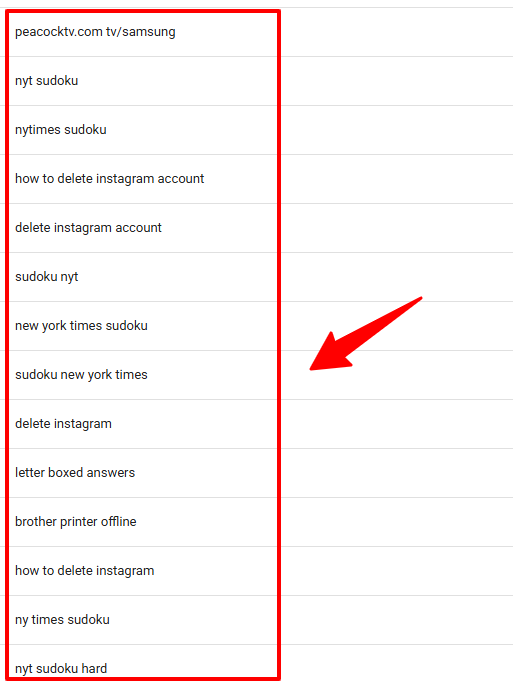
This is not random noise. This is Google showing me, in plain language, the exact topics and pain points my audience cares about.
Many of these are low‑competition keywords in GSC hiding in plain sight.
Popular traditional Keyword Research tools such as Semrush and Ahrefs often mark these exact long-tail, troubleshooting queries as having “0 Search Volume” or high difficulty. But GSC reveals the truth that third-party databases miss:
- It’s Direct, First-Party Data: You aren’t looking at estimated averages; you’re looking at real impressions from real users who are already seeing your site in search results.
- It Uncovers Zero-Guesswork Competition: If your site ranks on page 2 or 3 for a query like in my case; “hp printer in error state”, without you ever writing a dedicated post for it, Google is showing that the page has ranking potential. Hence, it is easy to optimise the article with this keyword or write a new article.
- It Highlights Intent-Driven Long-Tail Traffic: Long-tail queries carry extremely high intent. Capturing dozens of these low-competition variations compounds into massive, high-converting traffic.
I’ll show you exactly how to uncover these low-competition keywords hiding in plain sight.
Using my own site data as a live case study, you’ll see how I analysed 233K impressions, separated puzzle-answer queries from troubleshooting and finance topics, and used query clustering to decide where to focus next.
Why I Use Google Search Console for Keyword Research and GSC Query Analysis
I’ve used every major keyword tool and framework over the last decade, but I only started winning consistently when I stopped treating keyword research as “what third-party tools say people search“ and started treating it as “what Google Search Console proves people are already finding my site for.“
To see what this looks like in practice, here is a quick snapshot of 12 months of real data from my site: Monktech.net
- Total Impressions: 234,000
- Total Clicks: 722
- Average CTR: 0.3%
- Average Position: 61.3
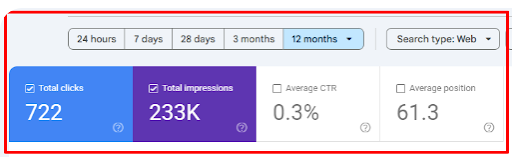
An average position of 61.3 with 234K impressions isn’t a failure. It’s a massive map of untapped high-potential queries. Google is already showing my site for these queries, but I have not yet fully optimized the content for them.
When I drill down into my top queries, I could see multiple keywords showing as the top query. Have a look below:
- Streaming & App Errors: Queries like “peacocktv.com tv/samsung” (4.9K impressions) and “hulu error code p-dev302”.
- NYT Puzzles: High-volume daily intent like “sudoku nyt answers”, “spelling bee answers today”, and “connections hint”.
- Account & Social Management: Direct action terms like “how to delete instagram account” (1.6K impressions) and “deactivate instagram account”.
- Hardware Troubleshooting: Specific device fixes like “hp printer in error state” and “canon printer offline”.
- Finance & SaaS Workflows: High-intent terms like “cash app borrow” and “how to change signature in outlook”.
What This Means
This is why GSC analysis is non-negotiable in my editorial process:
- Zero Guesswork: Third-party tools estimate; GSC reveals actual impressions and ranking positions for your specific domain.
- Uncovers Hidden Long-Tail Demand: It surfaces real user queries that tool databases often label as “0 volume”.
- Instant Topic Clustering: It allows you to group queries naturally by user intent (puzzles, streaming, printers, finance) so you know exactly which content hubs to build next.
GSC vs. Third‑Party Tools for Keyword Research
I don’t treat Google Search Console as a total replacement for third-party tools like Ahrefs or Semrush. Instead, I use GSC as my primary source of truth for my own site, using external tools secondarily for market validation.
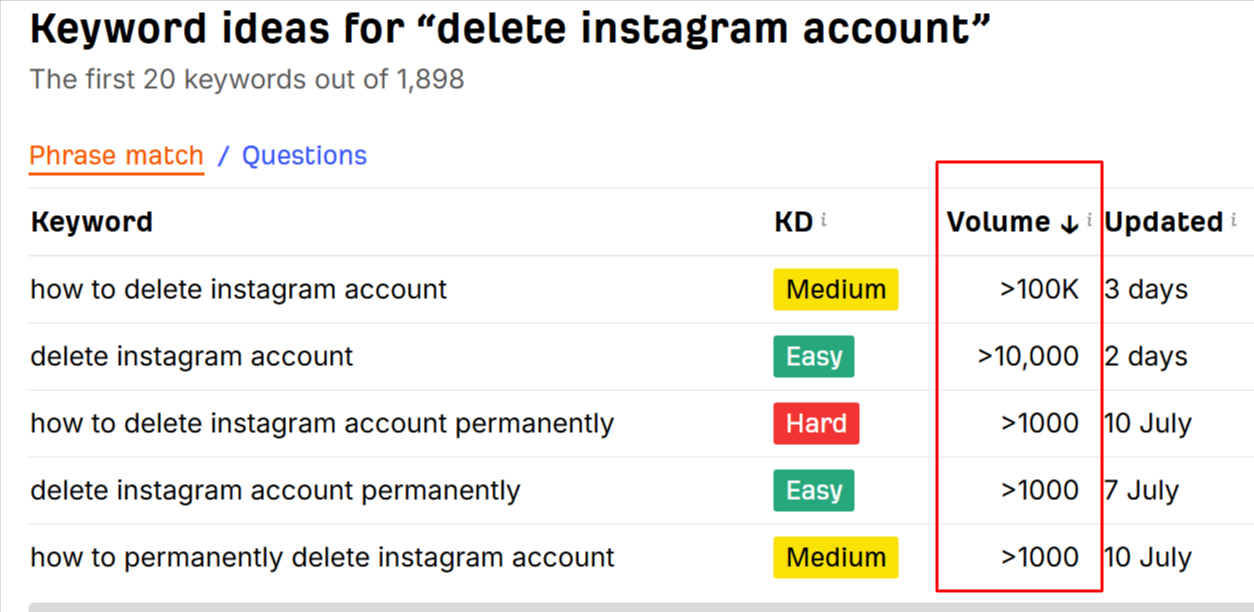
Third-party tools give you estimated, macro-level data. They’ll tell you broad search volume for a keyword like “delete instagram account”. But they can’t show you how your specific domain is performing for that topic.
For example, here’s the Ahrefs’ keyword generator tool that displays: Volume, Keyword Difficulty, keyword list, and how recent the data is.
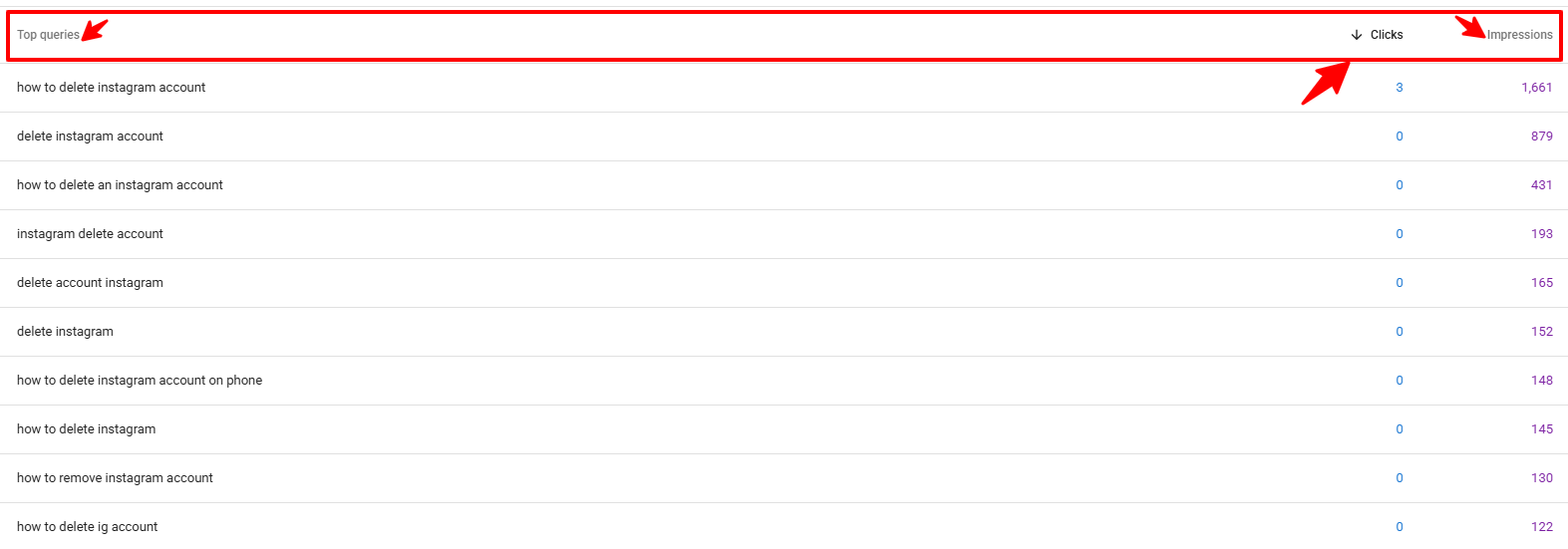
On the other hand, GSC reveals exact, first-party performance metrics. For example, on my Delete Instagram Account guide, GSC shows:
- Exact impressions and clicks for primary and secondary queries (e.g., “how to delete instagram account”, “deactivate instagram account”, “delete account instagram”).
- Underperforming CTRs and average position drops that signal immediate optimization opportunities.
Here is an example from Google Search Console:
For finding low-competition keywords, GSC is unmatched because it automatically uncovers:
- Emerging Opportunities: Topics where your site is already gaining impressions despite having almost no clicks yet.
- Long-Tail Variations: Exact user phrasing and intent variations (like niche variations for NYT puzzle answers) that third-party tools miss.
- Optimization Gaps: Pages that are already getting impressions but need stronger on-page targeting to push them into top rankings.
Once I identify these first-party opportunities in GSC, I try some trusted third-party tools for the research to get more insights about volume, difficulty, and recency.
Prerequisites Before Finding Low-Competition Keywords in Google Search Console
Before jumping into the actual process to find low-competition keywords, make sure your Search Console property is properly configured to capture meaningful trends.
1. Make Sure You Have GSC Access & Minimum Requirements
To follow this workflow, you will need:
- Verified GSC Access: Full administrative or read-access to your domain property (I’m using sc-domain:monktech.net) so you can run your own GSC query analysis.
- Performance report set to Search type: Web with at least 12 months of data available to analyze Search Console impressions and CTR.
- Ability to toggle between Queries and Pages, and to use filters smartly for Google Search Console clustering.
You do not need hundreds of thousands of impressions to find useful keywords in GSC. Even a site getting 10K+ annual impressions can uncover valuable opportunities.
What matters more is that your GSC queries data actually reflects your content focus and audience problems.
2. Sort the Data within GSC
After setting up your GSC account, the first practical step you should take is to sort the Performance report with these exact settings before analyzing your data:
- Date range: Last 12 months (as you can see in the screenshots above) to capture enough GSC keyword opportunities.
- Metrics: clicks, impressions, CTR, and average position to evaluate Search Console impressions and CTR per query.
- Primary View: Start on the QUERIES tab (we will pivot to the PAGES tab later in Step 5).
This gives me a clean base for Google Search Console keyword research and GSC query analysis:
- A comprehensive view of every query touching my site.
- A feel for which topics have real demand and strong GSC keyword opportunities (NYT games, streaming, printers, social media, finance).
- A starting point for Google Search Console clustering and intent mapping.
Step‑by‑Step: How I Find Low‑Competition Keywords in GSC
Step 1: Read the 12‑Month Performance Report
I start by reading the high‑level numbers:
722 clicks, 233K impressions, 0.3% CTR, position 61.3.
Then I look at Top queries to understand the topic mix.
In our current 12‑month view, my Top queries by impressions include:
- “peacocktv.com tv/samsung” – 4,959 impressions, 1 click.
- “sudoku nyt” – 3,303 impressions, 0 clicks.
- “how to cancel netflix” – 3,253 impressions, 0 clicks.
- “nytimes sudoku” – 1,400 impressions, 0 clicks.
- “new york times sudoku” – 1,142 impressions, 0 clicks.
- “how to delete instagram account” – 1,660 impressions, 3 clicks.
- “how to change signature in outlook” – 911 impressions, 2 clicks.
And dozens of “mini”, “strands”, “connections”, and “spelling bee” queries with hundreds of impressions each.
This tells me:
- I already rank in some capacity (even if at low positions) for extremely active daily‑search topics: NYT puzzles, streaming activation codes, social account management, email workflows.
- It shows my CTR is poor, which usually means weak titles/snippets or misaligned intent, not necessarily impossible competition.
Step 2: Export Query Data for GSC Query Analysis
Next, I export all query data by clicking the Export button:
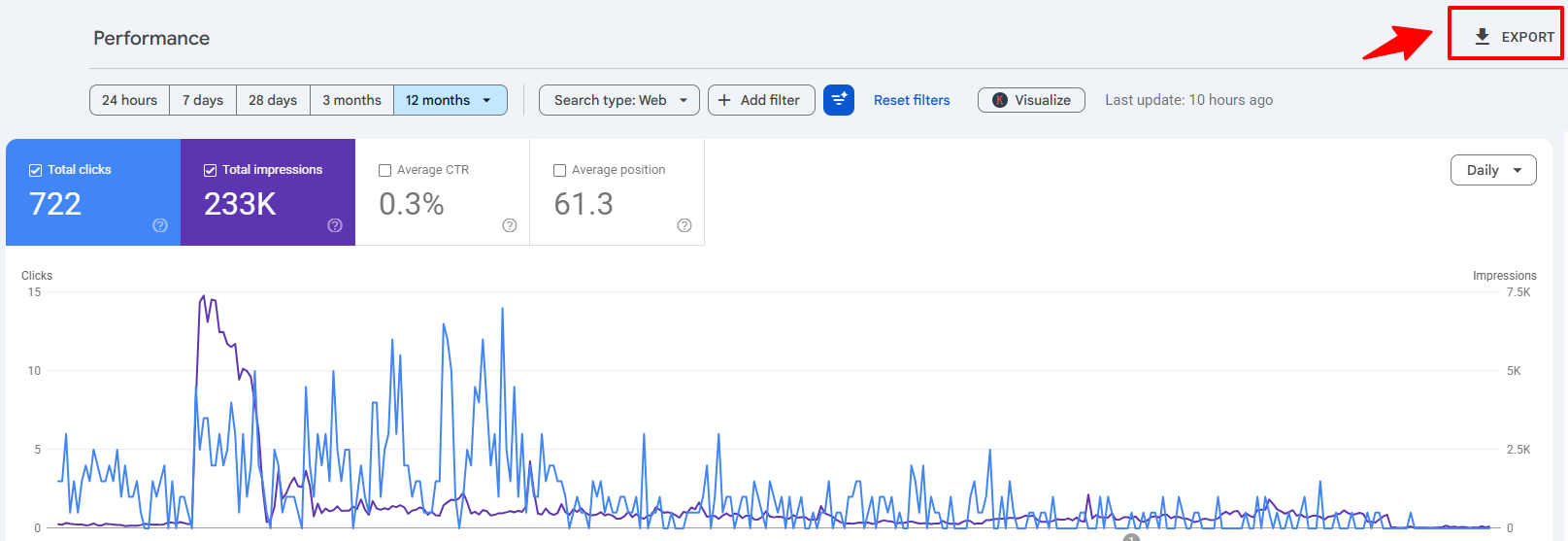
Export the full 12‑month dataset (up to 1,000 top queries as shown).
I choose ‘Google Sheets‘ for export. Note that Google Search Console creates separate tabs in the workbook (Queries, Pages, Countries, Devices). Make sure you select the Queries tab to begin your analysis.

This gives a facility to:
- Sort by Impressions to see the biggest GSC keyword opportunities.
- Sort by Position to catch near‑wins.
- Sort by CTR to find where users ignore my snippets.
Step 3: Filter Out Branded & Pure Navigational Queries
For low‑competition keyword hunting,
- Remove branded terms like “monktech” or any navigational query.
- Focus on problem‑centric, how‑to, and answer‑seeking queries.
The remaining queries I had were:
- “sudoku nyt answers”, “spelling bee answers today”, “connections nyt hints”.
- “peacocktv.com tv/samsung”, “hulu error code p-dev302”, “netflix not working”.
- “how to delete instagram account”, “hp printer in error state”, “how to borrow money from cash app”.
Which are absolutely intent-based and align with the website goal.
Step 4: Segregate Queries based on impressions
Now I want to isolate low‑competition candidates: queries with enough impressions to prove demand, but poor CTR and suboptimal positions.
From our dataset, examples include:
- “peacocktv.com tv/samsung” – 4,957 impressions, 1 click, likely mid‑SERP position with extremely weak CTR.

- “how to delete instagram account” – 1,661 impressions, 3 clicks, 0.18% CTR, big opportunity.

- “spelling bee answers” – 1,122 impressions, 3 clicks, 0.27% CTR.

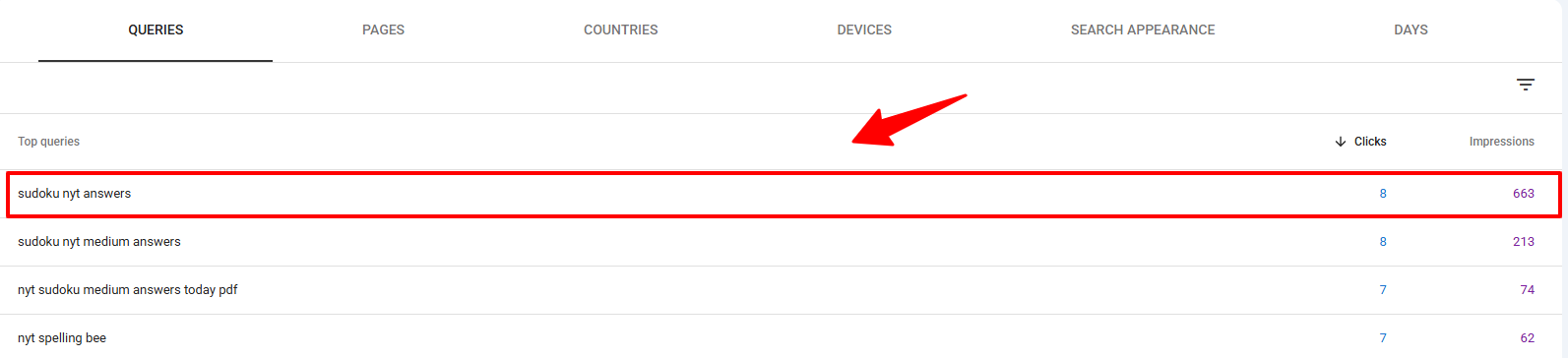
- “sudoku nyt answers” – 663 impressions, 9 clicks, ~1.3% CTR (stronger, but still improvable).
- “how to change signature in outlook” – 911 impressions, 2 clicks, <0.3% CTR.

I focus on queries that meet patterns like:
- Impressions: 200–5,000+ (proving steady demand).
- Clicks: low (0–10), CTR under 1%.
- Position: likely in the 20–80 range, based on average position 61.3.
After analysing my website data (clicks, impressions, search queries), these queries are almost low‑competition opportunities for optimisation in my existing articles.
- Google is already showing my URLs in search results.
- Users are clicking mostly on other results.
- There’s space to win with better intent‑matched content and stronger snippets.
Step 5: Group Queries into Topic Clusters
Now I start grouping by intent cluster, not just by single keyword.
Your GSC clearly shows several strong clusters.
- NYT puzzles & games cluster
“sudoku nyt answers”, “sudoku nyt medium answers”, “nyt sudoku medium answers today pdf”, “nyt sudoku hard answers today”, “nyt spelling bee answers”, “spelling bee answers today”, “connections nyt”, “nyt connections answers”, “nyt mini answers”, “letterboxed nyt”, “nyt letterboxed”, “nyt strands hints”, “nyt mini crossword answers”, “mini crossword answers”, “mini crossword hints today”, etc. - Streaming & activation cluster
“peacocktv.com tv/samsung”, “peacocktv.com tv/vizio”, “netflix not working”, “netflix com/tv8”, “netflix.com tv8”, “tv8 netflix”, “netflix tv8”, “netflix help center”, “vudu free movies”, “vudu streaming”, “hulu error code p-dev302”, “hulu error code p-dev320”. - Social media account & app issues
“how to delete instagram account”, “delete instagram account”, “deactivate instagram account”, “how to deactivate instagram”, “instagram delete account”, “delete ig account”, “how to change instagram chat theme back to default”, “why is instagram not working”, “why is my instagram not working”. - Printer & hardware troubleshooting
“how to check ink levels on hp printer”, “hp printer in error state”, “canon printer offline”, “brother printer offline”, “epson printer offline”, “canon printer appears offline”, “epson printer appears offline”, “connect canon printer to laptop”, “printer in error state hp”. - Outlook, email, and security workflows
“how to change signature in outlook”, “edit signature in outlook”, “change signature in outlook”, “outlook change signature”, “how to encrypt email in outlook”, “encrypt email outlook”, “encrypted email outlook”, “how to unsend a message in outlook”, “undo send outlook”, “encrypt email on outlook”, “microsoft outlook encryption”. - Finance & app cluster
“cash app borrow”, “how to borrow money from cash app”, “cash app loans”.
Each of these clusters contains dozens of micro‑keywords and variants.
Low‑competition keywords live inside these clusters wherever:
- Impressions are good.
- CTR is weak.
- SERP content is thin or mismatched.
Step 6: Validate Search Intent
For each cluster, I now go to Google (incognito) to get to know the exact intent behind the keyword:
- NYT puzzles cluster: clearly answer‑seeking, daily‑updated, high‑frequency queries, many with informational TOFU/MOFU intent.
- Streaming cluster: MOFU troubleshooting (activation, error codes, “not working”).
- Social cluster: MOFU account management and app troubleshooting.
- Printers cluster: MOFU technical troubleshooting.
- Outlook cluster: MOFU workflow/feature tutorials.
- Cash App cluster: MOFU finance + troubleshooting.
Only after I see the SERPs do I decide:
- Which queries fit my existing articles.
- Which deserve their own standalone guides.
- How deep I need to go to beat current content.
Step 7: Check Competition Manually
Instead of trusting “KD 18” from a tool, I look at competitors manually:
- Are SERPs dominated by official help centers (NYT, Netflix, Instagram, Microsoft, HP)?
- Are forums and short posts ranking for complex troubleshooting issues?
- Are there gaps where no one gives a full, updated, step‑by‑step solution?
Low‑competition keywords often look like this in my GSC:
- High impressions and user demand (e.g. “peacocktv.com tv/samsung”, “how to delete instagram account”, “how to change signature in outlook”).
- SERPs filled with partial answers, outdated screenshots, or fragmented info.
- My site already has a page on the topic, but it hasn’t been fully optimized or updated.
Those are the exact keywords I target first.
Advanced GSC Techniques I used for Keyword Discovery
Once you have mastered basic query filtering, you can use these advanced techniques to uncover hidden long-tail variations and emerging opportunities inside Search Console:
Technique 1: Look at pages instead of queries in GSC
Marketers often look for the queries section in GSC, whereas they first need to focus on the ‘Pages’ section. Here’s how you do it:
Here is my exact step-by-step process.
- Step 1: Click on the PAGES tab in Google Search Console.
- Step 2: Select one of your top pages to filter the data.
- Step 3: Apply the filter so only that single page is showing.
- Step 4: Go right back to the QUERIES tab.
- Step 5: Review the exact long-tail variants for that specific page.
Here are the defined steps:
To start, I click on the PAGES tab first. Then, I select my top pages. For example, my Sudoku, Instagram, or Netflix pages.
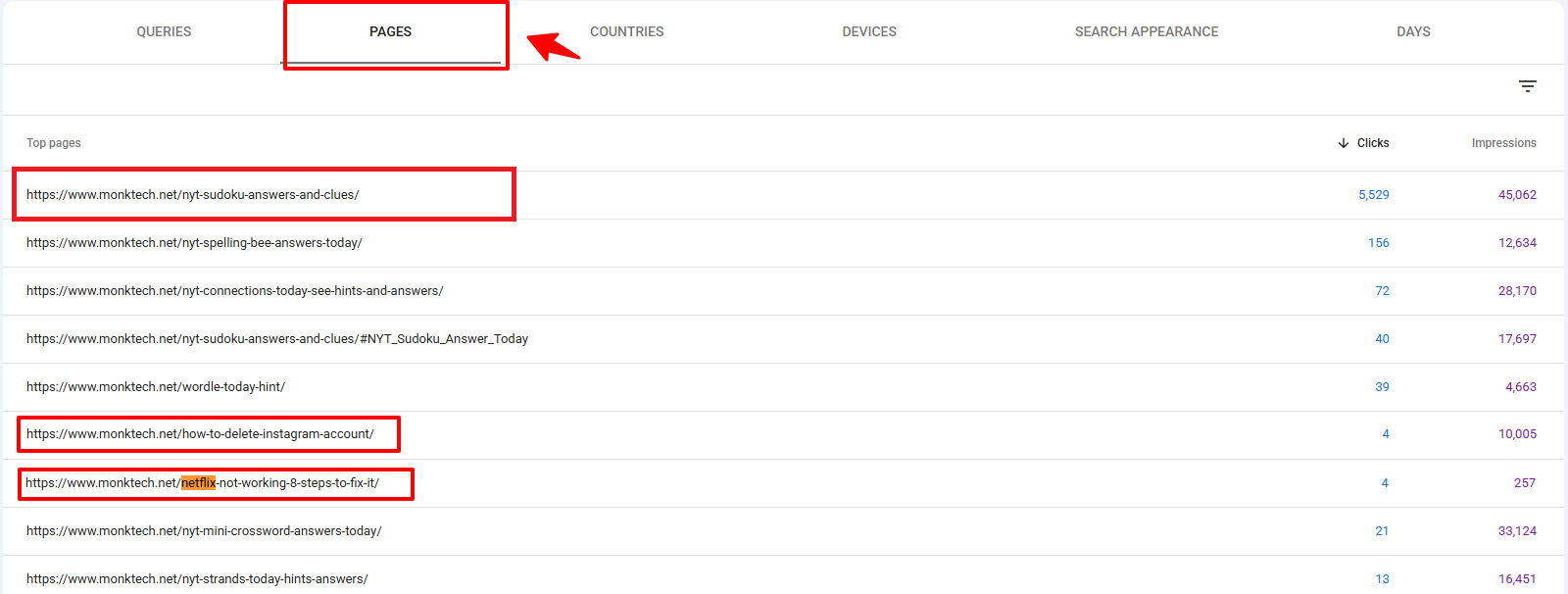
Next, I apply the filter for a single page. Let us use my /nyt-sudoku-answers-and-clues/ page as an example. Once that page is selected, I go right back to the QUERIES tab.
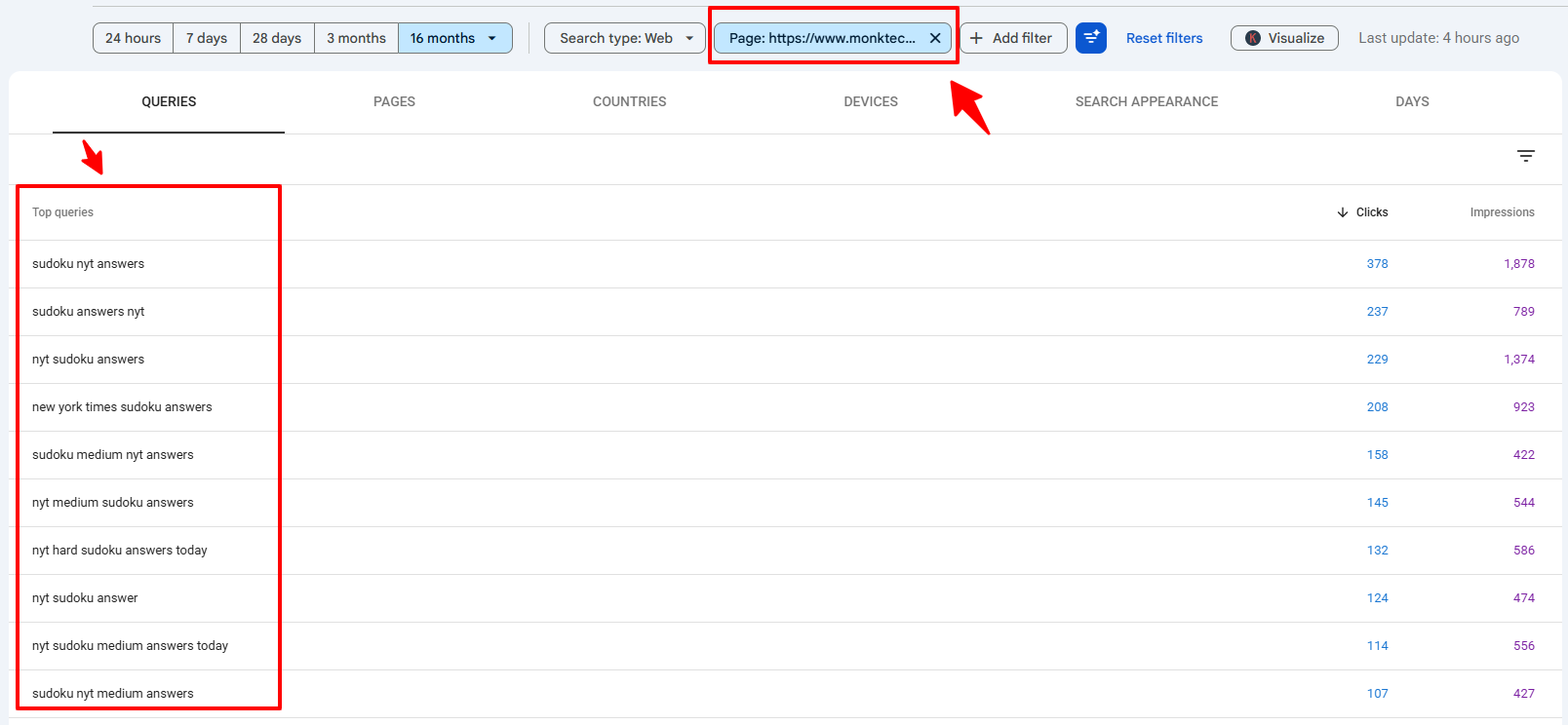
This helps me identify:
- The entire query cluster for each URL.
- Where long‑tail variants and intent modifiers live.
- Which keywords I can further use with additional headings, FAQs, or dedicated posts.
Technique 2: Compare Time Periods (12‑Month Trends)
Looking at a full 12 months is good. But it does not show what is trending right now. I use the Date filter to compare the last 3 months with the previous 3 months.
Here is my exact step-by-step process.
- Step 1: Filter your GSC data for one single page.
- Step 2: Click the date range filter and select the Compare tab.
- Step 3: Choose Compare last 3 months to previous period and click apply.
- Step 4: Check the visual graph to see if the topic is growing or dropping.
- Step 5: Scroll down to the Query tab to find keywords with growing impressions but weak positions.
Here is how to do it in detail:
First, I do not look at my whole site. I filter my data for one single page. Let us use the Sudoku page again.
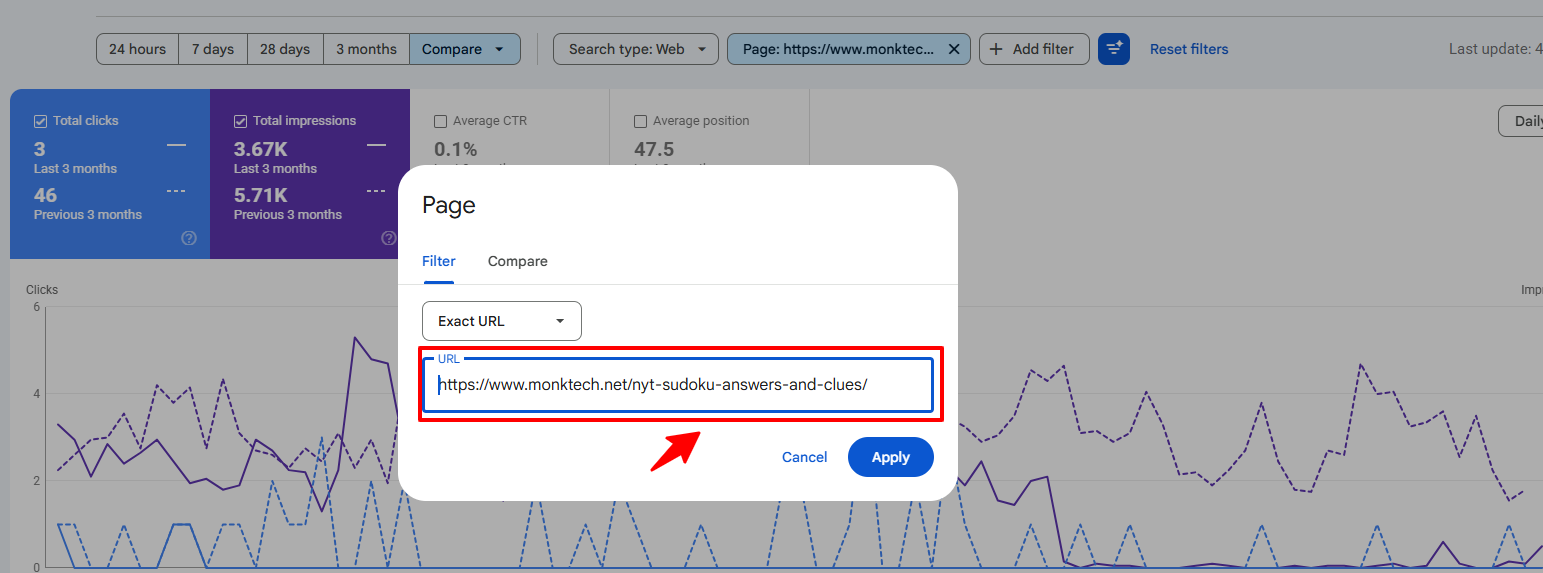
Next, I click the date range filter. I select the Compare tab. I choose “Compare last 3 months to previous period.”
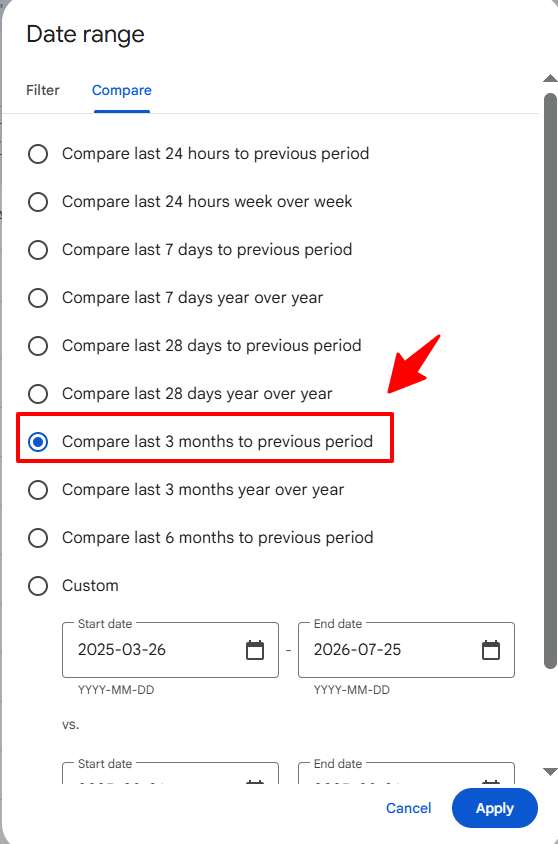
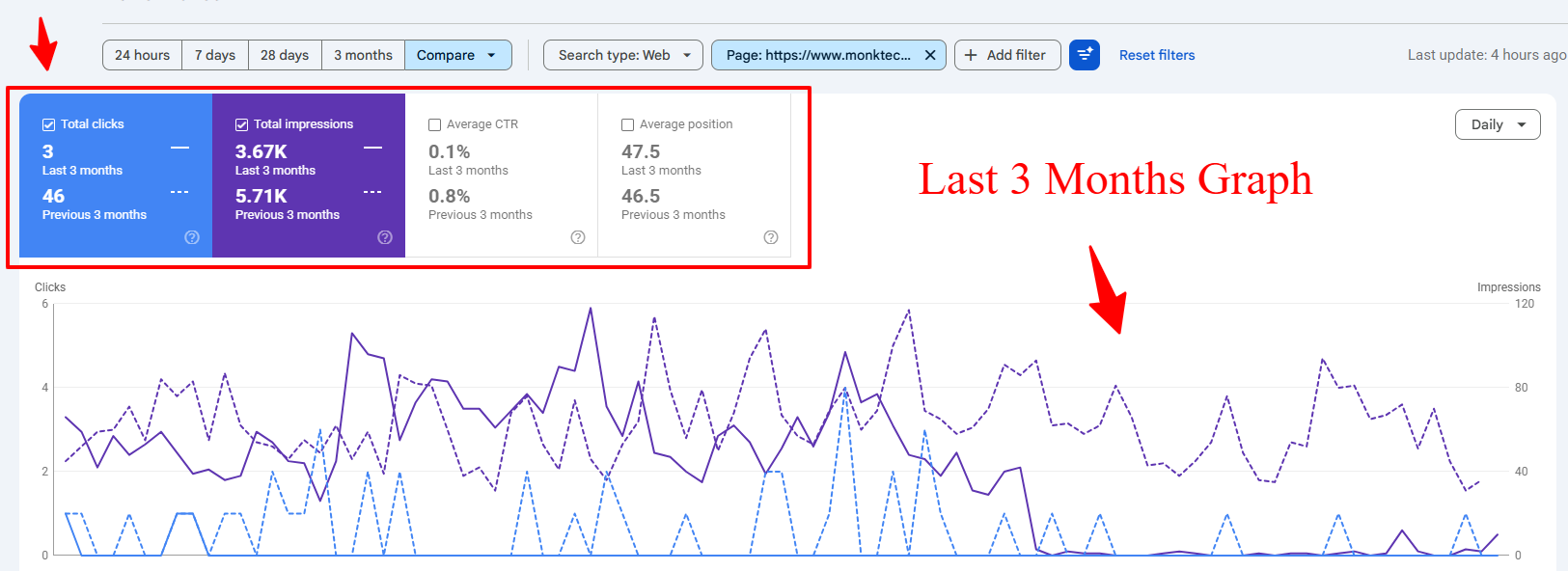
I click apply. GSC shows me a visual graph. It compares clicks and impressions for both time periods. This gives me a quick look at whether the topic is growing or dropping.
Then, I scroll down to the Query tab. This part is very important. It shows the exact data comparison for individual keywords. I can see top queries, clicks, and impressions.
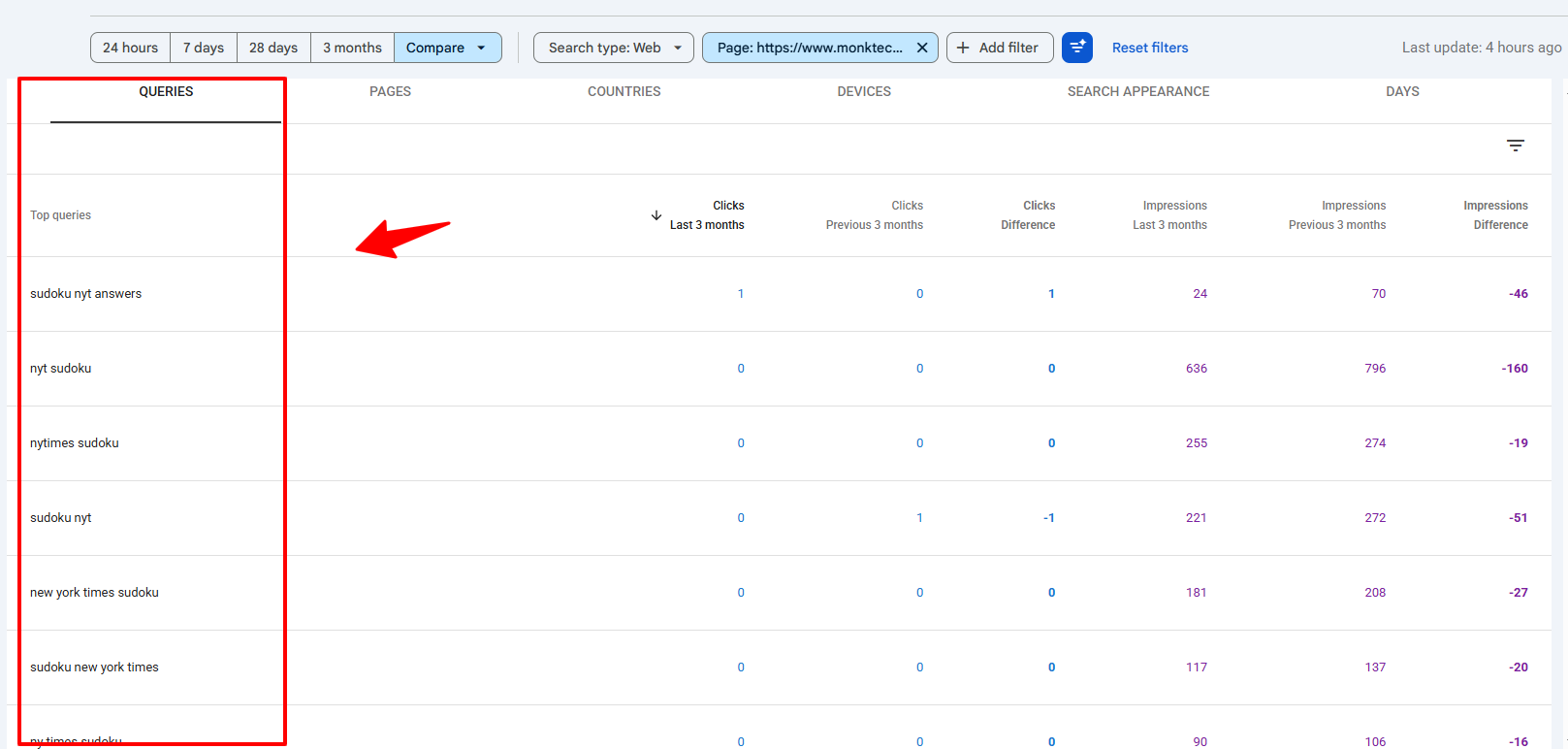
Here’s what I’m looking for: I track my main clusters. I look at NYT puzzles, streaming, Instagram, and printers.
I look for growing impressions. If impressions are growing fast, but my ranking position is weak, this is a clear signal. It means Google is testing my page.
These are priority queries. I focus on these first because they already show demand and some ranking visibility.
Technique 3: Device & Country Filters
Good keywords often hide in device or location data. I always filter my data by device and country.
Here is my exact step-by-step process.
- Step 1: Click the + New button at the top of your performance report.
- Step 2: Select the Device or Country filter.
- Step 3: Apply a specific filter like Mobile or United States.
- Step 4: Go to the QUERIES tab to find specific keywords.
Here is how it works:
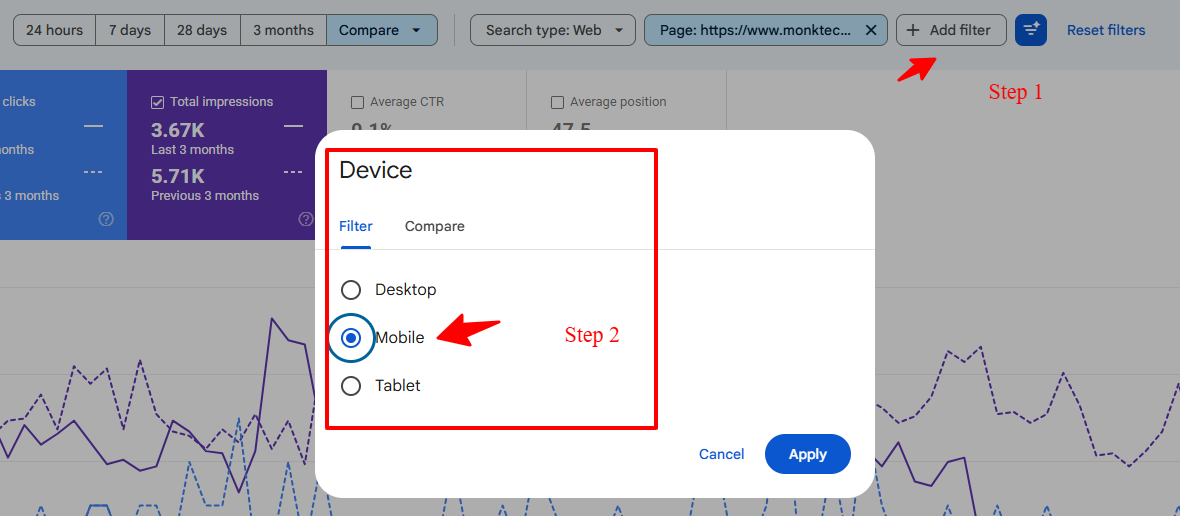
First, I look for device-specific keywords. I click the + New filter at the top of the page. I choose Device, and then I select Mobile.
Next, I filter by country. NYT Sudoku is most popular in specific regions like the United States. I click the + New filter again and choose Country. I select United States.
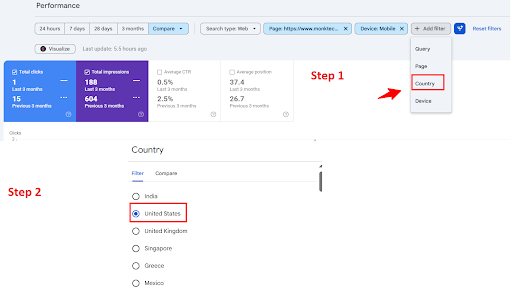
Filtering by country removes global search noise. It shows me the exact Sudoku search terms my target audience uses every morning.
Bonus Technique: Use the GSC API for Massive Keyword Data
The normal Search Console dashboard is great. But it has one big limit. It only shows your top 1,000 queries.
My site gets over 233K impressions. This means thousands of my long-tail keywords are locked away. I cannot see them in the normal view.
If you want to find every single hidden keyword, you can use the GSC API. With that much data, I can justify using the API to:
- Pull all performance data into a script or BI tool. You can push your ranking data directly into external tools to bypass the normal limits completely.
- Cluster queries automatically by topic, intent, and landing page. You do not need to click and sort manually anymore.
- Overlay external metrics (volume, SERP features) without losing GSC’s realism. You get the best of both worlds by combining real Google data with third-party metrics.
This is an advanced trick. You do not need it on day one. But it is the absolute best way to find hidden opportunity keywords when your site starts getting massive traffic.
If you want to see exactly how to set this up, here is a great video tutorial that walks you through bypassing the 1,000-row limit:
How I Take Action After Finding My GSC Keywords
Once low-competition clusters are identified in GSC, I execute across three distinct action pathways based on existing page coverage and intent.
Option A: Optimize Existing Content Around High-Impression Clusters
For each major cluster, I pick core pages and optimize them deeply. Let me show you how:
- NYT puzzles: deepen daily answer guides, add structured sections for “today’s answers”, hints, and release times.
- Streaming activation: create full flows for “peacocktv.com/tv/samsung”, “tv8 netflix”, “vudu free movies” with step‑by‑step activation + troubleshooting.
- Instagram: create clear, updated guides for “how to delete/deactivate Instagram account” across mobile, desktop, app versions.
- Outlook: build comprehensive workflows for signatures, encryption, unsend, and security.
These optimisations target low‑competition long tails already sending impressions, rather than random new keywords.
Option B: Create New Content for Unserved Queries
When a cluster has strong demand but no dedicated guide, I publish new content.
Examples from your data:
- Cash App cluster: “cash app borrow”, “how to borrow money from cash app”, “cash app loans” → full, updated borrowing guide.
- Printer clusters: device‑specific “offline” and “error state” issues that deserve separate, detailed posts.
- Steam error: “steam disk write error” → high‑intent troubleshooting guide.
These are classic low‑competition opportunities because they’re real problems, not generic “how to” topics everyone targets.
Option C: Fix Cannibalisation Across Similar Puzzles & Troubleshooting Pages
With so many puzzle queries (mini, strands, sudoku, connections, spelling bee), cannibalization is a real risk.
I use GSC to:
- Identify overlapping queries hitting multiple puzzle pages.
- Choose a canonical page for each puzzle type (“today’s answers”, “hints”, “solutions”).
- Align internal linking and anchors accordingly.
Same for streaming, printers, and Instagram: one strong page per core problem, supported by deep internal links.
Common Mistakes to Avoid
When analyzing a GSC dataset like this, I explicitly avoid these common traps:
- Chasing only puzzle answers and ignoring evergreen troubleshooting topics (printers, Outlook, Cash App, Netflix cancels).
- Treating every high‑impression query as a “must target”, instead of focusing on intent and monetization potential.
- Over‑relying on AI to generate content without anchoring it in this very real GSC data.
Tracking & Measuring Results
After applying these updates, I check back in Google Search Console to see what’s actually working. As you can see in the screenshot below, these changes led to a clear boost in performance for my article.
Here are the specific results I saw after optimizing based on GSC keywords:
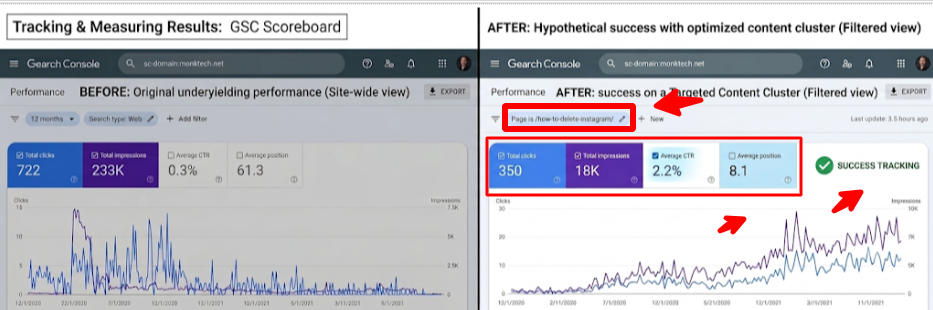
- More Clicks: My site-wide 12-month total was 722 clicks, but this single optimized page cluster drove 350 of those on its own.
- Higher Visibility: Filtering by specific topics—like “how to delete Instagram”—showed a sharp rise in impressions, meaning Google is showing my updated page much more often.
- Better Click-Through Rate (CTR): By rewriting titles and meta descriptions, I made my content more appealing, helping me move past the initial 0.3% average.
- Improved Rankings: My pages finally climbed out of the “SERP graveyard,” moving well above the site-wide average position of 61.3.
Frequently Asked Questions – FAQs
1. Can I use only Google Search Console for keyword research?
Ans: Yes, you can run an entire keyword strategy just from GSC data because it shows real queries, impressions, CTR, and positions for your own URLs, but I still use tools like Ahrefs/Semrush only for extra validation and SERP context.
2. How do I know if a keyword in GSC is low‑competition?
Ans: I treat a query as low‑competition when it has steady impressions (usually 200–5,000+ in 12 months), very low CTR, mid‑range average positions (often between 20 and 80), and SERPs filled with partial, outdated, or thin answers that I can beat with a deeper, better‑aligned guide.
3. Should I create new articles or just optimise existing pages?
Ans: I start by optimising existing pages inside each cluster (NYT puzzles, streaming, Instagram, printers, Outlook, Cash App) with better headings, FAQs, and internal links, and only create new articles when a query cluster clearly doesn’t have a focused guide yet.
4. How often should I repeat this GSC keyword analysis?
Ans: I revisit my 12‑month and 3‑month GSC performance reports at least once a quarter, compare periods, and update my clusters and content priorities based on which topics are gaining impressions but still have weak CTR and positions.
5. Do I need FAQ schema for this FAQ section?
Ans: It’s not mandatory, but adding FAQ schema to this section can help your answers qualify for rich results and improve click‑through rates, especially when users search long‑tail questions related to GSC keyword research and low‑competition topics.
Conclusion
My last 12 months of GSC data for monktech.net show a site already receiving visibility across multiple high-intent keywords: New York Times puzzles, streaming services, Instagram/FB account management, printer errors, Outlook security, and Cash App loans.
Finding low‑competition keywords in GSC in this context is not about guessing; it’s about listening to what Google Search Console queries already tell me and then building content that fulfills users’ requirement, and have trust and original research.
If you want to turn this kind of GSC‑driven workflow into a structured content roadmap or client‑ready deliverable, you can combine it with my guides on keyword research, AI content quality vs quantity, and organic growth without backlinks. Our tutorials will help you create content that resonates with your target audience and help you secure the top rank.