To find low-competition keywords in Google Search Console, open the Performance report, look at the queries your site already gets impressions for, and pick the ones with steady impressions, very low CTR, and positions you can realistically improve. Then check the live results page to confirm the competition is weak before you optimize a page or write a new one.
I’ve found GSC to be one of the most underrated keyword research tools in my stack. Not the generic dashboard view, but the raw query data. In this post, I use my site monktech.net as a live case study to show exactly how I find these keywords, how I group them, and what I do with them next.
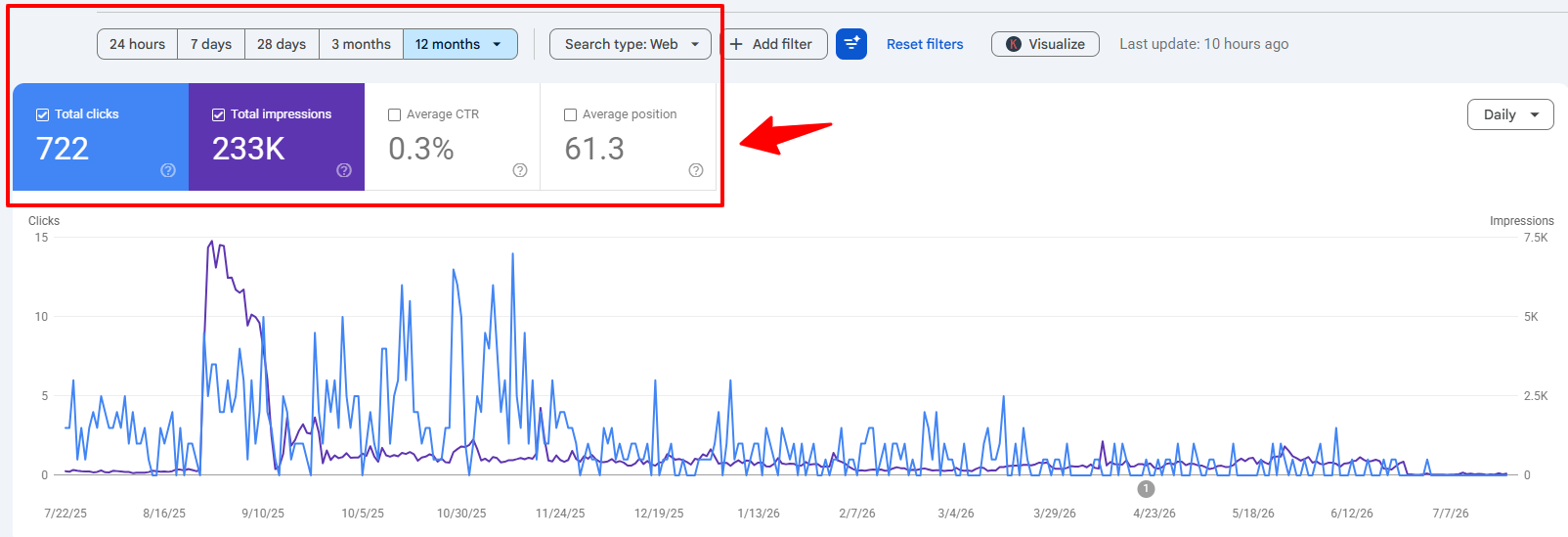
Over the last 12 months, this site recorded 233K impressions, 722 clicks, a 0.3% CTR, and an average position of 61.3.
Quick Overview: The 6-Step GSC Process
- Open Performance > Search results, set the date range to the last 12 months, and turn on all four metrics: clicks, impressions, CTR, and average position.
- Remove branded queries with the branded queries filter (if your site has it) or a regex filter.
- Shortlist queries with 200 to 5,000+ impressions, a CTR under 1%, and an average position between roughly 8 and 80.
- Group the shortlist into topic clusters and check which page Google ranks for each cluster.
- Check the live SERP in an incognito window. Thin, outdated, or forum-heavy results mean low competition.
- Optimize the existing page or publish a new one, then compare periods in GSC every quarter.
What Counts as a Low-Competition Keyword in Google Search Console?
A low-competition keyword in GSC is a query where Google already shows your page, people are searching for it, and the pages above you are beatable. GSC does not have a “difficulty” score. You judge competition from your own ranking data plus a manual look at the results page.
Here’s the signal combination I look for:
- Proof of demand: Steady impressions over 12 months, not a one-week spike.
- Proof of relevance: Google already ranks your page for it, often without you targeting it on purpose.
- Room to grow: A weak position or a CTR well below what that position usually earns.
- Weak competitors: The top results are thin, outdated, fragmented, or forum threads.
One important clarification: high impressions with low clicks do not automatically mean low competition. Sometimes the SERP is crowded with official help centers, AI Overviews, and video results. That’s why the SERP check in Step 6 is not optional.
Why Is Google Search Console a Goldmine for Low-Competition Keywords?
GSC shows you real queries from real users who already see your site in search results. Third-party tools estimate. GSC reports.
When I scroll through my query list, I see hundreds of real searches like “sudoku nyt answers”, “spelling bee answers today”, “peacocktv.com tv/samsung”, “how to delete instagram account”, “how to check ink levels on hp printer”, “hp printer in error state”, “hulu error code p-dev320”, “cash app borrow”, and “how to borrow money from cash app”.
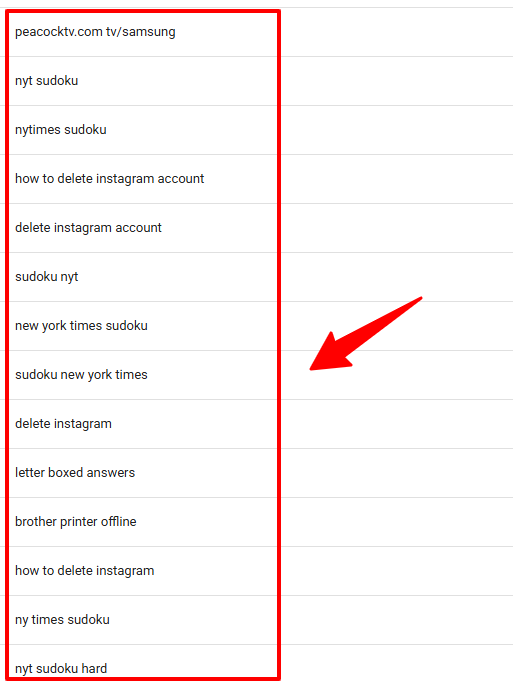
This is not random noise. It’s Google showing me, in plain language, the exact topics and pain points my audience cares about.
Popular keyword research tools such as Semrush and Ahrefs often show long-tail troubleshooting queries like these as “0 search volume” or give them a misleading difficulty score. GSC fills that gap in three ways:
- It’s first-party data: You see real impressions and clicks for your own domain, not modeled averages.
- It shows ranking potential you didn’t plan for: My site ranks on page 2 or 3 for “hp printer in error state” without a dedicated post. That tells me Google already sees the site as relevant, so a focused update or new article has a real shot.
- It surfaces high-intent long tails: One long-tail query rarely moves the needle. Dozens of them across a cluster do.
How Does GSC Compare to Third-Party Keyword Tools?
GSC is my primary source of truth for my own site. Third-party tools are my second opinion for market size and competitor data. I use both, for different jobs.
Third-party tools give you estimated, market-level data. They’ll tell you the broad search volume for “delete instagram account”. They can’t tell you how your domain actually performs for it.
For example, here’s the Ahrefs Keyword Generator showing volume, keyword difficulty, a keyword list, and how recent the data is.
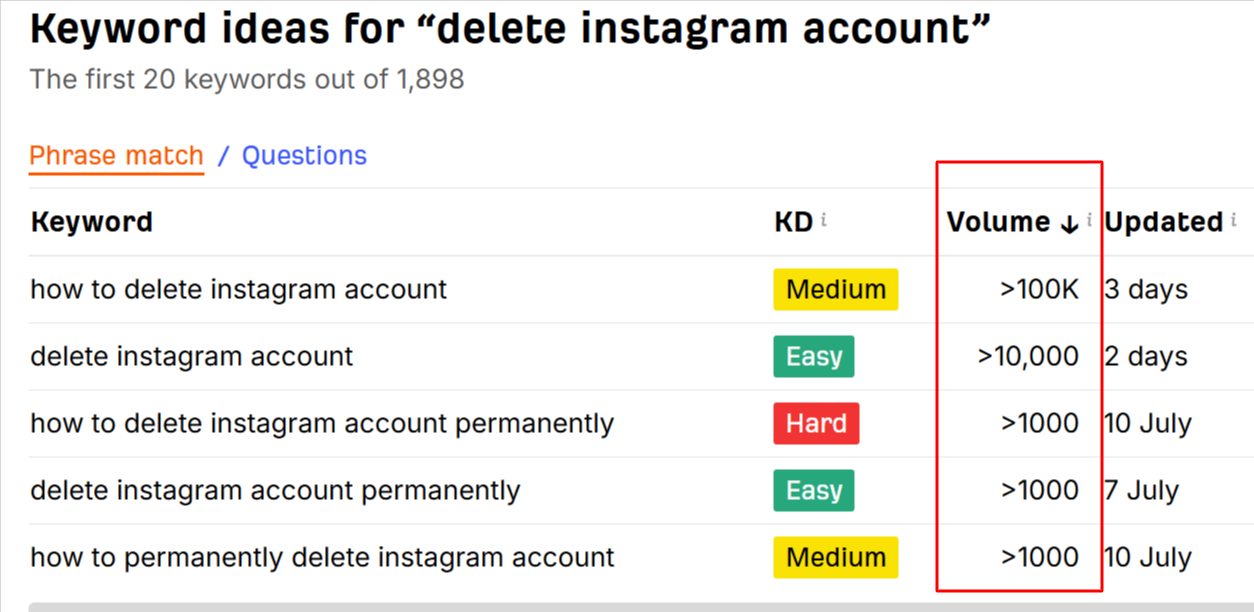
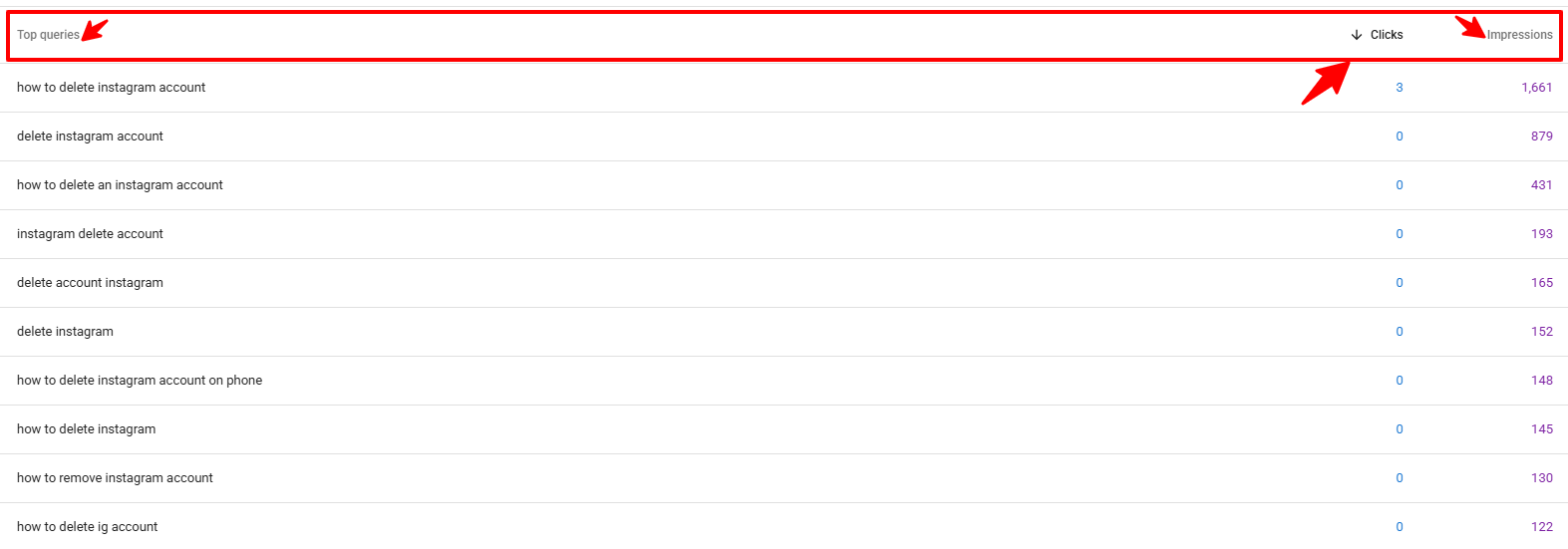
GSC, on the other hand, shows exact first-party numbers. For my Delete Instagram Account guide, it shows:
- Exact impressions and clicks for the main and secondary queries, such as “how to delete instagram account”, “deactivate instagram account”, and “delete account instagram”.
- CTR and average position changes that signal an immediate optimization opportunity.
| What you need | Google Search Console | Third-party tools (Ahrefs, Semrush) |
|---|---|---|
| Data source | Your site’s real impressions and clicks | Estimated volume from clickstream and models |
| Long-tail coverage | Shows rare phrasing your audience actually uses | Often shows “0” or no data |
| Competition data | None directly, you infer it from position and CTR | Keyword difficulty scores and backlink data |
| Keywords you don’t rank for yet | Not shown | Shown |
| Cost | Free | Paid plans |
Once I find first-party opportunities in GSC, I run them through a third-party tool to check volume, difficulty, and data freshness.
What Do You Need Before You Start?
You need verified GSC access, enough data to show patterns, and a basic understanding of the report’s limits.
1. GSC Access and Minimum Data
- Verified access: Owner or user access to your property. I’m using the domain property sc-domain:monktech.net.
- Performance report set to Search type: Web with at least a few months of data. Twelve months is better because it smooths out seasonal spikes.
- Comfort with the Queries and Pages tabs and the + Add filter button.
You don’t need hundreds of thousands of impressions. Even a site with 10K+ annual impressions can uncover useful opportunities. What matters more is that your query data reflects your content focus and your audience’s real problems.
2. Know the Data Limits
GSC is accurate, but it doesn’t show everything. Keep these limits in mind so you don’t misread the data:
- 1,000-row cap: The interface and its export show a maximum of 1,000 rows per table.
- 16 months of history: GSC keeps about 16 months of performance data. Export regularly if you want a longer record.
- Anonymized queries are hidden: Very rare queries are left out of the table to protect user privacy, so your rows won’t add up to the chart total.
- AI Overviews and AI Mode are blended in: Impressions and clicks from AI Mode count toward the Web search type totals. A query can pick up impressions from an AI feature without many clicks, which can drag CTR down.
Google explains the row limits and anonymized data in its deep dive on Search Console performance data filtering and limits.
3. Set Up the Report
Before analyzing anything, use these settings in the Performance report:
- Date range: Last 12 months.
- Metrics: Turn on all four: total clicks, total impressions, average CTR, and average position.
- Starting view: The QUERIES tab. You’ll switch to the PAGES tab later in the advanced techniques.
How Do You Find Low-Competition Keywords in GSC, Step by Step?
Here’s the exact workflow I used on monktech.net, from the first look at the report to choosing which keywords to target.
Step 1: Read the 12-Month Performance Report
Start with the high-level numbers. For my site, that’s 722 clicks, 233K impressions, 0.3% CTR, and position 61.3.
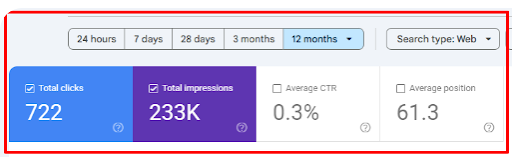
An average position of 61.3 with 233K impressions isn’t a failure. It’s a map of queries Google is already testing my site for that I haven’t fully optimized yet.
Next, sort the Queries table by impressions to see the topic mix. My top queries by impressions include:
- “peacocktv.com tv/samsung”: 4,959 impressions, 1 click
- “sudoku nyt”: 3,303 impressions, 0 clicks
- “how to cancel netflix”: 3,253 impressions, 0 clicks
- “how to delete instagram account”: 1,660 impressions, 3 clicks
- “nytimes sudoku”: 1,400 impressions, 0 clicks
- “new york times sudoku”: 1,142 impressions, 0 clicks
- “how to change signature in outlook”: 911 impressions, 2 clicks
There are also dozens of “mini”, “strands”, “connections”, and “spelling bee” queries with hundreds of impressions each.
This tells me two things:
- The site already ranks, even if low, for very active daily-search topics: NYT puzzles, streaming activation, social account management, and email workflows.
- The CTR is poor. That usually points to weak titles and snippets, a low position, or a mismatch with what searchers want. It doesn’t always mean the competition is impossible.
Step 2: Export the Query Data
Click the Export button at the top right of the report.
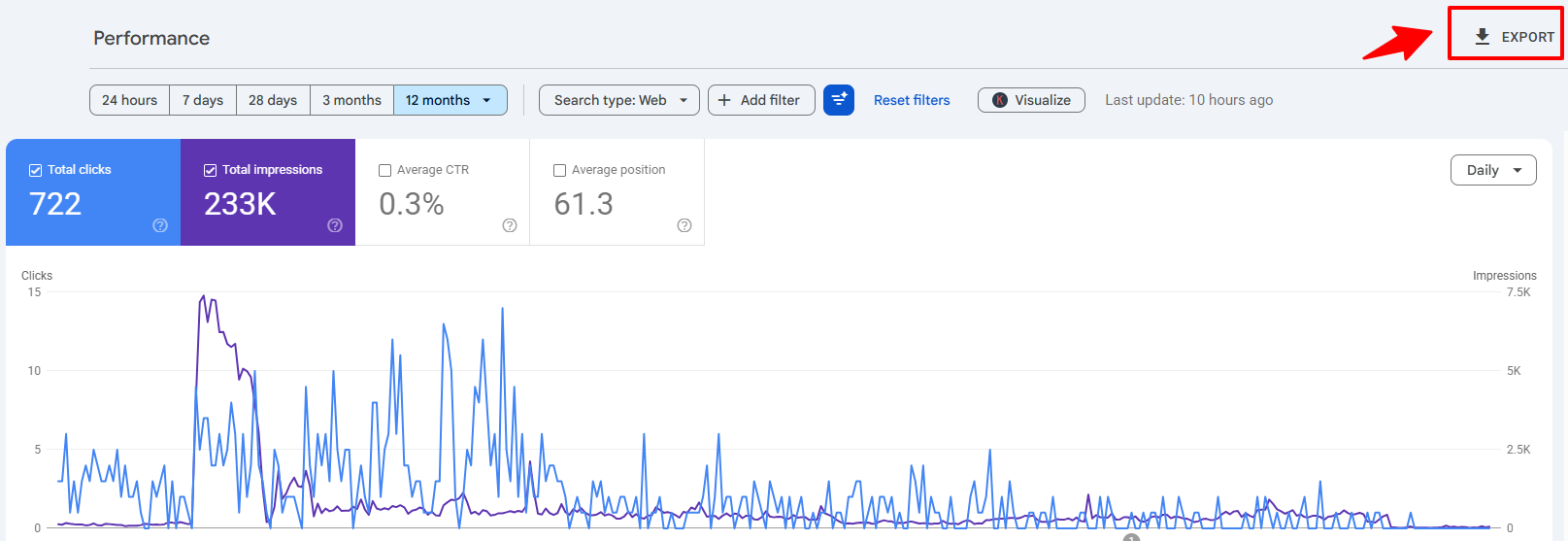
I choose Google Sheets. GSC creates separate tabs in the file, including Queries, Pages, Countries, Devices, Search appearance, Dates, and Filters. Open the Queries tab to start.

In the sheet, you can:
- Sort by impressions to find the biggest opportunities.
- Sort by position to catch near-wins.
- Sort by CTR to see where people ignore your snippet.
- Add a filter view that combines all three rules from Step 4 at once.
Step 3: Filter Out Branded and Navigational Queries
Branded queries inflate your numbers but aren’t low-competition opportunities. People searching your brand name were going to find you anyway.
You have two ways to remove them:
- Branded queries filter: Google added a built-in filter that splits queries into branded and non-branded. It’s available only for eligible sites with enough query volume, and Google notes the classification can occasionally mislabel a query. See Google’s announcement of the branded queries filter.
- Regex filter: Click + Add filter > Query > Custom (regex), choose Doesn’t match regex, and enter your brand variations, such as
monktech|monk tech|monktech.net.
Then keep the problem-centric, how-to, and answer-seeking queries. For my site, that left queries like:
- “sudoku nyt answers”, “spelling bee answers today”, “connections nyt hints”
- “peacocktv.com tv/samsung”, “hulu error code p-dev302”, “netflix not working”
- “how to delete instagram account”, “hp printer in error state”, “how to borrow money from cash app”
Every one of these has clear intent and fits the site’s purpose.
Bonus regex for question queries: Add a second Query filter with Matches regex and use ^(how|what|why|when|where|which|who|can|does|is)\b. This isolates question-style searches, which are often the easiest long tails to answer well and the most likely to be pulled into AI answers.
Step 4: Shortlist Queries by Impressions, CTR, and Position
Now isolate the real candidates: queries with enough impressions to prove demand, but a poor CTR and a position you can improve.
From my dataset:
- “peacocktv.com tv/samsung”: 4,959 impressions, 1 click, extremely weak CTR.

- “how to delete instagram account”: 1,660 impressions, 3 clicks, 0.18% CTR. A big opportunity.

- “spelling bee answers”: 1,122 impressions, 3 clicks, 0.27% CTR.

- “sudoku nyt answers”: 663 impressions, 9 clicks, about 1.4% CTR. Stronger, but still improvable.
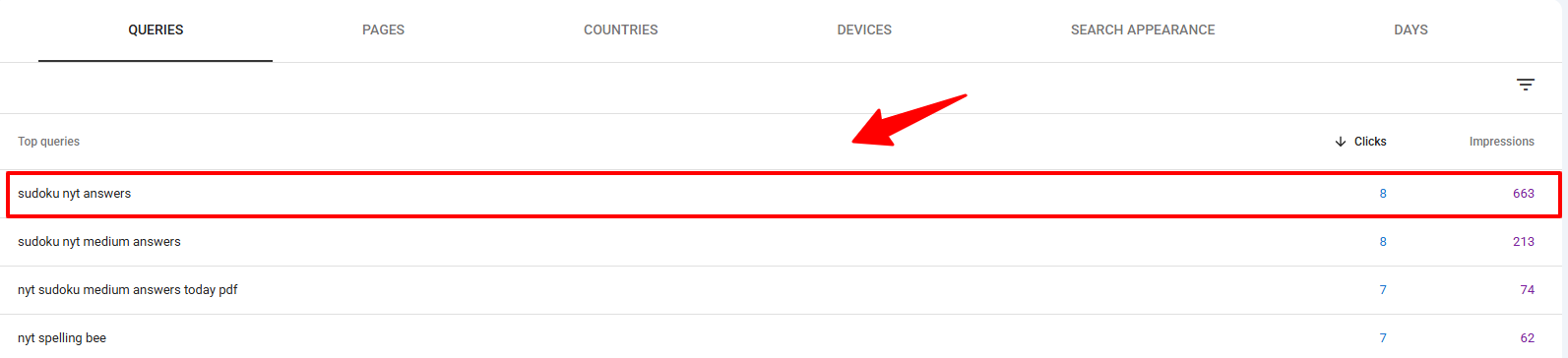
- “how to change signature in outlook”: 911 impressions, 2 clicks, about 0.2% CTR.

The rules I use to build the shortlist:
- Impressions: 200 to 5,000+ over 12 months, which proves steady demand.
- Clicks: Low (0 to 10), with CTR under 1%.
- Position: Check each query’s own average position. Don’t rely on the site-wide 61.3, which is just an average of everything.
Position tells you what kind of work each query needs:
| Query’s average position | What it usually means | Best action |
|---|---|---|
| 8 to 20 (striking distance) | Bottom of page 1 or top of page 2. Google already trusts the page. | Rewrite the title and meta description, add the query to a heading, add internal links. |
| 21 to 50 | Relevant, but the page doesn’t fully answer the query. | Add a dedicated section, update steps and screenshots, expand FAQs. |
| 51 to 80 | Google sees a loose connection only. | Usually needs a new, focused article built around the query. |
To filter by position inside GSC, click the filter icon above the table, choose Position, and set Greater than 7. Then export and trim the top end in your sheet.
Why these queries are opportunities:
- Google already shows my URLs in the results.
- Users are clicking other results instead.
- There’s room to win with better intent-matched content and stronger snippets.
Step 5: Group Queries into Topic Clusters
Next, group the shortlist by intent, not by single keyword. One page can usually rank for a whole cluster, so this is where the real traffic comes from.
My data shows six clear clusters:
- NYT puzzles and games: “sudoku nyt answers”, “sudoku nyt medium answers”, “nyt sudoku medium answers today pdf”, “nyt sudoku hard answers today”, “nyt spelling bee answers”, “spelling bee answers today”, “connections nyt”, “nyt connections answers”, “nyt mini answers”, “letterboxed nyt”, “nyt strands hints”, “nyt mini crossword answers”, “mini crossword hints today”.
- Streaming and activation: “peacocktv.com tv/samsung”, “peacocktv.com tv/vizio”, “netflix not working”, “netflix com/tv8”, “netflix.com tv8”, “tv8 netflix”, “netflix help center”, “vudu free movies”, “vudu streaming”, “hulu error code p-dev302”, “hulu error code p-dev320”.
- Social media accounts and app issues: “how to delete instagram account”, “delete instagram account”, “deactivate instagram account”, “how to deactivate instagram”, “delete ig account”, “how to change instagram chat theme back to default”, “why is my instagram not working”.
- Printer and hardware troubleshooting: “how to check ink levels on hp printer”, “hp printer in error state”, “printer in error state hp”, “canon printer offline”, “canon printer appears offline”, “brother printer offline”, “epson printer offline”, “connect canon printer to laptop”.
- Outlook, email, and security: “how to change signature in outlook”, “edit signature in outlook”, “outlook change signature”, “how to encrypt email in outlook”, “encrypt email outlook”, “microsoft outlook encryption”, “how to unsend a message in outlook”, “undo send outlook”.
- Finance apps: “cash app borrow”, “how to borrow money from cash app”, “cash app loans”.
Each cluster holds dozens of micro-keywords. The low-competition ones sit where impressions are good, CTR is weak, and the SERP content is thin or mismatched.
Quick check before you write anything: search site:yourdomain.com topic on Google to see whether you already have a page on that cluster. This simple step stops you from creating a duplicate article.
Step 6: Validate Search Intent on the Live SERP
For each cluster, search the main query on Google in an incognito window and see what kind of page Google rewards.
| Cluster | Intent | What the reader wants |
|---|---|---|
| NYT puzzles | Informational, daily and time-sensitive | Today’s answer or a hint, fast |
| Streaming | Troubleshooting | Activation steps and error code fixes |
| Social media | Task-based how-to | Account deletion or fix steps for their device |
| Printers | Technical troubleshooting | Brand-specific fix steps |
| Outlook | Feature tutorial | Steps for their Outlook version |
| Cash App | Finance how-to | Eligibility and steps to borrow |
Only after seeing the SERPs do I decide:
- Which queries fit an existing article.
- Which deserve a standalone guide.
- How deep I need to go to beat what’s ranking.
Step 7: Check the Competition Manually
Instead of trusting a “KD 18” score from a tool, I look at the top 10 results myself and ask:
- Is the SERP dominated by official help centers (NYT, Netflix, Instagram, Microsoft, HP)? Those are hard to outrank, but you can still win with clearer steps or device-specific coverage they skip.
- Are forums, Reddit threads, or short posts ranking for a complex troubleshooting issue? That’s a strong low-competition signal.
- Are there gaps, like no up-to-date screenshots, no fix for a specific device, or no step-by-step solution?
- Does an AI Overview already answer the question completely? If so, expect lower clicks even at a good position.
The keywords I target first look like this:
- High impressions and real demand, like “peacocktv.com tv/samsung”, “how to delete instagram account”, and “how to change signature in outlook”.
- SERPs filled with partial answers, outdated screenshots, or fragmented info.
- An existing page on my site that hasn’t been fully optimized or updated.
What Advanced GSC Techniques Uncover More Keywords?
Once basic filtering feels easy, these techniques reveal long-tail variations and trends the default view hides.
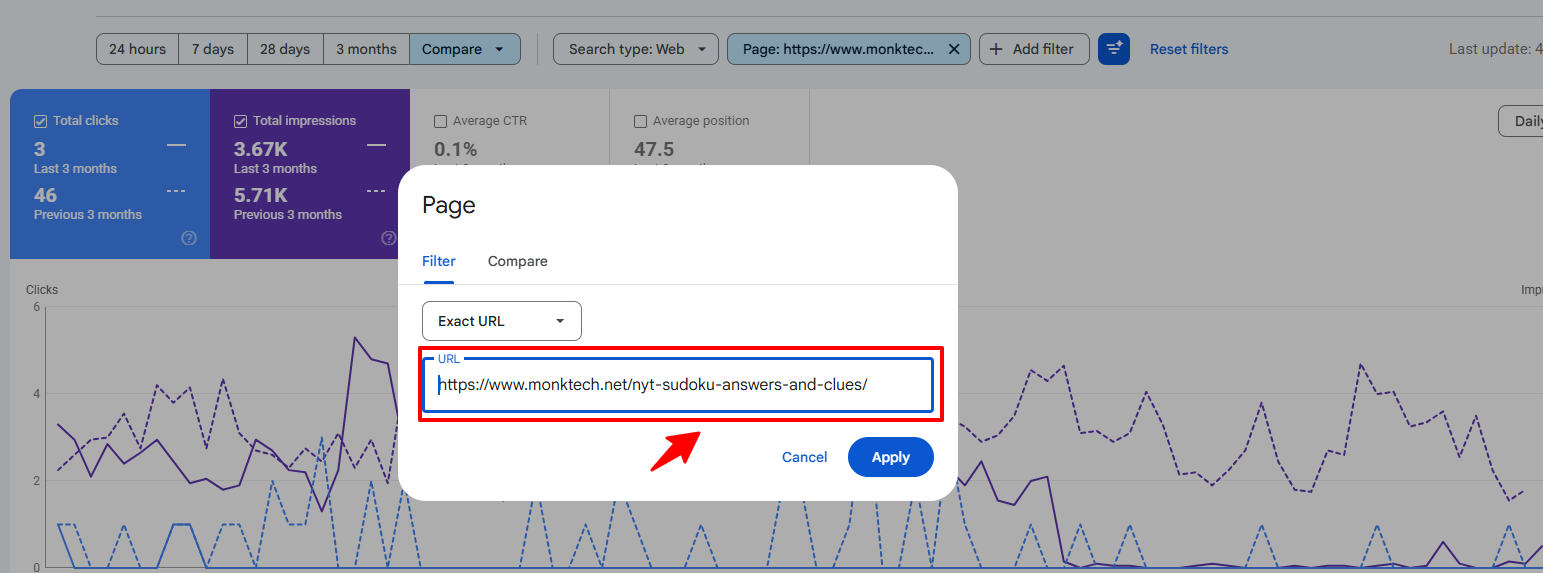
Technique 1: Filter by Page First, Then Look at Queries
Most people start in the Queries tab. Starting with one page shows you the full cluster Google connects to that URL.
- Click the PAGES tab.
- Click one of your top pages, such as my Sudoku, Instagram, or Netflix page. GSC adds it as a filter.
- Switch back to the QUERIES tab.
- Review every query that page gets impressions for.
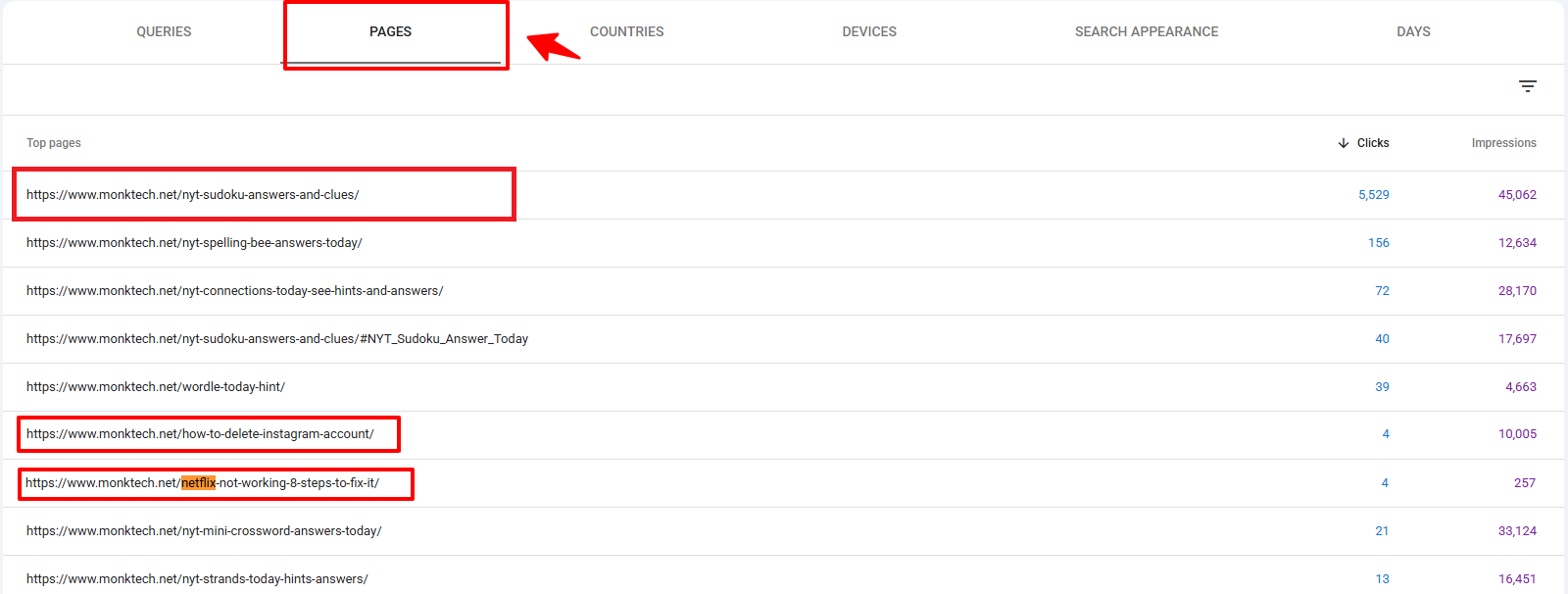
Here I filtered for my /nyt-sudoku-answers-and-clues/ page and went back to the Queries tab.
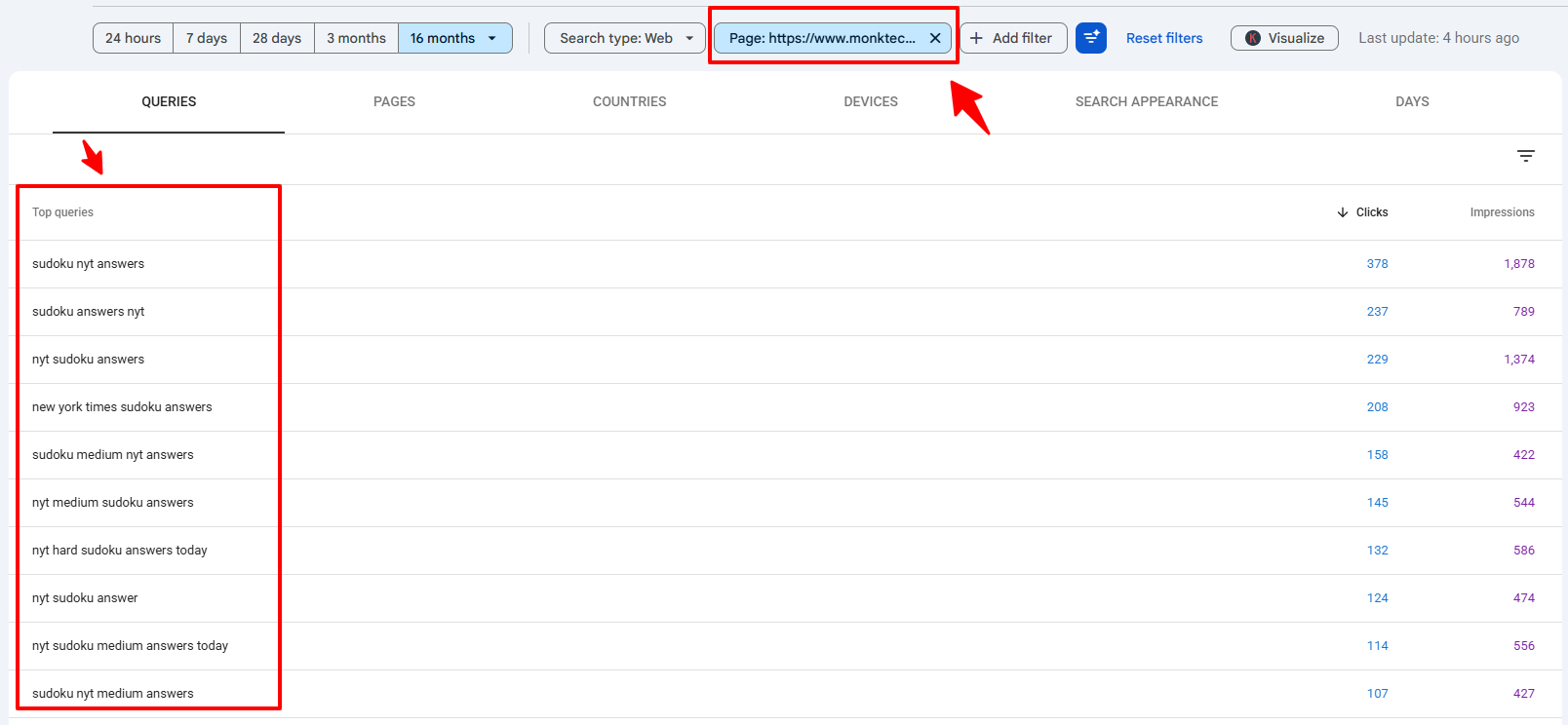
This shows me:
- The full query cluster for each URL.
- Where long-tail variants and modifiers live, like “medium”, “hard”, “today”, and “pdf”.
- Which queries deserve a new heading, FAQ, or dedicated post.
Reverse it to catch cannibalization: filter by one query, then open the Pages tab. If two or more of your URLs share impressions for the same query, they may be competing with each other.
Technique 2: Compare Time Periods to Spot Rising Topics
Twelve months shows the big picture, but not what’s trending now. I compare the last 3 months to the previous 3 months.
- Filter the report to one page.
- Click the date filter and open the Compare tab.
- Choose Compare last 3 months to previous period and click Apply.
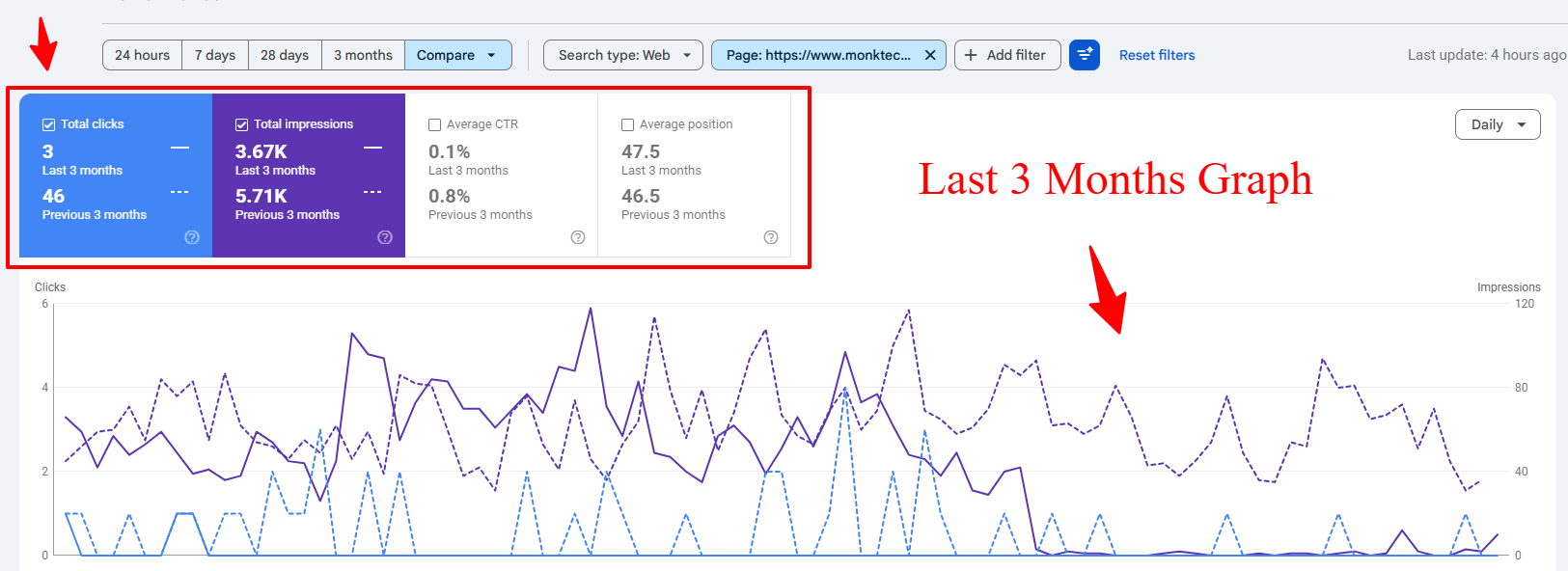
- Check the chart to see whether the topic is growing or dropping.
- Scroll to the Queries table to find queries with rising impressions but weak positions.
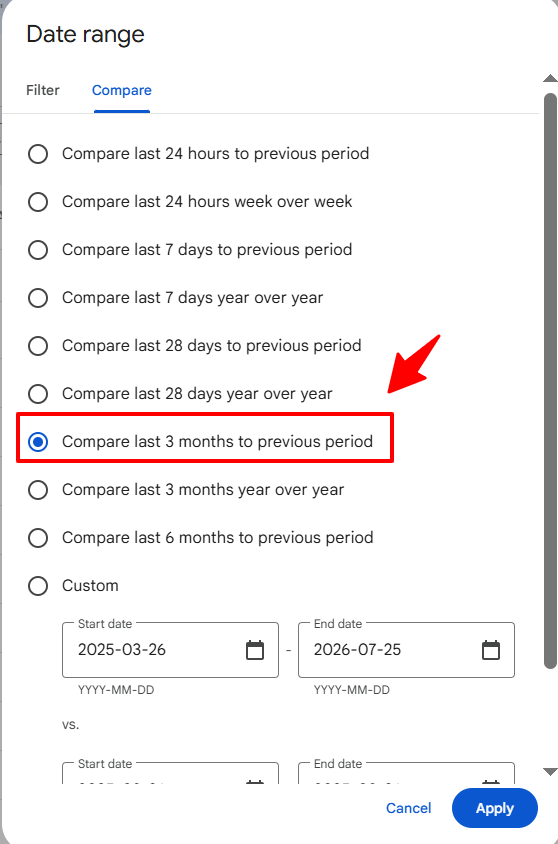
After you click Apply, GSC shows both periods on one chart for clicks and impressions.
The Queries table below the chart is the most useful part. It shows the side-by-side numbers for each keyword.
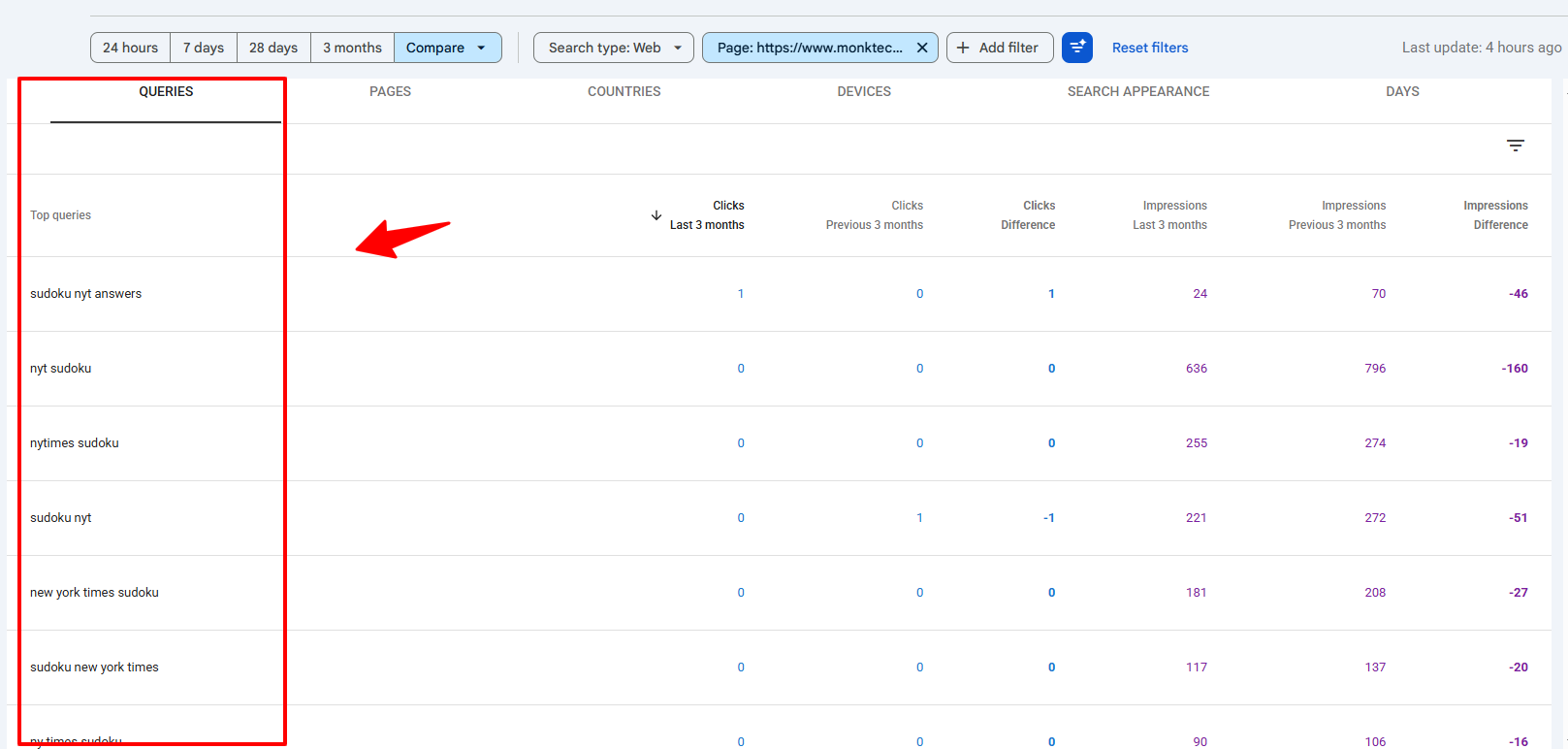
I track my main clusters here: NYT puzzles, streaming, Instagram, and printers. When impressions grow fast but the position stays weak, Google is testing the page for that query. Those become my priority queries, because demand and some visibility already exist.
Technique 3: Use Device and Country Filters
Good keywords often hide inside device or location data.
- Click + Add filter at the top of the Performance report.
- Select Device or Country.
- Apply a value like Mobile or United States.
- Go to the QUERIES tab to see keywords specific to that segment.
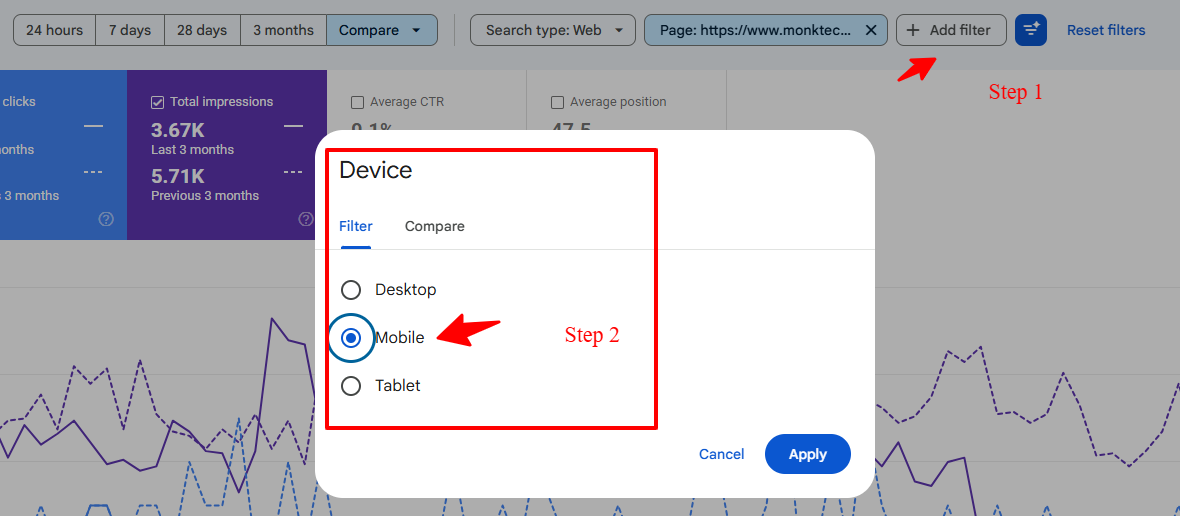
For example, NYT Sudoku searches come mostly from the United States, so I add a Country: United States filter.
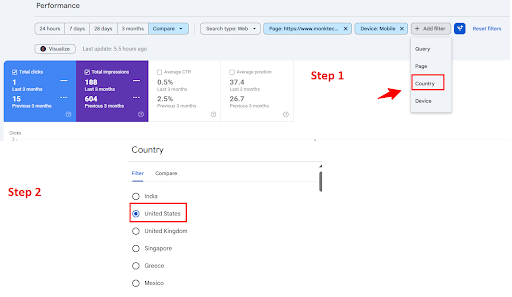
Filtering by country removes global noise and shows the exact Sudoku terms my target audience uses every morning. Mobile filters are just as useful for troubleshooting topics, since many people search for app and device fixes on their phones.
Technique 4: Use Regex to Pull Whole Patterns at Once
Regex filters let you pull every query that follows a pattern, instead of checking them one by one. Use + Add filter > Query > Custom (regex). Google’s RE2 syntax is used, and matching is case-insensitive by default.
- Error codes:
error|code|not working|offlinefinds troubleshooting queries across every cluster. - Long, conversational queries:
^(\S+\s+){7,}\S+$shows queries with eight or more words. These prompt-like searches are often underserved. - Brand-specific clusters:
hp|canon|epson|brotherpulls the full printer cluster in one view.
Google covers the basics in its post on Search Console regex filters and quick tips.
Bonus: Use the GSC API or BigQuery for Larger Sites
The dashboard and its export stop at 1,000 rows. With 233K impressions, thousands of my long-tail queries never show up in that view.
Two ways past that limit:
- Search Analytics API: Pulls up to 50,000 rows per day, per site, per search type. That’s far more than the interface, and it works with Looker Studio, Google Sheets add-ons, or a simple script.
- Bulk data export to BigQuery: Exports all available performance data with no 50K cap. It needs a Google Cloud account and some SQL knowledge.
With that much data, you can:
- Pull all your performance data into a script or BI tool.
- Cluster queries automatically by topic, intent, and landing page.
- Add external metrics like search volume and SERP features without losing GSC’s real data.
You don’t need this on day one. It becomes worth it once your site has more long-tail queries than the 1,000-row view can show. This video walks through getting past the 1,000-row limit:
How Do You Prioritize Which Keywords to Target First?
Start with the clusters that need the least work for the most return. I sort my shortlist into three tiers:
- Quick wins: Position 8 to 20, high impressions, an existing page. Fix the title, meta description, and headings first.
- Content upgrades: Position 21 to 50 with an existing page that only partly answers the query. Add sections, steps, and updated screenshots.
- New articles: Strong impressions but no dedicated page, or a position beyond 50.
Within each tier, I favor queries with evergreen demand and clear value to the site over one-day spikes.
What Should You Do After Finding Your GSC Keywords?
Once the clusters are clear, I take one of three paths, depending on what pages already exist and what the SERP rewards.
Option A: Optimize Existing Content for High-Impression Clusters
For each major cluster, I choose one core page and optimize it deeply:
- NYT puzzles: Add clear sections for today’s answers, hints, and release times.
- Streaming activation: Build full flows for “peacocktv.com/tv/samsung”, “tv8 netflix”, and “vudu free movies” with activation steps and troubleshooting.
- Instagram: Update the delete and deactivate account guides for iPhone, Android, and desktop.
- Outlook: Cover signatures, encryption, and unsend for both the new and classic Outlook versions.
On every page I also:
- Rewrite the title tag and meta description to match the exact wording people search.
- Put the top query variations into H2s and H3s, naturally.
- Answer the main question in the first two sentences of the page and each section.
- Add internal links from related, stronger pages.
These updates target low-competition long tails that already send impressions, not random new keywords.
Option B: Create New Content for Unserved Queries
When a cluster has strong demand but no dedicated guide, I publish new content:
- Cash App: “cash app borrow”, “how to borrow money from cash app”, and “cash app loans” call for one full, updated borrowing guide.
- Printers: Brand-specific “offline” and “error state” issues each deserve a separate, detailed post.
- Steam: “steam disk write error” deserves a focused troubleshooting guide.
These are classic low-competition opportunities because they’re specific, real problems, not generic topics everyone targets.
Option C: Fix Cannibalization Across Similar Pages
With so many puzzle queries (mini, strands, sudoku, connections, spelling bee), keyword cannibalization is a real risk.
I use GSC to:
- Find queries that trigger multiple puzzle pages.
- Pick one main page per puzzle type and intent, such as today’s answers versus hints.
- Align internal links and anchor text to point to that main page.
The same rule applies to streaming, printers, and Instagram: one strong page per core problem, supported by internal links.
What Mistakes Should You Avoid?
- Judging by the site-wide average position. A 61.3 average hides queries ranking at 9 and queries ranking at 95. Always check positions per query.
- Treating every high-impression query as a target. Focus on intent and the value the traffic brings to your site.
- Skipping the SERP check. Low CTR can come from an AI Overview or official help center, not a weak snippet.
- Chasing only puzzle answers. Daily answer content needs constant updates. Don’t ignore evergreen troubleshooting topics like printers, Outlook, Cash App, and Netflix cancellations.
- Judging results too early. GSC data runs a couple of days behind, and ranking changes take weeks. Give each update at least four to six weeks before comparing.
- Relying on AI to write the content without grounding it in your own GSC data and real testing.
How Do You Track and Measure Results?
After updating content, I go back to GSC, filter by the page or cluster, and compare the period after the update with the period before it.
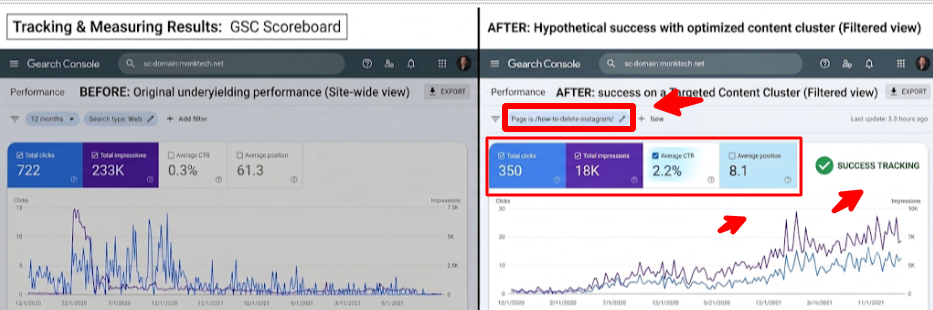
Here’s what I saw after optimizing based on GSC keywords:
- More clicks: The site’s 12-month total was 722 clicks, and this one optimized page cluster drove 350 of them on its own.
- Higher visibility: Topic filters like “how to delete instagram” showed a sharp rise in impressions, which means Google shows the updated page much more often.
- Better CTR: Rewritten titles and meta descriptions lifted the page above the site-wide 0.3% average.
- Improved rankings: The pages climbed well above the site-wide average position of 61.3.
Track each cluster on its own, not just the whole site. A site-wide average can hide a big win in one cluster and a loss in another.
Frequently Asked Questions
Can I use only Google Search Console for keyword research?
Yes, for keywords your site already appears for. GSC can’t show keywords you don’t rank for at all, so you’ll need a third-party tool or Google Keyword Planner when you’re expanding into brand-new topics.
Is Google Search Console keyword research completely free?
Yes. The Performance report, filters, regex, comparison mode, and exports are all free. The API is also free to use. The BigQuery bulk export may cost money depending on your Google Cloud storage and query usage.
Why does a query show impressions but zero clicks?
Usually your page ranks too low for people to scroll to it, or your snippet doesn’t match what they want. It can also happen when an AI Overview or featured snippet answers the question on the results page, so fewer people click any result.
What’s the difference between striking distance and low-competition keywords?
Striking distance keywords are defined only by position, usually 8 to 20. Low-competition keywords can rank anywhere, but the pages above you are weak enough to beat. The best targets are both.
How often should I repeat this analysis?
Once a quarter works for most sites. Compare the last 3 months with the previous 3 months, refresh your clusters, and move any query whose impressions rose but position didn’t to the top of your list.
Do I need FAQ schema for an FAQ section like this?
Not for rich results. Google stopped showing FAQ rich results for all sites in May 2026, as covered in Search Engine Journal’s report on the FAQ rich results deprecation. A well-written FAQ section still helps readers and gives search engines and AI tools clear question-and-answer pairs to understand.
Final Recommendation
Open your GSC Performance report today, set it to 12 months, and remove branded queries. Then pick just one cluster with high impressions, a CTR under 1%, and an existing page ranking between 8 and 50. Rewrite that page’s title, answer the top queries in clear headings, and check the results in four to six weeks.
For monktech.net, the data already shows strong visibility across NYT puzzles, streaming, Instagram, printers, Outlook, and Cash App. Finding low-competition keywords isn’t guesswork. It’s listening to what your GSC queries already tell you and building content that answers them better than anyone else.
To turn this workflow into a full content roadmap, pair it with my guides on AI content quality vs. quantity and growing organic traffic without backlinks.